


You join a Teams call, and the person on the other end squints at a frame where your face is a dark silhouette against a bright window. The built-in laptop camera did that, and no amount of adjusting your chair fixed it. A dedicated webcam with automatic light correction and a microphone that rejects room noise solves most of that in one USB plug.
I sorted through the listings for 8 webcams sold for Microsoft Teams use, comparing stated resolution, field of view, low-light features, microphone design, privacy covers, and mounting options. The goal was to separate the models with clearly documented specs from the ones that only promise “HD quality” and leave you guessing.
My overall pick for best webcams for Microsoft Teams is the Logitech Brio 101 Full HD 1080p Webcam for PC. It pairs 1080p video with automatic light balancing and a sliding privacy shutter, and the listing states it works with Teams, Zoom, and Google Meet without extra software. My top picks are just below.
Best Webcams for Microsoft Teams at a Glance
| Product | PGH Score | ||
|---|---|---|---|

|
Best Overall Logitech Brio 101 Full HD 1080p Webcam | 9.9 | Check Price on Amazon |

|
Best for Remote Work Logitech Brio 100 1080p Webcam with Auto-Light | 9.8 | Check Price on Amazon |

|
Best for Video Calls Logitech C920x HD Pro Webcam with 1080p 30fps | 9.8 | Check Price on Amazon |

|
Logitech C920e HD 1080p Webcam with Privacy Screen | 9.8 | Check Price on Amazon |

|
Best for Dim Rooms Logitech MX Brio 4K Webcam with 1080p 60fps | 9.8 | Check Price on Amazon |
|
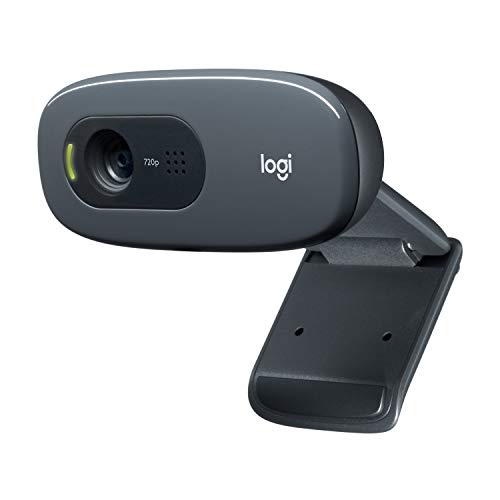
Logitech C270 720p Webcam with Auto Light | 9.7 | Check Price on Amazon |

|
NexiGo N60 1080p Webcam with Privacy Cover | 9.5 | Check Price on Amazon |

|
Logitech C920e 1080p Webcam with Dual Microphones | 9.4 | Check Price on Amazon |
In-Depth Reviews
Logitech Brio 101 is a 1080p webcam with built-in mic, auto-light balance, and a sliding privacy shutter.
Key Facts
- Resolution
- Full HD 1080p
- Connectivity
- USB plug-and-play
- Compatibility
- Zoom, Teams, Google Meet
- Included
- Built-in microphone, privacy shutter
Pros
- +1080p resolution for sharp video
- +Auto-light balance improves visibility in low light
- +Built-in mic reduces need for separate headset
- +Privacy shutter offers physical lens cover
Cons
- −No 4K or higher resolution option
- −Mounting clip may not fit thick monitors
- −No included USB-C adapter for newer laptops
Detailed Review
The Logitech Brio 101 centers on a 1080p sensor and a sliding privacy shutter, a physical cover that slides over the lens when the camera is idle. Auto-light balance is rated to boost brightness by up to 50% compared to previous-generation Logitech webcams, which helps in dim home offices.
The built-in mic handles voice capture without a separate headset, and USB plug-and-play works with Teams, Zoom, and Google Meet. For my money, this suits students and remote workers who want a simple 1080p camera with a real privacy cover.
Logitech Brio 100 is a 1080p webcam with auto-light balance, built-in mic, and privacy shutter for video calls and streaming.
Key Facts
- Resolution
- 1080p Full HD
- Connectivity
- USB plug-and-play
- Compatibility
- Zoom, Microsoft Teams, Google Meet
- Dimensions
- 2.62 x 2.87 x 1.26 inches
Pros
- +1080p video clarity for meetings and streaming
- +Auto-light balance reduces shadows in dim rooms
- +Built-in mic eliminates need for separate audio gear
- +Privacy shutter provides physical lens cover
Cons
- −No 60fps mode for smoother motion in streaming
- −Fixed focus limits sharpness at close range
Detailed Review
The Logitech Brio 100 centers on 1080p resolution and auto-light balance that boosts brightness by up to 50% compared to previous Logitech webcams. That matters for remote workers in dim home offices where shadows otherwise hide the face. A built-in mic handles voice capture without a separate microphone, which keeps a desk setup simple for Zoom or Teams calls.
The integrated privacy shutter slides over the lens for physical privacy when the camera is idle. I rate this a practical pick for students and remote workers who need reliable video without extra gear. The fixed focus means close-up detail stays soft, so it suits talking-head calls more than product close-ups.
The Logitech C920x is a 1080p webcam with dual stereo mics, HD light correction, and autofocus, designed for video calls and streaming.
Key Facts
- Key Spec
- 1080p at 30fps
- Connectivity
- USB
- Compatibility
- Windows 11, macOS, Zoom, Microsoft Teams, Google Meet
- Included
- 3-month XSplit VCam license
Pros
- +1080p 30fps video with autofocus for sharp, detailed calls
- +Dual stereo mics reduce need for a separate microphone
- +HD light correction handles dim or backlit rooms
- +Broad app support including Zoom, Teams, and Google Meet
Cons
- −No privacy shutter included, so lens stays exposed when idle
- −Fixed 30fps cap limits smoothness for fast-motion streaming
- −Bundled XSplit VCam license lasts only three months
Detailed Review
The Logitech C920x centers on 1080p video at 30fps with autofocus, a combination that keeps your face sharp during calls and recordings. Dual stereo mics capture audio without a separate microphone, which simplifies a desk setup for meetings or streaming. HD light correction adjusts exposure automatically, so a dim home office or a backlit window does not wash out the image.
I recommend this for students and remote workers who want a reliable 1080p camera for Zoom, Teams, or Google Meet without adding a dedicated mic. The fixed 30fps cap is the main trade-off for fast-motion streaming, where a higher frame rate would look smoother. Also note the lack of a privacy shutter, so the lens stays uncovered when the camera is idle.
Logitech C920e is a 1080p webcam with a 78-degree fixed field of view, dual omnidirectional mics, and a flip-up privacy screen, bundled with a Litra Glow LED light.
Key Facts
- Key Spec
- 1080p HD with autofocus
- Field of View
- 78 degrees fixed
- Microphones
- Two omnidirectional, up to about 3 feet
- Included
- Attachable privacy screen and Litra Glow LED light
Pros
- +78-degree fixed view suits solo calls and desk sharing
- +Flip-up privacy screen gives clear lens confirmation
- +Dual mics capture voice from about 3 feet away
- +Bundled Litra Glow light improves desk lighting
Cons
- −Fixed 78-degree view limits wide room shots
- −No optical zoom or pan-tilt adjustments
- −Privacy screen adds a physical flap to manage
Detailed Review
The 78-degree fixed field of view on the C920e frames one person well and leaves room to show a document or prototype on a desk. Dual omnidirectional microphones pick up voice from about 3 feet, which suits a single speaker at a normal desk distance. I rate the flip-up privacy screen a practical touch for shared offices where lens status needs a quick visual check.
Autofocus and automatic light correction handle changing room light without manual tweaks, and the bundled Litra Glow adds a separate LED source for dim setups. The fixed lens means no pan or zoom, so a wide room shot or a group call needs a different camera. For a solo remote worker or student on video calls, the C920e covers the core job with a privacy cover and a light in one box.
Logitech MX Brio is a 4K webcam shooting 4K at 30fps or 1080p at 60fps, with a 70% larger pixel sensor and dual beamforming mics.
Key Facts
- Key Spec
- 4K at 30fps or 1080p at 60fps
- Connectivity
- Works with Zoom, Microsoft Teams, Google Meet, Streamlabs, OBS
- Compatibility
- macOS and Windows
- Size
- 5.5 x 5.5 x 2.63 inches
Pros
- +4K 30fps and 1080p 60fps capture options
- +70% larger pixel sensor for dim rooms
- +Show Mode tilts down to desk notes
- +Manual ISO, shutter and white balance controls
Cons
- −No 4K at 60fps option for high-motion capture
- −Bundled mount and cable details absent from data
- −0.82 pound body is heavy for laptop lids
Detailed Review
The MX Brio's headline is its sensor, which Logitech says has 70% larger pixels than its previous webcam, paired with 4K at 30fps or 1080p at 60fps capture. For a dim home office or a backlit window, that larger pixel pitch is the detail that matters more than the resolution number, since it feeds the auto-exposure and noise reduction that keep a face readable.
Show Mode tilts the camera down to your desk, which suits tutors, designers, and anyone walking through sketches on a call. The manual ISO, shutter, tint, and vibrance controls give a streamer a way to lock exposure instead of letting auto mode drift mid-session.
I would steer remote workers who record fast motion toward the 1080p 60fps mode, since 4K tops out at 30fps here. The 0.82 pound body also sits heavily on a thin laptop lid, so a monitor mount suits it better.
Logitech C270 is a 720p/30 fps webcam with a 55-degree field of view, RightLight 2 auto light correction, and a noise-reducing mic rated to pick up voice up to about 5 feet away.
Key Facts
- Video Resolution
- 720p at 30 fps
- Field of View
- 55 degrees diagonal
- Microphone
- Built-in noise-reducing, rated to about 5 feet
- Light Correction
- RightLight 2 auto light correction
Pros
- +720p 30 fps video with auto light correction for uneven lighting
- +Noise-reducing mic rated to capture voice up to about 5 feet
- +Universal clip mounts on screen or folds into a shelf stand
- +Compatible with Zoom, Skype, Teams, and Switch 2 GameChat
Cons
- −720p resolution limits detail compared to 1080p webcams
- −55-degree field of view shows a tight frame for group calls
- −No physical privacy shutter to block the lens when idle
Detailed Review
The C270 shoots 720p at 30 fps with a 55-degree diagonal field of view, which frames one person at a desk rather than a whole room. RightLight 2 auto light correction is the feature I value most here, since it adjusts exposure for dim or backlit rooms without manual tweaking.
The built-in noise-reducing mic is rated to pick up voice up to about 5 feet away, so it suits a solo desk setup but not a shared table. The universal clip attaches to a monitor or laptop screen, and it folds to stand on a shelf when you want a higher angle.
For my money, the 720p sensor is the real trade-off, since fine detail in hair and fabric softens compared to 1080p. I would pick this for students and remote workers who need a dependable call camera for Zoom, Teams, or Switch 2 GameChat without chasing resolution.
NexiGo N60 is a 1080p webcam with a built-in noise-cancelling mic and privacy cover, plug-and-play over USB.
Key Facts
- Resolution
- 1080p at 30fps
- Sensor
- Two-MP CMOS
- Lens
- 3.6mm glass, fixed focus
- Connectivity
- USB 2.0/3.0 plug-and-play
Pros
- +1080p 30fps video suits Zoom, Teams, and video calls
- +Built-in noise-cancelling mic reduces ambient room noise
- +Privacy cover adds a physical lens block
- +Plug-and-play USB needs no driver install
Cons
- −Fixed lens offers no zoom or autofocus adjustment
- −No tripod thread or mounting bracket included
- −Not compatible with Xbox or PlayStation consoles
Detailed Review
The NexiGo N60 is built around a two-megapixel CMOS sensor that outputs 1920 x 1080 at 30fps, which is the right target for Zoom, Teams, and class calls rather than high-frame-rate capture. Its 3.6mm glass lens is fixed and optimized between roughly 20 inches and 13 feet, so it frames a desk or a small room well but gives you no zoom to tighten the shot.
I value the built-in noise-cancelling microphone for a home office where a laptop mic picks up keyboard clatter, and the sliding privacy cover is a simple physical block between meetings. The plug-and-play USB connection means no driver install on Windows, macOS, Linux, or Chrome OS.
For a student or remote worker who wants a dependable 1080p image without a tripod or autofocus, this fits. Console players should look elsewhere, since it does not work with Xbox or PlayStation.
The Logitech C920e is a 1080p webcam with a 78-degree fixed field of view, dual omnidirectional mics, and an attachable privacy screen.
Key Facts
- Field of View
- 78 degrees fixed
- Microphones
- Two integrated omnidirectional
- Mounting
- Adjustable clip and 1/4-inch thread
- Compatibility
- Windows 11, Zoom, Microsoft Teams
Pros
- +Privacy screen flips to confirm lens coverage at a glance
- +Dual mics capture audio from about 3 feet away
- +Adjustable clip fits laptops and external monitors
- +1/4-inch thread adds tripod mounting versatility
Cons
- −Fixed 78-degree view offers no zoom or framing adjustment
- −Wired USB connection limits placement to cable reach
- −No stated warranty terms in the product data
Detailed Review
The C920e centers on a 78-degree fixed field of view that frames one person with room to show a document or sample. Its dual omnidirectional microphones pick up voice from about 3 feet away, which suits a desk setup where the webcam sits just above the monitor. I would point a remote worker or student toward this fixed framing over a wide-angle lens that shrinks the speaker in frame.
An attachable privacy screen flips up and down, and a glance confirms whether the lens is covered. The adjustable clip mounts on a laptop lid or external monitor, and a 1/4-inch thread opens tripod mounting for a more permanent desk position.
The fixed lens means no zoom or pan adjustment, so framing depends on where the clip sits. A wired USB connection also ties placement to cable reach, which matters on a deep desk.
FAQs
Do you need a 4K webcam for Microsoft Teams?
A 1080p webcam is enough for Teams because the app typically compresses video for the call, so the extra resolution of a 4K model rarely reaches the other side at full detail. A 4K camera helps more when you record meetings or stream, where the source file keeps the detail. For everyday calls, spend the difference on better lighting instead.
What is the difference between a webcam with a privacy shutter and one without?
A privacy shutter is a physical slide or flip cover over the lens, and it lets you confirm at a glance that the camera is blocked when you are not on a call. Several models here include one, while the C920x listing states it does not. If you work in a shared space or handle sensitive calls, the shutter is worth prioritizing.
Will these webcams work with a laptop or a desktop monitor?
Most of these models use a USB connection and an adjustable clip that folds to sit on a monitor or laptop lid, and the listings state compatibility with Windows and macOS. Confirm the clip fit and the USB port type on the manufacturer’s spec sheet before buying, especially for a thin laptop bezel or a curved monitor.
Is it worth adding a separate light to a Teams webcam?
A separate light often improves a call more than a higher-resolution sensor, because most webcam image problems come from uneven room lighting rather than pixel count. One bundle here pairs a webcam with a Litra Glow LED light. If your desk sits in a dim corner, plan for a light or a window facing you.
Final Thoughts
For Teams calls, the features that matter most are reliable low-light handling, a microphone that keeps your voice clear, and a mounting clip that stays put on your screen. Resolution beyond 1080p matters mainly if you record or stream, and a privacy cover is a small detail that becomes important in shared spaces.
The Logitech Brio 101 Full HD 1080p Webcam for PC is the best overall choice for most people who join Teams meetings from a desk. It covers 1080p video, automatic light balancing, a built-in mic, and a sliding shutter in a plug-and-play package that the listing states works with Teams, Zoom, and Google Meet. If you want to spend less, the Logitech C270 720p Webcam Plug-and-Play Wide is the value pick: 720p video, a noise-reducing mic, and a foldable clip that also lets the camera stand on a shelf. Skip the budget route if you present slides or share your screen often, since the lower resolution shows on text. Anyone who records or streams should look at the 4K models instead. If your setup calls for something different, browse my other webcam reviews and guides, and check the current price on Amazon before you decide. The right webcam removes the guesswork about whether you will look and sound clear on the next call.
