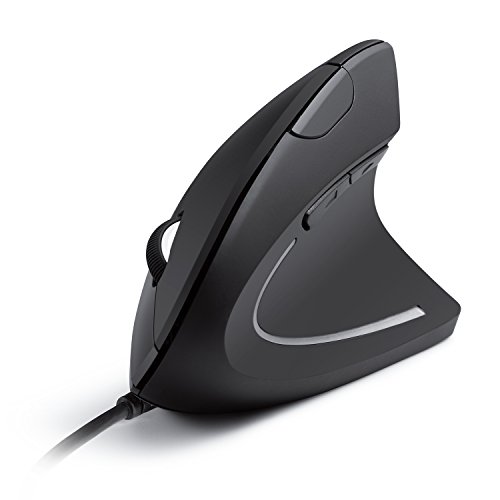
By the third hour of spreadsheets, a mouse that is too short for your palm turns every click into a small reach. Your fingers curl under, your wrist rolls outward, and the cursor starts drifting past the cell you wanted. Most listings lead with a DPI number and say almost nothing about hand length, tilt angle, or how the shape actually sits under a large palm.
I looked at 8 ergonomic mice aimed at larger hands and compared the stated hand-length ranges, the vertical tilt, the button layout, and how each one connects to a laptop or desktop. The models worth considering state a hand-size range up front, use a shape that supports the palm instead of cramping it, and keep the buttons you actually use within reach.
My overall pick for best ergonomic mice for large hands is the UGREEN Ergonomic Wireless Mouse. It uses a vertical handshake position, connects over Bluetooth or a 2.4G receiver, and switches between up to three devices, which suits a desk with a work laptop and a personal machine. My top picks are just below.
Best Ergonomic Mice for Large Hands at a Glance
| Product | PGH Score | ||
|---|---|---|---|

|
Best Overall UGREEN Ergonomic Wireless Mouse with 4000 DPI | 9.8 | Check Price on Amazon |

|
Best for Large Hands ProtoArc EM11 Pro Ergonomic Mouse for Large Hands | 9.8 | Check Price on Amazon |

|
Best for Small Hands Logitech Lift Vertical Ergonomic Wireless Mouse | 9.7 | Check Price on Amazon |

|
Best for Multi-Device Desks TECKNET Ergonomic Wireless Mouse with 3-Device | 9.6 | Check Price on Amazon |

|
Best for Wrist Comfort Acer Ergonomic Wireless Vertical Mouse with 58° | 9.5 | Check Price on Amazon |

|
Best for Office Comfort Anker 2.4G Wireless Vertical Ergonomic Mouse | 9.5 | Check Price on Amazon |

|
Logitech MX Vertical Wireless Ergonomic Mouse | 9.5 | Check Price on Amazon |

|
Best for Carpal Tunnel Lekvey Rechargeable Vertical Ergonomic | 9.4 | Check Price on Amazon |
In-Depth Reviews
The UGREEN Ergonomic Wireless Mouse is a vertical mouse with 1000/1600/2000/4000 DPI, quiet clicks, and dual Bluetooth plus 2.4G connectivity for up to three devices.
Key Facts
- Key Spec
- DPI: 1000/1600/2000/4000
- Connectivity
- Bluetooth and 2.4G wireless, up to 10m range
- Compatibility
- Windows, macOS, Linux, ChromeOS, Android
- Size
- Large, 4.72 x 3.39 x 0.04 inches
Pros
- +Vertical shape eases wrist rotation during long desk sessions
- +Quiet clicks suit shared offices and late-night use
- +Bluetooth and 2.4G pairing covers up to three devices
- +Adjustable DPI from 1000 to 4000 fits varied tasks
Cons
- −Large shell may not suit smaller hands
- −Single AA battery means no built-in rechargeable cell
Detailed Review
The UGREEN Ergonomic Wireless Mouse uses a vertical handshake shape to cut wrist rotation, which is the main reason to consider it over a standard flat mouse. It is built for medium to large hands, so smaller hands should check the size guide before ordering.
Four DPI steps from 1000 to 4000 cover document editing and faster browsing, and the quiet-click buttons keep shared rooms calm. Dual 2.4G and Bluetooth links let me pair it to a laptop, desktop, and tablet, then switch without re-pairing.
PTFE glide feet reduce friction on the desk, and one AA battery with smart sleep mode keeps upkeep simple. For my money, this fits desk workers and students who want a calmer wrist position and a quieter click, not a lightweight esports mouse.
Vertical ergonomic mouse sized for 7.5 to 8.5 inch hands, with a side scroll wheel and 7200 DPI sensor.
Key Facts
- Key Spec
- Adjustable up to 7200 DPI
- Connectivity
- Two Bluetooth 5.0 channels and one 2.4 GHz USB-A receiver
- Compatibility
- Windows 8/10 or later, macOS 10.12 or later, Android 4.3 or later
- Battery
- Built-in 500mAh rechargeable lithium-ion
Pros
- +Vertical shape keeps wrist in a natural handshake position
- +Side scroll wheel removes bottom scroll bar dragging
- +Three-device switching suits hybrid and dual-computer desks
- +Six buttons customizable through a browser tool
Cons
- −Grip takes one to two weeks of consistent use to feel natural
- −Included Type-C cable handles charging only, not data
- −Smaller hands under 7.5 inches need a different model
Detailed Review
The EM11 Pro is built around hand length, not hand size in the abstract. ProtoArc sizes it for 7.5 to 8.5 inch hands, so the palm gets fuller support instead of a cramped grip, and the vertical shell holds the wrist closer to a handshake position through long spreadsheet and email sessions.
What separates it from a plain vertical mouse is the side scroll wheel. Gliding left and right across wide Excel sheets or video editing timelines keeps the hand in place instead of reaching for the bottom scroll bar. The 7200 DPI sensor covers multi-screen desks when pushed higher, and the browser-based tool configures all six buttons with no software install.
For my money, this suits hybrid workers juggling a work laptop and a personal desktop, since two Bluetooth channels plus a 2.4 GHz receiver cover three devices. Budget the one to two week adjustment before the grip feels natural, and note the included Type-C cable charges only.
Logitech Lift is a vertical ergonomic wireless mouse shaped at 57 degrees for small to medium right hands, with Bluetooth or Logi Bolt connection.
Key Facts
- Key Spec
- 57-Degree Vertical Shape
- Connectivity
- Bluetooth Low Energy or Logi Bolt USB-A Receiver
- Compatibility
- Windows, macOS, iPadOS, Chrome OS, Linux
- Size
- 5.6 x 3.4 x 3 inches
Pros
- +57-degree vertical shape reduces forearm twist
- +Bluetooth and Logi Bolt dual wireless options
- +Quiet clicks suit shared offices and late-night work
- +Snug thumb rest and softly textured grip
Cons
- −Right-hand-only shape rules out left-handed use
- −Small to medium sizing may not suit larger hands
- −Two-year battery claim depends on usage and settings
Detailed Review
The Lift's 57-degree vertical shape is the whole point here, tilting the wrist toward a handshake-like position rather than the flat palm-down angle of a standard mouse. Logitech builds it specifically for small to medium right hands, so the fit is narrower than most vertical mice I look at. For anyone logging long desk hours, that geometry is the reason to pick it over a conventional shape.
Connectivity is genuinely flexible. Bluetooth Low Energy covers laptops and tablets without dongles, while the included Logi Bolt USB-A receiver handles machines where wireless stability matters more. Quiet clicks and a SmartWheel round out the daily-use feel, and four of the six buttons are customizable for shortcuts or app switching.
Two things to weigh before buying. The right-hand-only shape rules it out for left-handed users, and the small to medium sizing will feel cramped if your hands run large. The two-year battery figure also assumes typical use, so heavy daily hours will shorten it.
TECKNET vertical ergonomic mouse with 4800 DPI, Bluetooth 5.0 and 2.4GHz USB-A, switching among three devices and six DPI levels.
Key Facts
- Key Spec
- 4800 DPI, 6 adjustable levels
- Connectivity
- Bluetooth 5.0/3.0 and 2.4GHz USB-A
- Compatibility
- Windows, Mac, Chrome, Linux
- Warranty
- 36 months (registered only)
Pros
- +Vertical shell reduces wrist pressure over flat mice
- +Three-device switching across Bluetooth and 2.4GHz
- +Six DPI steps from 800 to 4800
- +Quiet left and right click buttons
Cons
- −Right-handed only, no left-handed version
- −Requires two AAA batteries, not included
- −Side buttons not compatible with macOS
Detailed Review
The TECKNET Ergonomic Mouse places your palm at a near-vertical angle, a shape meant to take pressure off the wrist during long desk sessions. It connects over Bluetooth 5.0 or 2.4GHz USB-A and can hold three devices at once, with a bottom button for switching between them.
Six DPI levels run from 800 to 4800, and the LED flashes to confirm each step. The left and right clicks are quiet, which suits a shared room or a late-night study desk. I see this fitting a right-handed office or student setup where one mouse jumps between a laptop and a desktop.
Two AAA batteries are required and not included, and the side buttons do not work on macOS. The shape is right-handed only, so left-handed users should look elsewhere.
Acer's ergonomic wireless mouse features a 58-degree vertical tilt, 2.4GHz USB-A receiver, three DPI settings, and a rechargeable battery for medium to large hands.
Key Facts
- Key Spec
- 58° Vertical Tilt, 800/1200/1600 DPI
- Connectivity
- 2.4GHz Wireless via USB-A Receiver
- Compatibility
- Windows PC and Laptop Only, Not Mac Compatible
- Battery
- 500mAh Rechargeable
Pros
- +58-degree vertical tilt encourages a more neutral wrist posture
- +Three DPI settings adjustable via a visual indicator
- +Rechargeable 500mAh battery avoids disposable battery swaps
- +Forward and back side buttons speed up browsing
Cons
- −USB-A receiver only, no Bluetooth or USB-C option
- −Not compatible with Mac, including side buttons
- −No adjustable DPI beyond three fixed levels
Detailed Review
The Acer Ergonomic Wireless Mouse is built around a 58-degree vertical tilt, which angles the hand closer to a handshake position than a flat mouse does. That shape is sized for medium to large hands, and the forward and back side buttons sit within easy thumb reach for browsing.
Connection is handled by a 2.4GHz USB-A receiver that stores inside the mouse, and the three DPI steps (800, 1200, 1600) cover everyday desktop work with a visual indicator for the current setting. The 500mAh rechargeable battery removes the need for disposables, though the mouse sleeps after 10 minutes and wakes with a double click.
I would steer anyone on a Mac away from this one, since the receiver is USB-A only and the side buttons do not function there. For a Windows laptop or desktop where wrist comfort during long sessions matters more than a high sensor spec, this is a sensible fit.
The Anker 2.4G Wireless Vertical Ergonomic Mouse is a right-hand vertical mouse with 800/1200/1600 DPI and 5 buttons, powered by two AAA batteries.
Key Facts
- Key Spec
- 800/1200/1600 DPI Optical Sensor
- Connectivity
- 2.4 GHz Wireless via USB Receiver
- Buttons
- 5 Buttons
- Power
- 2 AAA Batteries Required (Not Included)
Pros
- +Vertical shell encourages a neutral wrist angle
- +Three selectable DPI steps for different tasks
- +Receiver stores in the mouse base for travel
- +18-month warranty included
Cons
- −Right-hand only design leaves left-handed users out
- −Requires two AAA batteries, not included
- −No Bluetooth, so a free USB-A port is required
Detailed Review
The Anker 2.4G Wireless Vertical Ergonomic Mouse is built around a right-hand vertical shell that holds the wrist in a handshake position, and it measures about 4.7 inches long and weighs 3.4 ounces. That shape suits desk work and long browsing sessions more than fast flick shots, since the vertical grip changes how the hand pivots.
Three DPI steps, 800, 1200, and 1600, let me set tracking speed for spreadsheets or casual games, and the next and previous buttons speed up page navigation. Tracking is optical, so a mousepad still helps on glass or glossy desks.
Two real trade-offs stand out. It runs on two AAA batteries that are not included, and it connects only through the bundled 2.4 GHz USB receiver, so a free USB-A port is needed. For a right-handed office or study desk, I would pair it with a wrist rest and a spare set of batteries.
Logitech MX Vertical is a wireless ergonomic mouse with a 57° handshake angle and 4000 DPI sensor, designed to reduce wrist pressure and muscle strain.
Key Facts
- Key Spec
- 4000 DPI Sensor
- Connectivity
- Wireless (USB Receiver Included)
- Compatibility
- Windows and Apple Computers
- Size
- 4.724 x 3.11 x 3.09 inches
Pros
- +57° vertical angle for improved wrist posture
- +4000 DPI sensor reduces hand movement
- +Rechargeable battery with multi-device switching
- +Textured rubber surface for secure grip
Cons
- −Heavier than standard mice, at 0.5 pounds
- −Vertical shape has a learning curve for some grips
Detailed Review
The MX Vertical's 57° handshake angle is the defining feature, placing your thumb on a rest and reducing wrist pressure compared with a flat mouse. Logitech states this natural position cuts muscular activity by 10 percent, which is the kind of concrete figure I want to see for ergonomic gear.
The 4000 DPI sensor and cursor speed switch mean less hand travel across the desk, and the textured rubber surface keeps a firm grip during long work or gaming sessions. For my money, this suits anyone who spends hours at a desk and wants to ease wrist strain without giving up wireless freedom.
At 0.5 pounds it is heavier than a typical mouse, so fast flick shots in shooters will feel slower. If you mainly play competitive FPS, a lighter shape makes more sense.
A rechargeable vertical wireless mouse with a 600mAh battery, USB-C charging, three DPI levels, and a handshake grip for medium or large hands.
Key Facts
- Battery
- 600mAh rechargeable, USB-C
- DPI Levels
- 800 / 1200 / 1600
- Connectivity
- 2.4G wireless via USB receiver
- Compatibility
- Windows, Mac OS, Linux
Pros
- +Vertical shape encourages a neutral wrist position
- +Rechargeable 600mAh battery with included USB-C cable
- +Dedicated page back and forward buttons
- +Plug-and-play 2.4G receiver with no pairing needed
Cons
- −No Bluetooth, so the USB receiver must stay plugged in
- −Fixed DPI steps and non-programmable buttons limit customization
- −Recommended for medium or large hands, not smaller ones
Detailed Review
The Lekvey vertical mouse is built around a handshake grip that keeps the wrist in a neutral position, and it is sized for medium or large hands at 5.0 by 3.0 by 2.5 inches. A built-in 600mAh battery recharges over USB-C, and the included cable runs about 5 feet.
Three DPI levels of 800, 1200, and 1600 cover everyday browsing and document work, while the page back and forward buttons speed up web navigation. The 2.4G receiver stores in the base and needs no pairing or drivers, which suits Windows, Mac, and Linux setups.
For my money, this fits desk workers and students who want a vertical shape without a steep learning curve, though the lack of Bluetooth means the receiver occupies a USB port. The buttons are non-programmable, so anyone wanting custom macros should look elsewhere. Expect a few days to adjust to the vertical angle.
FAQs
How do you know if a mouse is actually sized for large hands?
The listing should state a hand-length range, not just say “large.” The ProtoArc EM11 Pro, for example, is designed for hand lengths of 7.5 to 8.5 inches, and its own notes point smaller hands to a different model. Measure from the base of your palm to the tip of your middle finger before ordering, and treat any mouse with no stated range as a guess.
Is a vertical mouse better for long work sessions?
A vertical shape keeps the wrist in a handshake position instead of flat, which some people find more comfortable across a full workday. The change takes adjustment, and the listings themselves suggest allowing one to two weeks to adapt. If you already have wrist or hand pain that persists, that is a conversation for a doctor, not a mouse swap.
Do these ergonomic mice work with a Mac?
Support varies by model, so check the compatibility line before buying. The Acer Ergonomic Mouse states plainly that it is not compatible with Mac and not Bluetooth, while the TECKNET and Acer side buttons do not work on macOS even when the mouse itself does. The UGREEN model lists Windows, macOS, Linux, ChromeOS, and Android support.
Is it worth switching to a vertical mouse for gaming?
A vertical mouse is built for desk work, not fast aiming, so it is a poor fit for competitive shooters. The tilt and the shape slow the small, quick movements that flick shots need. Keep a standard gaming mouse for play and use a vertical model for documents, email, and spreadsheets. If you want a lighter option for play, the picks in the mice category cover both directions.
Final Thoughts
What separates a good large-hand ergonomic mouse from a frustrating one comes down to three things: a stated hand-length range, a tilt that matches how you sit, and a connection method that fits your desk. A mouse that fits your palm keeps your fingers relaxed, and one that does not will have you reaching for the edge of the pad all day.
For most people, the UGREEN Ergonomic Wireless Mouse is the best overall choice. It is designed for medium to large hands, connects over Bluetooth or a 2.4G receiver, and switches between up to three devices, which suits a hybrid desk with a work laptop and a home PC. If you want to spend less, the TECKNET Ergonomic Mouse, 4800 DPI is the value pick, with six DPI levels, three-device switching, and quiet left and right clicks, though its side buttons do not work on macOS. Skip both if you need a mouse for competitive gaming, and check the current price on Amazon once you have measured your hand.