


A desk that fits the room but not the tower is a problem you only notice after assembly. The PC ends up on the floor, the monitor sits too low, and the cables turn into a nest behind the legs. A compartment or side shelf for the case changes that, and it matters more in a dorm or a small bedroom than in a dedicated office.
I looked at 9 gaming desks that build the PC storage into the frame rather than treating it as an afterthought. The useful ones combine a compact footprint with a shelf tall enough for a mid-tower, a raised monitor platform, and a power strip you do not have to crawl under the desk to reach. My overall pick for best gaming desks with pc compartment is the X-cosrack 33.5″ Small Gaming Desk with LED Lights. Its reversible CPU stand and hidden drawer keep a small setup organized without pushing the desk past a corner wall.
My top picks are just below.
Best Gaming Desks with PC Compartment at a Glance


In-Depth Reviews

A 33.5-inch compact gaming desk with RGB lighting, a 3-in-1 power hub, monitor stand, fabric drawer, and reversible CPU shelf.
Key Facts
- Key Spec
- 33.5-inch width, 15.75-inch depth
- Connectivity
- 2 AC outlets, 1 USB, 1 Type-C, 1.5m cord
- Lighting
- Remote RGB, 22 modes, 256 colors
- Max Load
- 180 lb
Pros
- +Compact 33.5-inch width suits tight bedroom or dorm corners
- +Power hub adds 2 AC, 1 USB, and 1 Type-C port
- +Monitor stand raises screens and frees desktop space
- +Reversible shelf works as CPU stand or book organizer
Cons
- −33.5-inch width leaves little room for dual monitors
- −Only 15.75-inch depth limits larger keyboards or monitor arms
- −Fabric drawer offers limited storage for bulky accessories
Detailed Review
The X-cosrack desk measures 33.5 inches wide and 15.75 inches deep, so it slots into bedroom corners where a full-size desk will not fit. Its remote-controlled RGB system offers 22 dynamic modes and 20 static colors, which I would use to match a room's lighting rather than chase a competitive edge.
A built-in power hub adds two AC outlets, one USB port, and one Type-C port with a 1.5-meter cord reaching about 5 feet. The monitor stand lifts a screen to eye level and frees desktop space, while the reversible metal shelf holds a PC case or books.
The 15.75-inch depth is the real constraint, since a large keyboard plus a monitor arm will feel cramped. For a dorm or small office setup, the X-braced steel frame and tool-free assembly make it a straightforward pick.

Furologee 47-inch gaming desk with built-in RGB light strip, three AC outlets, one USB and one USB-C port, plus two fabric drawers and a reversible shelf.
Key Facts
- Size
- 47.2 x 18.9 x 35.5 inches
- Weight
- 30.86 pounds
- Connectivity
- 3 AC outlets, 1 USB, 1 USB-C
- Storage
- 2 fabric drawers, 2 hooks, reversible shelf
Pros
- +RGB strip under the monitor shelf with app control
- +Three AC outlets plus USB and USB-C on the desktop
- +Reversible shelf and adjustable height fit either side
- +Two fabric drawers and hooks for controller storage
Cons
- −At 30.86 pounds, awkward for one person to move alone
- −Depth of 18.9 inches is shallow for large multi-monitor rigs
- −No stated weight capacity for the monitor shelf
Detailed Review
The Furologee 47-inch desk puts a built-in RGB light strip under the monitor shelf and a power strip with three AC outlets, one USB, and one USB-C port right on the tabletop. That means a headset, phone, and speakers can all stay plugged in without crawling under the desk for a wall outlet.
The reversible side shelf can mount on the left or right, so a tower or printer can sit where it actually fits your room, and the full-width monitor riser lifts a screen toward eye level. Two fabric drawers and two hooks swallow controllers, cables, and headphones, which keeps the desktop clear for a keyboard and mouse.
I would not push this past a single monitor and a mid-tower, since the 18.9-inch depth and 30.86-pound steel frame favor a compact setup over a sprawling battle station. It suits a dorm, a small apartment, or a first build where cable management and outlet access matter more than surface area.
The ODK 53-inch L-shaped gaming desk includes dual shelves, a CPU stand, 3 AC outlets, 2 USB ports, and an adjustable RGB LED strip with 10 color presets.
Key Facts
- Key Spec
- 3 AC Outlets and 2 USB Ports
- Size
- 29.8 H x 53 W x 18.9 D inches
- Weight
- 46.1 pounds
- Included
- Dual Shelves, CPU Stand, Hook, Tool Bag
Pros
- +Reversible design fits either corner of a room
- +Dual shelves and CPU stand free up desktop space
- +Built-in outlets and USB ports reduce cable clutter
- +Adjustable foot pads keep the frame stable on uneven floors
Cons
- −46.1 pounds makes solo repositioning a two-person job
- −No cable tray included to hide the outlet wiring
Detailed Review
The ODK 53-inch L-shaped desk pairs a reversible frame with dual shelves, a CPU stand, and a headset hook, so a tower and headset stay off the work surface. Its built-in power strip adds three AC outlets and two USB ports, which cuts down on wall adapters for a desktop and phone.
The RGB strip offers 10 color presets, 8 brightness levels, and 10 dynamic modes with a memory function. The X-shaped steel frame and adjustable foot pads help keep dual monitors steady, though the 46.1-pound weight makes moving it a two-person job. I'd pick this for a corner bedroom or study where a tower needs a dedicated spot.

Korfile 48-inch gaming desk with carbon fiber textured surface, three AC outlets, one USB-A, one Type-C, RGB LED lighting, three fabric drawers, and a 220-pound load capacity.
Key Facts
- Key Spec
- 220 lb Load Capacity
- Connectivity
- 3 AC Outlets, 1 USB-A, 1 Type-C
- Size
- 48.98 x 18.9 x 47.24 inches
- Included
- 3 Fabric Drawers, 4 Side Hooks, Reversible PC Shelf
Pros
- +Built-in three AC outlets and USB-C reduce power strip clutter
- +Reversible PC shelf fits different room layouts
- +220-pound load capacity supports multi-monitor setups
- +Carbon fiber textured surface wipes clean easily
Cons
- −48-inch width limits dual-monitor plus tower space
- −Fabric drawers offer less durability than solid wood
- −RGB and power features require nearby wall outlet
Detailed Review
The Korfile 48-inch gaming desk builds its look around a carbon fiber textured surface over an MDF core, which resists daily scratches and wipes clean without much effort. A 220-pound load capacity means a monitor arm, dual displays, and a tower on the reversible PC shelf stay within stated limits, though I would still check the manufacturer's weight guidance before loading it fully.
Three AC outlets, one USB-A, and one Type-C sit right on the desktop, so a keyboard, headset, and phone can charge without a separate power strip underfoot. The RGB setup offers 10 static colors, 10 dynamic modes, and 6 brightness levels through an app, which suits a bedroom or streaming corner where ambient light matters more than raw desk space.
For my money, this desk fits a single-monitor gaming or study setup in a smaller room, and the three fabric drawers and four side hooks keep cables and accessories off the top. The 48-inch width is the honest constraint here, since a dual-monitor plus tower arrangement will feel tight.

Compact 33.7-inch L-shaped gaming desk with built-in power strip, app-controlled LED lights, CPU stand, and foldable fabric drawers for small rooms.
Key Facts
- Key Spec
- 33.66 x 15.75 x 43.35 inches
- Connectivity
- 2 AC outlets, 2 USB ports, 6.6FT cord
- Lighting
- 7 colors, 20 modes, app and button control
- Storage
- 2 fabric drawers, 5-tier shelves, side bag
Pros
- +Built-in power strip with 2 AC outlets and 2 USB ports
- +Reversible shelf adapts to left or right room layouts
- +Five-tier shelving with CPU stand and fabric drawers
- +Adjustable feet keep desk level on uneven floors
Cons
- −33.7-inch width limits dual-monitor or full-size keyboard setups
- −10-pound frame with MDF top may flex under heavy loads
- −Fabric drawers offer less durability than solid wood or metal
Detailed Review
The Jakyitvi desk packs a built-in power strip with 2 AC outlets and 2 USB ports into a 33.7-inch footprint, so a PC, monitor, and phone can share one wall outlet. The reversible upper shelf installs on either side, which matters in a bedroom corner where the only free wall runs left instead of right.
I rate the lower shelf as a CPU stand for a mid-tower, and the two foldable fabric drawers plus the 5-tier shelving handle notebooks, pens, and a headset without crowding the main surface. The 10-pound MDF and steel frame is light enough to reposition alone, though that same lightness means a heavy tower on the shelf is worth checking against the desk's stated limits.
For a student in a small room, the LED strip with 7 colors and 20 modes adds atmosphere without a separate purchase. Just know the 33.7-inch width rules out side-by-side monitors.
YOUDENOVA 51 inch gaming desk with four fabric drawers, a PC tower rack, built-in LED strips, and power outlets in a carbon fiber black finish.
Key Facts
- Key Spec
- 51 Inch Desktop with Monitor Shelf
- Connectivity
- Built-in USB Ports and Power Outlets
- Storage
- 4 Fabric Drawers and Headset Hook
- Size
- 55.1 x 18.9 x 59.1 Inches
Pros
- +Four fabric drawers plus headset hook for cable and gear storage
- +PC tower rack moves the case off the desktop
- +Built-in outlets and USB ports reduce wall-charger clutter
- +Raised monitor shelf opens desk space underneath
Cons
- −Fabric drawers offer less structure than solid wood or metal
- −51 inch width leaves little room for a second monitor
- −Carbon fiber texture is a finish choice, not a structural material
Detailed Review
The YOUDENOVA desk pairs a 51 inch carbon fiber black top with four fabric drawers, a side headset hook, and an open rack sized for a full-size PC tower. That rack matters if you want the case off the floor without losing desk space to it.
I would point a dorm or small-room gamer toward the built-in LED strips, USB ports, and power outlets, since phone and headset charging stays at the desk instead of the wall. The raised monitor shelf also opens the area underneath for a keyboard or console.
The fabric drawers are the weak spot. They hold controllers and cables fine, but they will not carry heavy gear the way a solid drawer would, and 51 inches gets tight once a tower and a monitor share the footprint.

Bestier 44 inch gaming desk with four AC outlets, two USB ports, LED lighting, and reversible shelves for PC towers or consoles.
Key Facts
- Key Spec
- 1500W rated power, 4 AC outlets at 120V/12A, 2 USB at 5V 2.2A
- Connectivity
- 4 AC outlets and 2 USB charging ports built into desktop
- Size
- 44.3 x 19.7 x 44.5 inches
- Included
- LED lighting with 7 colors and 22 dynamic modes, headset hook, side storage bag
Pros
- +Built-in four AC outlets and two USB charging ports
- +Reversible shelves with three height positions for towers
- +Headset hook and side storage bag add cable organization
- +Steel frame with X-crossbar for structural stability
Cons
- −44 inch width limits dual monitor and full tower space
- −Assembly required with no pre-drilled cable management cutouts
- −LED lighting controlled by buttons, no remote or app
Detailed Review
The four AC outlets and two USB ports sit right on the desktop, so a gaming PC, monitor, and headset can share one power strip spot without a floor surge protector. The 44 inch top is on the compact side, which suits a bedroom or dorm corner more than a dual monitor streaming setup.
I like the reversible shelves that mount on either side and the second shelf that moves to three heights, letting a tower or console sit off the floor. The headset hook and side storage bag handle small accessories, though the LED lighting runs through push buttons rather than a remote.
For a small room where cable clutter and outlet access matter more than desk surface, this Bestier desk makes sense. Just plan the layout before buying, since a full tower plus two monitors will crowd the top.
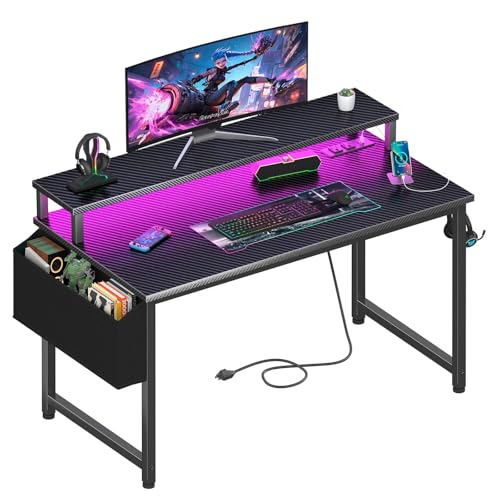
Lufeiya 40-inch gaming desk with a built-in power strip, two USB ports, and RGB LED lighting, plus a monitor stand and carbon fiber surface.
Key Facts
- Key Spec
- 2 power outlets and 2 USB charging ports
- Size
- 39.4 inches wide, 19.7 inches deep, 33.4 inches high
- Weight
- 20.4 pounds
- Included
- Storage bag, 2 headphone hooks, assembly tools
Pros
- +Power strip with 2 outlets and 2 USB ports
- +Monitor stand supports 2 monitors or laptops
- +Scratch-resistant and waterproof carbon fiber surface
- +Removable headphone hooks and storage bag
Cons
- −No height adjustment for the monitor stand
- −Desk depth of 19.7 inches limits large peripherals
Detailed Review
The Lufeiya gaming desk packs a built-in power strip with two outlets and two USB ports into a 39.4-inch wide carbon fiber surface. That means you can charge a phone and power a monitor without hunting for a wall outlet, which keeps a small gaming or study corner tidy.
The monitor stand raises a screen or two to eye level, and the RGB strip offers seven colors and four dynamic modes to set a mood. I see this fitting a student desk or a compact home office where cable clutter is the enemy.
The 19.7-inch depth is on the shallow side for a full keyboard and mouse spread, and the stand has no height adjustment. Check your setup's footprint before you commit.

The Korfile 66-inch L-shaped gaming desk has two fabric drawers, a sliding CPU shelf, and a built-in power station with 3 AC outlets and 2 USB ports.
Key Facts
- Key Spec
- 3 AC outlets and 2 USB ports
- Size
- 39.4 x 65.4 x 36.5 inches
- Color
- Black
- Included
- Two fabric drawers, sliding CPU shelf, two headphone hooks, LED strip
Pros
- +Integrated 3 AC outlets and 2 USB ports on the desktop
- +Reversible L shape adapts to either corner
- +Two fabric drawers and sliding CPU shelf tame clutter
- +Long monitor riser frees desk space and lifts the screen
Cons
- −Assembly required before any of the storage is usable
- −Sliding CPU shelf sits low where dust collects
Detailed Review
The Korfile 66-inch L-shaped desk builds its pitch around a desktop power station with 3 AC outlets and 2 USB ports, which means a monitor, laptop, desk lamp, and phone can share one strip instead of a floor surge protector. Two fabric drawers, a sliding CPU shelf, and a pair of headphone hooks handle the clutter that normally ends up on the desktop.
The integrated LED strip offers 20 colors, 22 dynamic scenes, and 5 brightness settings, so the lighting can shift from a low glow for late study to something brighter for a gaming session. The reversible layout lets the long run sit on whichever wall suits the room, and the extended monitor riser lifts a screen to eye level while freeing space underneath for a keyboard or small accessories.
That riser is the piece I would weigh hardest, since it fixes the monitor height rather than letting a stand or arm set it. Buyers who already run a VESA arm may find the shelf redundant, and anyone with a large tower should check the CPU shelf clearance against their case before ordering.
FAQs
Can a 33-inch desk hold a full gaming PC?
A compact desk can hold a mid-tower if the case sits on a dedicated shelf instead of the desktop. Measure your case height and width against the shelf opening before buying, because a full-tower or a wide airflow case may not clear the frame. The X-cosrack and Jakyitvi models both list a reversible CPU stand for this purpose.
Is an L-shaped desk better for a dual monitor setup?
An L-shaped desk gives you a corner to spread two monitors without crowding the keyboard, which is why the 53-inch and 66-inch models here list dual-display layouts. The tradeoff is floor space, since the return arm needs room to the side. In a narrow bedroom, a straight 44 to 48-inch desk with a monitor riser often fits better.
Do gaming desks with LED lights need an app to work?
Most of these desks control the LED strip with a button on the light itself, and some add app control for color and brightness. The Furologee and Korfile models list app adjustment, while the Bestier and Lufeiya models use on-strip buttons. If you would rather not install another app, check the control method in the listing.
How much weight can these desks support?
Stated load capacity varies by model, with the Korfile 48-inch listing a 220-pound figure and the X-cosrack listing 180 pounds. Stay within the manufacturer’s stated weight capacity, and keep in mind that a heavy monitor arm clamped to a thin desktop concentrates load at one point. Check the desk thickness and the arm’s clamp range before mounting anything.
Final Thoughts
What separates a good gaming desk with a PC compartment from a cramped one is the shelf layout, not the lighting. A reversible CPU stand, a raised monitor platform, and a power strip within reach do more for a small room than any RGB mode. If you are building out the rest of the setup, the broader gear and peripherals section covers the pieces that pair with a desk like this.
For most small rooms, the X-cosrack 33.5″ Small Gaming Desk with LED Lights is the best overall choice. Its 33.5-inch frame fits a corner, the reversible CPU stand keeps the tower off the floor, and the fabric drawer hides the clutter a compact setup tends to collect. If you want to spend less, the 33.7 Inch Small Gaming Desk Table with LED Lights is the best value pick, with a built-in power strip and a lower shelf that doubles as a CPU stand. Skip both if you run a full-tower case or need room for three monitors, and look at the 66-inch L-shaped option instead. Check the current price on Amazon, and the right shelf height removes the guesswork about where the PC actually goes.
