


You have probably been on a call where the other person kept asking you to repeat yourself, or where your face was a dark silhouette against a bright window. The webcam on most laptops is the weak link, and the built-in mic is usually worse. A separate webcam with its own microphone fixes both problems at once, and you do not need to spend much to notice the difference.
I looked at the listings for 7 webcams with built-in microphones and compared what each one actually states: sensor and resolution, how the mic handles background noise, whether a privacy cover is included, and how the mount attaches to a laptop or monitor. The picks below are the ones with clearly documented specs and a realistic set of features for remote work, online classes, and streaming.
My overall pick for best webcams with built-in microphones is the 1080P HD Webcam with Microphone. It pairs a 1080p sensor with a noise-reducing mic and ships with a slide-on privacy cover, so you get the basics without hunting for extras. My top picks are just below.
Best Webcams with Built-in Microphones at a Glance
| Product | PGH Score | ||
|---|---|---|---|

|
Best Overall Shcngqio TWC29 1080p Webcam with Noise-Canceling | 9.8 | Check Price on Amazon |
|
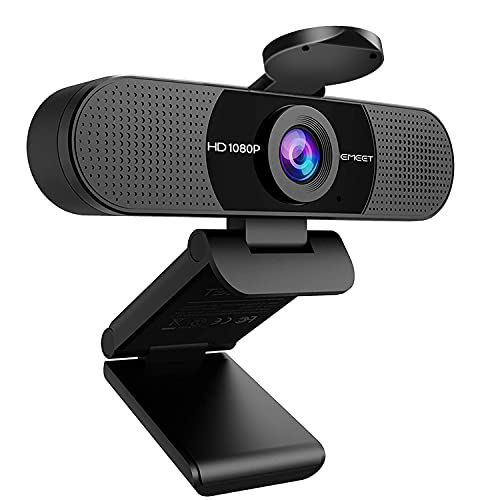
Best for Video Calls EMEET C960 1080p Webcam with Dual Noise Reduction | 9.8 | Check Price on Amazon |

|
Best for Remote Work Tewiky 1080p Webcam with Mic and Rotatable Tripod | 9.5 | Check Price on Amazon |

|
NexiGo N60 1080p Webcam with Privacy Cover | 9.5 | Check Price on Amazon |

|
Acer A610 1080p Webcam with Dual Noise-Reducing | 9.5 | Check Price on Amazon |

|
NIVEOLI 1080P Webcam with Privacy Shutter and Dual | 9.4 | Check Price on Amazon |

|
Best for Small Meetings AIRHUG 3 in 1 1080P Webcam with Mic and Speaker | 9.4 | Check Price on Amazon |
In-Depth Reviews
The Shcngqio TWC29 is a 1080p USB webcam with a 1/2.9-inch CMOS sensor, wide-angle lens, built-in noise-canceling mic, and slide-on privacy cover.
Key Facts
- Key Spec
- 1080p at 30fps, 1/2.9-inch CMOS sensor
- Connectivity
- 5ft USB cable, USB 2.0, 3.0, or 3.1
- Compatibility
- Laptop, desktop, PC, Mac, and OTG mobile devices
- Included
- Slide-on privacy cover
Pros
- +1080p 30fps footage from a 1/2.9-inch CMOS sensor
- +Noise-canceling mic keeps speech clear in noisy rooms
- +Slide-on privacy cover included for between calls
- +Plug-and-play USB setup with no drivers needed
Cons
- −Fixed clip mount limits angle adjustment on thick monitors
- −No autofocus means close-up detail stays soft
- −Built-in mic only, no audio input for a dedicated mic
Detailed Review
The Shcngqio TWC29 is built around a 1/2.9-inch CMOS sensor pushing 1080p at 30fps, which is the right target for Zoom calls, remote classes, and casual streaming rather than high-frame-rate capture. A wide-angle lens keeps more of a desk or room in frame, so I would point this at a student setup where the camera sits close to the chair.
Auto light correction adjusts exposure and color temperature, which helps in a dim bedroom or a sunlit home office without manual tweaking. The built-in noise-canceling mic handles speech for meetings and webinars, though it is the only audio path here, so a dedicated mic is still the move for serious streaming.
The included slide-on cover is a small but real addition for anyone who wants the lens blocked between calls. My main reservation is the fixed clip mount, which limits angle adjustment on thicker monitors, and the lack of autofocus means close-up detail stays soft.
The EMEET C960 is a 1080p webcam with two omnidirectional noise reduction mics and a 90-degree field of view for calls and streaming.
Key Facts
- Resolution
- 1080p (1920 x 1080)
- Field of View
- 90 degrees
- Microphones
- 2 omnidirectional noise reduction
- Connectivity
- USB plug-and-play
Pros
- +Two noise-reduction mics reduce background sound in calls
- +90-degree field of view accommodates multiple people
- +Plug-and-play USB works without driver installation
- +Foldable clip fits laptops and monitors easily
Cons
- −Fixed focal length limits sharpness outside 11.8 to 118.1 inches
- −Incompatible with Windows Hello facial recognition
- −No optical zoom or autofocus for close-up detail
Detailed Review
The EMEET C960 centers on a 1080p sensor with a 90-degree field of view, which fits two or three people at a desk without repositioning the camera. Its fixed focal length keeps subjects sharp between 11.8 and 118.1 inches, so it works for typical desk distances but not for close-up detail.
Two omnidirectional noise-reduction mics handle voice pickup, and the plug-and-play USB connection skips driver installs on Windows, Mac, and Linux. I see this suiting students and remote workers who want a simple camera for Zoom or Teams without extra software.
The lack of Windows Hello support means no facial login, and there is no autofocus or optical zoom. For a basic 1080p webcam with dual mics, it covers the essentials for everyday calls and light streaming.
Tewiky's 1080p webcam with a built-in noise-cancelling mic, wide-angle lens, privacy cover, and detachable tripod, plug-and-play over USB.
Key Facts
- Resolution
- 1080p at 30fps
- Connectivity
- USB with 5ft cable
- Compatibility
- Windows, Mac, Linux, Android, UVC devices
- Included
- Webcam, USB cable, detachable tripod, privacy cover
Pros
- +1080p wide-angle video at 30fps for clear calls and streaming
- +Built-in noise-cancelling mic cuts background noise
- +Plug-and-play USB setup with no drivers required
- +Detachable tripod and privacy cover included
Cons
- −No 60fps mode limits smoother motion for fast-paced streaming
- −Fixed focus means close-up objects may appear soft
- −12-month warranty may feel short for long-term use
Detailed Review
The Tewiky 1080p webcam pairs a wide-angle lens with 30fps video and a built-in noise-cancelling microphone, which suits remote work calls and online teaching where you want your face and voice clear without extra gear. The detachable tripod and built-in privacy cover are practical touches I appreciate for desk setups that get rearranged often.
Plug-and-play over USB with a 5ft cable means no driver installs, and automatic light correction adjusts brightness and color in changing room lighting. For streaming or gaming, the 30fps cap and fixed focus are the real limits, since faster motion and close-up detail won't look as sharp as a 60fps autofocus camera.
If your main need is reliable 1080p video for meetings, classes, or casual calls, this webcam covers the basics without extra software or a separate mic.
NexiGo N60 is a 1080p webcam with a built-in noise-cancelling mic and privacy cover, plug-and-play over USB.
Key Facts
- Resolution
- 1080p at 30fps
- Sensor
- Two-MP CMOS
- Lens
- 3.6mm glass, fixed focus
- Connectivity
- USB 2.0/3.0 plug-and-play
Pros
- +1080p 30fps video suits Zoom, Teams, and video calls
- +Built-in noise-cancelling mic reduces ambient room noise
- +Privacy cover adds a physical lens block
- +Plug-and-play USB needs no driver install
Cons
- −Fixed lens offers no zoom or autofocus adjustment
- −No tripod thread or mounting bracket included
- −Not compatible with Xbox or PlayStation consoles
Detailed Review
The NexiGo N60 is built around a two-megapixel CMOS sensor that outputs 1920 x 1080 at 30fps, which is the right target for Zoom, Teams, and class calls rather than high-frame-rate capture. Its 3.6mm glass lens is fixed and optimized between roughly 20 inches and 13 feet, so it frames a desk or a small room well but gives you no zoom to tighten the shot.
I value the built-in noise-cancelling microphone for a home office where a laptop mic picks up keyboard clatter, and the sliding privacy cover is a simple physical block between meetings. The plug-and-play USB connection means no driver install on Windows, macOS, Linux, or Chrome OS.
For a student or remote worker who wants a dependable 1080p image without a tripod or autofocus, this fits. Console players should look elsewhere, since it does not work with Xbox or PlayStation.
Acer A610 is a 1080p webcam with dual noise-reducing mics, a built-in privacy cover, and 360-degree rotation for flexible positioning.
Key Facts
- Resolution
- 1080p Full HD
- Field of View
- 83 degrees
- Microphones
- Dual noise-reducing
- Connectivity
- USB with Type-A to Type-C adapter
Pros
- +1080p CMOS sensor for clear video
- +Dual noise-reducing mics for voice clarity
- +Built-in privacy cover for lens security
- +360-degree rotation for flexible positioning
Cons
- −Fixed focus limits sharpness for close-up objects
- −No zoom control for adjusting framing
- −No built-in speakers for audio output
Detailed Review
The Acer A610 is built around a 1080p CMOS sensor and an 83-degree field of view, which puts a standard desk setup in frame without pushing you back. Dual noise-reducing microphones handle voice pickup, and the included Type-A to Type-C adapter covers laptops that skip USB-A.
I see this fitting remote workers and students who want a privacy cover and 360-degree rotation without adding drivers. The fixed focus and lack of zoom control mean close-up detail and tight framing are off the table, so it suits talking-head calls rather than product demos.
NIVEOLI 1080P USB webcam with dual noise-reducing mics, built-in privacy shutter, and auto light correction for video calls and streaming.
Key Facts
- Key Spec
- 1080p at 30fps
- Connectivity
- USB 2.0
- Compatibility
- Windows, Mac, Linux, Android
- Included
- Built-in privacy cover and adjustable clip
Pros
- +1080p at 30fps for clear video calls and streams
- +Dual noise-reducing mics for busy rooms
- +Built-in privacy shutter blocks the lens
- +Plug-and-play USB 2.0 with no drivers needed
Cons
- −Fixed focus limits sharpness at very close range
- −USB 2.0 connection only, no USB-C or wireless option
- −Clip mount fit depends on monitor or laptop thickness
Detailed Review
This NIVEOLI webcam shoots 1080p at 30 frames per second and pairs that with dual noise-reducing digital mics, which is the spec that matters most if you take calls in a shared room. The built-in privacy shutter slides over the lens, a physical block that software toggles cannot match. Auto light correction and fixed focus keep the image balanced without you adjusting anything.
I'd consider this for students in dorm rooms or remote workers who want a cheap, no-fuss camera for Zoom and Skype. The 360-degree rotating head and adjustable clip make it easy to angle on a monitor or sit it standalone. Windows, Mac, Linux, and Android are all listed as compatible.
The fixed focus means close-up framing stays soft, and USB 2.0 is the only connection. For basic calls and casual streaming, that is a fair trade at this size and weight.
AIRHUG 3-in-1 USB webcam with 1080p/30fps video, built-in microphone, 5W speaker, and privacy cover for conferences and online classes.
Key Facts
- Key Spec
- 1080p/30fps, 2.07MP sensor, 76 degree field of view
- Connectivity
- USB via Type C core cable
- Compatibility
- Windows 7, 8, 10, 11 and Mac OS
- Included
- Webcam, Type C cable, privacy cover, user manual
Pros
- +All-in-one camera, mic, and speaker in one USB device
- +1080p/30fps video with 76 degree field of view
- +Microphone picks up voices up to 6 feet away
- +Privacy cover included for camera security
Cons
- −Fixed focus limits sharpness at close range
- −No tripod included for angle adjustment
Detailed Review
The AIRHUG 3 in 1 pairs a 2.07MP sensor with a 5W speaker rated up to 90dB, which suits a small conference room or a shared desk where one USB device handles video and sound. Its microphone picks up voices up to 6 feet away, so a single unit can cover a few people around a table.
The 76 degree field of view and fixed focus keep the frame tight on one person, which I find better for solo calls than for wide room shots. The included privacy cover and driver-free USB connection make it simple to move between a laptop and a desktop.
Fixed focus means close-up detail is limited, and the mount relies on the screen clip rather than a tripod. For students in online classes or remote workers on Zoom and Teams, this fits a straightforward single-user setup.
FAQs
Do you need a separate microphone with a webcam that has a built-in mic?
A webcam with a built-in noise-reducing mic is enough for most video calls, online classes, and casual streaming. The mic sits close to your face, which helps it pick up your voice over room noise. If you record podcasts or stream to a large audience, a dedicated USB mic will still sound better, but for everyday calls the built-in option saves desk space and a USB port.
Is 1080p still good enough for video calls and streaming?
1080p at 30fps is plenty for Zoom, Teams, and most streaming platforms, which compress the video anyway. The bigger factor is lighting: a 1080p camera in a well-lit room looks better than a higher-resolution one in a dim corner. Auto light correction helps, but a desk lamp aimed at your face does more than any spec bump.
Will a webcam clip fit on a thick monitor or a laptop lid?
Most webcam clips are designed for standard laptop lids and monitor bezels, but thick or curved panels can be a problem. Check the manufacturer’s stated mount range before buying, and look for a model with a tripod thread if your display is unusually thick. A few of the picks here include a tripod or a 360-degree rotating head to work around awkward screens.
Does a privacy cover actually matter?
A privacy cover is a physical shutter that blocks the lens when the camera is not in use, and it is worth having if you work in a shared space or just prefer not to be on camera by default. It also keeps dust off the lens. Every pick in this roundup includes one, either built in or as a slide-on accessory.
Final Thoughts
The two things that matter most in this category are how the mic handles your room and how the camera copes with your lighting. Resolution is almost secondary at this level, since every pick here is 1080p. If you want the safest all-rounder, the 1080P HD Webcam with Microphone covers the basics well: a noise-reducing mic, auto light correction, and a privacy cover in the box. It suits remote workers, students, and anyone who wants a clean setup without extra accessories.
If you want to spend as little as possible, the NIVEOLI Webcam 1080P with Microphone & Privacy is the value pick, with dual noise-reducing mics and a built-in privacy shutter at the lowest price in the group. Skip both if you need 4K for detailed product shots or professional video work, since none of these cameras offer it. Otherwise, check the current price on Amazon and pick the one whose mount and mic description match your desk.

