


You are three corners from a clean rally stage and the shifter refuses to slot the next gear, or the clamp slides across the desk the moment you yank the lever. A sequential shifter that wobbles, misses a shift, or only works on one platform turns practice into frustration.
The models worth considering pair a firm, repeatable shift action with a mounting method that survives aggressive inputs and a connection that matches your wheel and platform. I compared the Best Sequential Shifters for Sim Racing on stated construction, mounting hardware, platform support, and how each one handles the shift itself, then cross-referenced the specs each listing provides.
My overall pick for best sequential shifters for sim racing is the YESHMA USB Sequential Shifter For PC Windows. It runs over USB on Windows and the listing states compatibility with several common Logitech and Thrustmaster wheelbases, which covers a lot of existing rigs. My top picks are just below.
Best Sequential Shifters for Sim Racing at a Glance
| Product | PGH Score | ||
|---|---|---|---|

|
Best Overall YESHMA USB Sequential Shifter for PC Sim Racing | 9.8 | Check Price on Amazon |

|
Best for MOZA Sim Racers MOZA SGP Sequential Shifter with Hall Sensor | 9.8 | Check Price on Amazon |

|
Best for PC Sim Racing Nitho 6-Speed H-Pattern Gear Shifter for PC Sim | 9.5 | Check Price on Amazon |
|
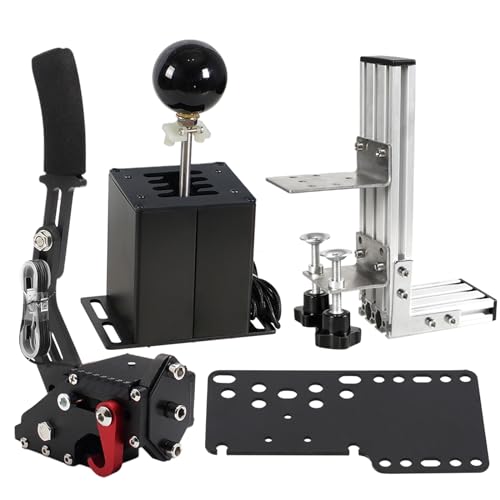
Best for Rally Sims GSTP USB Simulator Shifter with 6+R and 64 Bit | 9.5 | Check Price on Amazon |

|
BGQG USB Sequential Shifter for PC Sim Racing | 9.4 | Check Price on Amazon |

|
Best for Sim Racing Logitech G RS Sim Racing Shifter & Handbrake | 9.4 | Check Price on Amazon |
In-Depth Reviews
PC-only USB sequential shifter compatible with Logitech G25 G27 G29 G920 and Thrustmaster T300 T500 wheels, with damping feel and M8 swappable gear head.
Key Facts
- Connectivity
- USB
- Compatibility
- PC Windows 10, 7, XP; Logitech G25, G27, G29, G920; Thrustmaster T300, T500
- Key Spec
- M8 threaded shifter rod
- Color
- Silver
Pros
- +Works with common Logitech and Thrustmaster wheel bases
- +M8 thread allows swapping or DIY gear heads
- +USB connection keeps setup simple for PC
- +Damping feel adds resistance to each shift
Cons
- −No console or Mac support limits use
- −Silver finish only, no color options
Detailed Review
The YESHMA USB Sequential Shifter is a PC-only add-on for sim racers who already run a Logitech G25, G27, G29, G920, T300, or T500 wheel. It connects over USB and works with Windows 10, 7, and XP, so it slots into an existing PC rig without extra adapters.
The damping sensation is the detail that matters most here. A sequential shifter with some resistance gives each pull and push a defined feel, which suits rally, touring, and sequential gearbox cars where you are not rowing through an H-pattern. I see this fitting a desk or rig where the wheel is already Logitech or Thrustmaster based.
The M8 threaded rod lets you swap or make your own gear head, which is a real plus if you want a different knob shape. The catch is platform lock-in. It will not work on PS4, PS5, Xbox, or Mac, so if you race across consoles, this stays a PC part.
MOZA SGP sequential shifter with all-metal body, non-contact Hall sensor, and two RGB mechanical buttons, connecting via USB or compatible MOZA wheelbases.
Key Facts
- Key Spec
- Non-Contact Hall Sensor
- Connectivity
- USB or Compatible MOZA Bases
- Compatibility
- MOZA R3, R5, R9 V2, R12, R16, R21 Wheelbases
- Size
- 12.6 x 2.05 x 7.17 inches
Pros
- +Non-contact Hall sensor avoids mechanical wear
- +Adjustable damper tunes shift resistance
- +M12 thread accepts most aftermarket knobs
- +USB or MOZA base connection for PC
Cons
- −Weighs about 4 pounds, heavy for some rigs
- −No console compatibility stated
- −RGB color options limited to eight
Detailed Review
The MOZA SGP sequential shifter uses a non-contact Hall sensor instead of a mechanical switch, which removes a common wear point. Its all-metal aluminum and steel body gives it a solid feel, but at roughly 4 pounds it adds noticeable weight to a rig.
I appreciate the M12 threaded knob because it lets you swap in most aftermarket shifter heads, and the 64mm height adjustment helps match your seating position. The adjustable damper lets you set shift resistance from firm to soft.
For PC sim racers with a MOZA wheelbase or a spare USB port, this is a straightforward sequential option. Check your rig's mounting limits before buying, since the weight and size may not suit every setup.
Nitho's USB gear shifter adds 6-speed plus reverse H-pattern and sequential shifting to PC racing wheels, with two interchangeable shift plates and a clamp fitting desks up to 55 mm.
Key Facts
- Connectivity
- USB
- Compatibility
- Windows PC, most PC racing wheels with separate USB shifter support
- Clamp Capacity
- Up to 55 mm thick
- Included
- H-pattern plate, sequential plate, Allen key
Pros
- +Two shift plates cover H-pattern and sequential driving styles
- +Direct USB connection needs no driver or extra software
- +Clamp fits desks and racing rigs up to 55 mm thick
- +Onboard Allen key storage keeps plate swaps quick
Cons
- −No console support, Windows PC only
- −Some games require manual gear mapping in control settings
- −Separate USB shifter support varies by racing wheel
Detailed Review
The Nitho Gear Shifter gives PC sim racers a dedicated six-speed plus reverse H-pattern gate, plus a sequential plate for rally and touring car work. Swapping between the two plates is a hands-on affair with the included Allen key, which stores underneath the body.
Connection is straight USB to a Windows PC, with no driver install, though some games need gear mapping in their own control settings. The adjustable clamp grips desks and rigs up to 55 mm thick, which covers most wheel stands.
I rate this a sensible entry point for anyone running a PC wheel that accepts a separate USB shifter. Check that your wheel and game both support one before buying, since that compatibility is not universal.
GSTP USB simulator shifter with a 64 bit Hall sensor handbrake, an all-metal body, and an L bracket for clamp mounting.
Key Facts
- Key Spec
- 64 Bit Hall Sensor Handbrake
- Connectivity
- USB Plug and Play
- Compatibility
- Windows 10, Windows 7, Windows XP
- Included
- L Bracket and Clamp
Pros
- +All-metal main body with removable shift knob
- +64 bit Hall sensor for non-contact handbrake
- +USB plug-and-play with no driver on Win10
- +L bracket and clamp included for mounting
Cons
- −No sequential mode switch for H-pattern only
- −Windows 7 and XP need a separate driver install
- −No force feedback or vibration on the shifter
Detailed Review
The GSTP USB Simulator Shifter pairs an all-metal main body with a 64 bit Hall sensor handbrake, and the panel is the only non-metal piece. That metal construction matters for anyone who yanks the lever hard during rally or drift runs. I see this as a fit for sim racers who already own a Logitech G29, G27, G25, G920, or a Thrustmaster T300RS/GT wheel and want a separate shifter and handbrake.
Both units run as independent USB devices with plug-and-play on Windows 10, and the included L bracket and clamp let you bolt the shifter to a desk or rig without buying extra hardware. The handbrake uses a non-contact 64 bit Hall sensor rather than a touch switch, which suits quick pulls in Dirt, WRC, or Assetto Corsa.
Two trade-offs stand out. Windows 7 and XP need a separate driver install, so older sim PCs add a setup step. The handbrake also has no force feedback, which leaves out anyone expecting resistance feedback from the lever.
USB sequential shifter for Windows PC sim racing, compatible with Logitech G25 through G923, Thrustmaster T300 and T500, and PXN and TMX wheels.
Key Facts
- Connectivity
- USB
- Compatibility
- Windows 10, 7, XP
- Wheel Support
- Logitech G25, G27, G29, G920, G923, Thrustmaster T300, T500, PXN, TMX
- Included
- 56-inch cable
Pros
- +Windows plug-and-play with automatic driver recognition
- +Broad wheel support across Logitech, Thrustmaster, and PXN
- +M8 threaded rod for DIY shift knob swaps
- +56-inch cable and table clamp or 6mm screw mounting
Cons
- −No console or Mac support, Windows PC only
- −Table clamp or screws needed for stable mounting
Detailed Review
The BGQG sequential shifter is a Windows-only USB unit, working with Windows 10, 7, and XP through automatic driver recognition, and it fits Logitech G25 through G923, Thrustmaster T300 and T500, plus PXN and TMX wheels. That wheel list covers a lot of the common sim racing setups, which matters if you are adding a shifter to an existing rig. I would point rally and touring car players toward this one, since sequential shifting suits Horizon, WRC, Dirt, LFS, Corsa, and Assetto.
The gear head uses an M8 threaded rod, so you can swap the knob for your own, and the damping feel is meant to mimic a real sequential gate. The 56-inch cable gives some slack for routing, and the base mounts with 6mm screws or a table clamp. Just confirm the fit with your wheel and check the manufacturer's stated limits before you bolt anything down.
The catch is platform lock-in. This is PC only, so PS4, PS5, Xbox, and Mac are out, and you need the clamp or screws to keep it steady during hard shifts.
Logitech G RS Shifter & Handbrake with a mode switch to toggle between shifter and handbrake, plus a height-adjustable handle and table clamp.
Key Facts
- Key Spec
- 2-in-1 shifter and handbrake with mode switch
- Connectivity
- Wired USB (via wheel base or adapter)
- Compatibility
- PRO Series wheels; G923, G920, G29 on PC; console requires Racing Adapter
- Size
- 4.49 x 5.35 x 14.13 inches
Pros
- +2-in-1 mode switching between shifter and handbrake
- +Height-adjustable handle for custom ergonomic positioning
- +Robust table clamp minimizes wobble during aggressive maneuvers
- +Tunable actuation and response curve via G HUB software
Cons
- −Racing Adapter required for console use, adding extra cost
- −Simultaneous use needs second unit sold separately
- −Weighs 5.35 pounds, limiting portability
Detailed Review
The Logitech G RS Shifter & Handbrake is a compact 2-in-1 unit that switches between gear shifter and handbrake with a dedicated mode switch. It makes the most sense for sim racers who want both functions without dedicating two separate mounting points on a rig.
The height-adjustable handle and robust table clamp let me position the unit for comfortable reach in either mode. G HUB software allows tuning the shifter's actuation point and the handbrake's response curve, which matters for drift-heavy games where progressive tension helps control.
For console use, a Racing Adapter is required, and running both functions simultaneously means buying a second unit. At 5.35 pounds, it stays put but is not something I would move between setups often.
FAQs
Can you use a sequential shifter on PC without a matching wheelbase?
A USB shifter that connects directly to your PC does not need a matching wheelbase, as long as the game supports a separate USB shifter and you map the gears in its control settings. Several picks here run standalone over USB, though some games still need manual gear mapping before the shifter responds.
Is it better to clamp a shifter to a desk or bolt it to a rig?
Bolting to a rig is the more stable option if your frame has a mounting plate, since a clamped shifter can shift under hard inputs. If you race at a desk, check the clamp range against your desk thickness and stay within the manufacturer’s stated fit range before you buy.
Do you need a separate handbrake for drifting?
A dedicated handbrake gives you a cleaner, more progressive pull for drift entries than a button mapped on the wheel. Some shifters here include a handbrake mode or a combined unit, which saves rig space, though a two-in-one design means switching modes rather than using both at once.
What is the difference between sequential and H-pattern shifting?
Sequential shifting moves one gear at a time with a push or pull, which suits rally and touring cars, while H-pattern gives you a gated layout with a clutch for manual gearboxes. A shifter with interchangeable plates lets you switch between the two without buying a second unit.
Final Thoughts
The deciding factors for a sequential shifter come down to three things: whether it connects to your platform, whether it mounts firmly enough to survive hard shifts, and whether the shift action feels repeatable rather than vague. Get those right and the rest is preference.
For most PC sim racers, the YESHMA USB Sequential Shifter For PC Windows is the best overall choice. It runs over USB on Windows, and the listing states compatibility with several common Logitech and Thrustmaster wheelbases, so it slots into a lot of existing setups without a platform change. If you want to spend less, the Nitho Gear Shifter 6-Speed+Reverse H-Pattern is the value pick, with interchangeable H-pattern and sequential plates and a clamp that the listing states fits surfaces up to 55 mm thick. Skip both if you race on console or Mac, since these are PC-focused units, and check the sim racing and flight sim category for more rig-building options. If you are still sorting out the rest of your cockpit, a look at gear and peripherals covers the wider setup. Check the current price on Amazon, and the right shifter takes the guesswork out of which gear you are actually in.

