


You plug a capture card into your PS5, fire up OBS, and the preview window goes black. Or the audio drifts a half-second behind the picture. Or the card handles 1080p fine but chokes the moment you try 1440p. Console capture is fussier than PC capture because the console decides what signal it will send, and a cheap card that ignores HDCP or skimps on USB bandwidth will stall your stream before it starts.
The cards worth considering share a few traits: a USB 3.0 connection rather than USB 2.0, a pass-through port so you can play on your TV while the card records, and a stated capture resolution you can match to your console and monitor. I compared the Best Capture Cards for Ps5 on capture resolution, pass-through support, mic input, and how each one handles the PS5 specifically.
My overall pick for best capture cards for ps5 is the XIIXMASK USB 3.0 HDMI Capture Card. Its five-port layout, aluminum shell, and 4K60 pass-through make it a straightforward fit for a PS5 setup where you want to play and record at the same time. My top picks are just below.
Best Capture Cards for Ps5 at a Glance
| Product | PGH Score | ||
|---|---|---|---|

|
Best Overall XIIXMASK USB 3.0 HDMI Capture Card with 4K 60Hz | 9.9 | Check Price on Amazon |

|
Best for 2K Streaming UGREEN HDMI Capture Card for 2K 30FPS Streaming | 9.9 | Check Price on Amazon |

|
Best for Console Streaming Acer USB 3.0 HDMI Capture Card with 4K Loop-Out | 9.8 | Check Price on Amazon |

|
VIXLW 4K HDMI Capture Card with 1080p60 | 9.7 | Check Price on Amazon |

|
Guermok USB 3.0 HDMI Capture Card with 4K60 | 9.6 | Check Price on Amazon |

|
Elgato 4K S Capture Card for PS5 and Xbox | 9.6 | Check Price on Amazon |
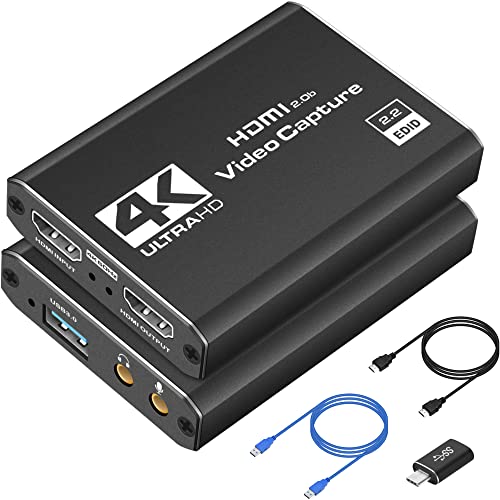
|
Dcyfol 4K HDMI Capture Card with USB 3.0 and 1080P | 9.5 | Check Price on Amazon |
In-Depth Reviews
XIIXMASK USB 3.0 HDMI capture card with 4K 60Hz pass-through and 1080p 60fps capture, plus 3.5mm mic input for commentary.
Key Facts
- Key Spec
- 4K 60Hz Pass-Through, 1080p 60fps Capture
- Connectivity
- USB 3.0, HDMI In/Out, 3.5mm Mic In
- Compatibility
- Windows 7/8/10, Mac OS, Linux, Android
- Included
- Capture Card, USB 3.0 to USB-A/USB-C Cable, Manual
Pros
- +4K 60Hz pass-through for zero-lag TV play
- +1080p 60fps capture matches common streaming output
- +USB-A and USB-C cable included for both ports
- +3.5mm mic input for live commentary
Cons
- −Does not record party chat audio
- −Requires OBS restart after audio setup
- −USB 3.0 port needed for full capture quality
Detailed Review
The XIIXMASK capture card handles 4K 60Hz pass-through while capturing at 1080p 60fps, so the TV keeps the full-resolution signal and the PC gets a clean stream feed. A 3.5mm mic input lets me add voice commentary without a separate audio interface.
The aluminum housing is a practical choice for long streaming sessions because it helps move heat away from the internals. The included USB-A and USB-C cable means it works with both a desktop tower and a USB-C laptop.
Party chat audio is not recorded through the card, which matters for console players who rely on in-game chat. After audio setup, OBS needs a restart to output sound. I would suggest this for solo streamers and creators who want a simple 1080p 60fps capture path.
USB 3.0 capture card capturing up to 2K at 30fps with 4K loop-out, plug-and-play for Switch, PS5, Xbox, and PC.
Key Facts
- Max Capture
- 2K at 30fps
- Loop-Out
- 4K at 30Hz
- Interface
- USB 3.0 Type-A and Type-C
- Compatibility
- Windows, macOS, Linux, Android
Pros
- +Dual USB-A and USB-C ports for flexible recording devices
- +4K 30Hz loop-out enables real-time zero-latency monitoring
- +Aluminum casing promotes heat dissipation for stable performance
- +Plug-and-play setup with no drivers or external power
Cons
- −Capture capped at 2K 30fps, no 4K recording support
- −PS4 and PS5 require HDCP turned off to function
- −iPhone cannot be used as a data acquisition device
Detailed Review
The UGREEN capture card records at up to 2K 30fps, so it suits streamers who need clear 1440p gameplay clips without 4K overhead. Its 4K 30Hz loop-out passes the signal to a TV or monitor for zero-latency play, which matters when timing depends on what you see.
I rate the dual USB-A and USB-C interface as the practical standout, letting you connect to a laptop or iPad without hunting for an adapter. The aluminum shell helps with heat dissipation during longer sessions, though the 2K 30fps ceiling means fast-paced 60fps capture is off the table.
For Switch, PS5, or Xbox Series X recording, this is a straightforward pick if you can live with HDCP off and no iPhone support.
Acer USB 3.0 capture card with 4K HDMI input, 1080p 60Hz output, mic-in, and USB Type-A and Type-C ports.
Key Facts
- Key Spec
- 4K HDMI Input, 1080p 60Hz Capture Output
- Connectivity
- USB Type-A and USB Type-C, HDMI Loop-Out, 3.5mm Mic-In
- Compatibility
- Switch, Switch 2, PS5, PS4, Xbox, DSLR Cameras, PC, macOS, Android
- Size
- 6.3 x 5.2 x 0.6 inches
Pros
- +4K HDMI loop-out keeps gameplay on the TV
- +Mic-in syncs commentary without separate audio gear
- +USB Type-A and Type-C ports cover more laptops
- +YUY2 color format for cleaner streamed color
Cons
- −Captures at 1080p 60Hz, not 4K
- −No capture software bundled with the card
- −Mic-in only fits 3.5mm devices
Detailed Review
The Acer USB 3.0 HDMI Capture Card centers on a 4K HDMI input with a 1080p 60Hz capture output, so console gameplay can stay on the TV through the loop-out while the stream records at 60 frames per second. The YUY2 color format is the detail I care about most here, since it carries richer color than the MJPEG compression many cheap cards fall back on.
A mic-in jack lets a headset or 3.5mm mic plug straight into the card, which keeps voice commentary lined up with the game feed instead of drifting out of sync in editing. The USB Type-A and Type-C ports mean the same card works across a desktop tower and a newer laptop without a dongle hunt.
For a Switch 2, PS5, or Xbox streamer on a single-PC setup, this is a tidy fit. The ceiling is real though. Capture tops out at 1080p 60Hz, so a 4K recording workflow needs a different card.
USB 3.0 capture card with 4K60 HDMI loop-out, 1080p60 capture, 2K30 output, and a 3.5mm mic input for commentary.
Key Facts
- Capture Resolution
- 1080p60 over USB 3.0
- Loop-Out
- 4K60 HDMI passthrough
- Connectivity
- HDMI in, USB 3.0, 3.5mm mic input
- Compatibility
- Windows 7/8/10, macOS, Linux, Android, OBS Studio
Pros
- +4K60 HDMI loop-out keeps gameplay lag-free on the TV
- +1080p60 capture over USB 3.0 for streaming and recording
- +3.5mm mic input for live commentary and interviews
- +Plug-and-play with no driver or external power supply
Cons
- −No capture of party chat audio through the card
- −Requires a 3.5mm microphone headset for mic input
- −USB 3.0 port needed for full 1080p60 capture
Detailed Review
The 4K60 HDMI loop-out is the feature I care about most here, because it lets a console or camera feed pass through to a TV at full 4K60 while the card records a separate 1080p60 stream over USB 3.0. For anyone capturing PS5, Xbox Series X, or a DSLR, that passthrough keeps the live play lag-free instead of forcing you to watch a delayed preview.
The 3.5mm mic input handles live commentary for streams or interviews, though it only accepts a 3.5mm microphone headset and does not record party chat audio. I would pair this with OBS Studio or Streamlabs on a Windows, macOS, or Linux machine, and the aluminum body plus included USB-A to USB-C adapter make it easy to move between a desktop and a laptop.
Setup is genuinely plug-and-play with no driver or external power supply, but a USB 3.0 port is needed to hit 1080p60 capture, and OBS needs a restart after audio setup to avoid silent output. For a console streamer or camera user who wants clean loop-out without a capture PC in the middle, this is a sensible fit.
USB 3.0 HDMI capture card that records 1080p at 60fps and 1440p at 30fps, with 4K60 HDMI pass-through and a 3.5mm mic input.
Key Facts
- Capture Resolution
- 1920x1080 at 60Hz, 2560x1440 at 30Hz
- HDMI Input
- Up to 4K at 60Hz, 1080p at 120Hz
- Pass-Through
- Up to 4K at 60Hz in YUV420, 4K at 30Hz in RGB/YUV444
- Connectivity
- USB 3.0, HDMI in, HDMI loop-out, mic in, audio in, headphone, speaker
Pros
- +4K60 HDMI pass-through for lag-free monitor viewing
- +1080p 60fps capture suits OBS gameplay recording
- +Separate mic in and headphone monitoring ports
- +Driver-free UVC setup across Windows and macOS
Cons
- −TRS mic input rules out TRRS headsets and USB microphones
- −1440p capture capped at 30fps for higher-resolution recording
- −Recording needs third-party capture software installed
Detailed Review
The Guermok capture card records at up to 1080p 60fps and 2560x1440 at 30Hz, while passing a 4K60 HDMI signal through to a monitor so the game feed stays live. That pass-through matters more than the capture spec for console players on PS5 or Xbox, since the display does not route through the recording pipeline.
Audio is handled by a 3.5mm TRS mic input plus headphone monitoring and speaker output, so a standard mic and headset can sit on the card instead of a separate interface. The catch is the TRS-only jack, which leaves TRRS headset mics and USB microphones out of the chain.
For a $23 USB 3.0 dongle, I would point students and streamers at it for OBS gameplay capture and meeting recording, and skip it if 1440p60 capture is the goal.
Elgato 4K S capture card records 4K60 with 1440p120 or 1080p240 high frame rate passthrough, HDR10 support, and a 3.5mm analog audio input.
Key Facts
- Capture Resolution
- 4K60
- Passthrough
- 1440p120 or 1080p240
- HDR Support
- HDR10 with tone mapping on Windows
- Connectivity
- USB-C, 3.5mm analog audio input
Pros
- +4K60 capture with HDR10 support for detailed recordings
- +High frame rate passthrough up to 1440p120 or 1080p240
- +3.5mm analog input for chat or commentary
- +Compact 4.4 x 2.8 x 0.7 inch footprint
Cons
- −No 4K120 passthrough for high refresh 4K displays
- −HDR tone mapping limited to Windows systems
- −No included cables or accessories mentioned
Detailed Review
The Elgato 4K S captures at 4K60 while passing through 1440p120 or 1080p240 to your display, so fast-paced console shooters stay smooth on screen. Its 3.5mm analog audio input lets you mix in-game chat or commentary without a separate mixer. I rate this a strong fit for PS5 and Xbox Series X/S owners who want clean 4K uploads without dropping competitive frame rates.
HDR10 support with tone mapping on Windows is a real plus for creators editing in that ecosystem. The card measures just 4.4 x 2.8 x 0.7 inches and weighs about 3.2 ounces, so it tucks behind a console or under a monitor arm easily. On Mac, though, HDR tone mapping is not available, which matters if your editing rig is Apple-based.
There is no 4K120 passthrough, so a 4K high refresh monitor will not get its full rate through the card. For 1440p120 or 1080p240 setups, that trade-off rarely bites. It makes the most sense for console streamers who capture at 4K60 and play at high frame rates on a 1440p screen.
Dcyfol USB 3.0 capture card records 1080P 60FPS from HDMI sources while passing 4K to your TV. Plug-and-play with OBS, Streamlabs, and XSplit.
Key Facts
- Key Spec
- 1080P 60FPS capture with 4K HDMI loop-out
- Connectivity
- USB 3.0 to PC, HDMI in and HDMI out
- Compatibility
- PS5, PS4, Switch, Xbox, PC, DSLR cameras, OBS, Streamlabs, XSplit
- Size
- 1 x 1 x 2.7 inches
Pros
- +1080P 60FPS capture suits YouTube and Twitch uploads
- +4K HDMI passthrough lets you play on TV without delay
- +Driver-free USB 3.0 works with OBS, Streamlabs, XSplit
- +Compact 2.7 inch body fits travel and LAN bags
Cons
- −Capture caps at 1080P 60FPS, no 4K recording
- −No included HDMI cables for console or camera hookup
- −USB 3.0 port required, older USB 2.0 laptops may struggle
Detailed Review
The Dcyfol capture card records at 1080P 60FPS while passing a 4K HDMI signal to your TV, so console play stays on the big screen. That combination suits PS5, Xbox, and Switch owners who want to stream without adding a second monitor.
Setup is driver-free over USB 3.0, and the card works with OBS Studio, Streamlabs, and XSplit for recording or live broadcasts. I see this fitting a student or new creator building a channel from a single PC and console.
Two honest limits matter. The capture itself tops out at 1080P 60FPS, so 4K recording is not supported, and no HDMI cables ship in the box. Budget for two HDMI cables before your first stream.
FAQs
Does a capture card work with a PS5 out of the box?
Most USB capture cards work with a PS5 once you turn HDCP off in the console settings, because the PS5 blocks protected video from passing through to a recorder by default. If you leave HDCP on, the card usually shows a black screen or a copyright warning instead of gameplay. Check the manufacturer’s compatibility notes for your specific card and firmware before you buy.
Is 1080p 60fps enough for streaming PS5 gameplay?
1080p at 60fps is the standard capture target for Twitch and YouTube console streams, and most viewers watch at that resolution anyway. A card rated for 1080p60 capture paired with a 4K pass-through port lets you play on a 4K TV while the stream runs at 1080p. If you want to archive 4K footage locally, you need a card rated for 4K capture, which costs more and demands more USB bandwidth.
Can you use a capture card with a laptop instead of a desktop?
A USB 3.0 capture card works with most laptops that have a free USB 3.0 port, and no external power is needed on the models here. The catch is USB bandwidth: a laptop with only USB 2.0 ports will cap your capture resolution and frame rate. For a full streaming setup, pair the card with other streaming gear that matches your port layout.
Do you need a mic input on a capture card?
A 3.5mm mic input on the card lets you record commentary directly alongside gameplay without routing audio through a separate interface. Some cards only accept a TRS microphone and will not work with a TRRS headset or a USB mic, so check the listing before you rely on it. If you already run a USB microphone through OBS, the card’s mic port is optional.
Final Thoughts
For PS5 capture, the two things that matter most are a USB 3.0 connection and a pass-through port, because those decide whether you can play and record at the same time without a laggy preview. Capture resolution comes next, and 1080p60 is still the practical target for most console streams.
The XIIXMASK USB 3.0 HDMI Capture Card is my overall pick for a PS5 setup, thanks to its 4K60 pass-through, five-port layout, and aluminum body that the listing says helps with heat dissipation during longer sessions. If you want to spend less, the Guermok USB 3.0 HDMI Capture Card covers 1080p60 capture and 4K60 pass-through with separate mic and audio ports, which suits a first streaming setup on a tighter budget. Skip both if you need 4K60 capture rather than pass-through, since that class of card costs considerably more and demands more USB bandwidth than these provide. If you are building out the rest of your broadcast, the streaming gear category covers the supporting pieces. Check the current price on Amazon, and the right card removes the guesswork about whether your PS5 signal will actually reach OBS.
