


A budget laptop that stalls on a video call or runs out of storage before the semester ends turns a cheap purchase into an expensive mistake. The listings in this range often lead with a low price and say little about RAM, storage type, or how the screen handles a bright room.
I compared the Best Laptops under $400 by reading the manufacturer spec sheets, checking the stated memory and storage, and cross-referencing verified buyer feedback on build and battery behavior. The models worth a look pair a current-generation low-power processor with enough RAM for a browser full of tabs and a screen that stays readable under classroom lighting.
My overall pick for best laptops under $400 is the ASUS Vivobook Go 15 Laptop. Its 15.6-inch full HD panel and 180-degree hinge make it easy to share notes or slides across a table, and the listing states fast charging that reaches 60 percent in about 49 minutes. My top picks are just below.
Best Laptops under $400 at a Glance
| Product | PGH Score | ||
|---|---|---|---|

|
Best Overall ASUS Vivobook Go 15 Laptop with 15.6-Inch FHD | 9.9 | Check Price on Amazon |

|
Best for Students HP Everyday Slim 14-Inch Laptop with Intel N150 | 9.9 | Check Price on Amazon |

|
Best for Everyday Browsing Acer Aspire Go 15 Laptop with 15.6" FHD IPS | 9.6 | Check Price on Amazon |
|
Lenovo Chromebook 2-in-1 14" Touchscreen | 9.6 | Check Price on Amazon |

|
Best for All-Day Productivity HP OmniBook 3 14" Laptop with Snapdragon X | 9.5 | Check Price on Amazon |

|
Best for Everyday Work Dell 15 Laptop with Intel Core 3 100U and 512GB | 9.5 | Check Price on Amazon |

|
Best for Light Coursework HP 14 Ultra-Light Laptop with Intel N150 and 14" | 9.4 | Check Price on Amazon |
In-Depth Reviews
The ASUS Vivobook Go 15 is a 15.6-inch FHD laptop with an AMD Athlon Silver 10 processor, 4GB RAM, and a 128GB SSD running Windows 11 Home.
Key Facts
- Key Spec
- 15.6-inch FHD 1920 x 1080, 60Hz
- Connectivity
- USB 2.0 Type-A, USB 3.2 Gen 1 Type-A, USB 3.2 Gen 1 Type-C, HDMI 1.4, 3.5mm audio
- Compatibility
- Windows 11 Home
- Size
- 14.19 x 0.7 x 9.1 inches
Pros
- +180-degree hinge for easy screen sharing
- +Fast charging to 60 percent in 49 minutes
- +USB-C, HDMI 1.4, and two USB-A ports
- +Privacy shutter on the 720p webcam
Cons
- −4GB RAM limits heavy multitasking
- −128GB SSD fills quickly with large files
- −Athlon Silver 10 CPU suits basic daily tasks only
Detailed Review
The Vivobook Go 15 pairs a 15.6-inch 1920 x 1080 panel with a 60Hz refresh rate, so text stays sharp for documents and video looks clean at native resolution. The 3.59-pound body and 0.7-inch profile make it easy to slide into a backpack for class or commuting.
I see the 180-degree lay-flat hinge as the standout detail, since it lets you push the screen flat to share notes or a presentation across a table without turning the whole machine around. The 720p webcam with a built-in privacy shutter is a practical touch for remote meetings.
The 4GB of RAM and 128GB SSD are the real constraints here, and they mean keeping browser tabs and large files in check. Fast charging to 60 percent in about 49 minutes helps, but this is a light-duty machine for writing, browsing, and streaming rather than heavy multitasking.
HP Everyday Slim Laptop with a 14-inch HD anti-glare display, Intel N150 processor, 128GB SSD, and Microsoft 365 with 1TB OneDrive storage included.
Key Facts
- Key Spec
- Intel N150 Processor, 128GB SSD, 14-inch HD (1366x768) Display
- Connectivity
- Wi-Fi 6 (2x2), Bluetooth 5.4, USB-C, 2x USB-A, HDMI 1.4b, SD Card Reader
- Size
- 12.7 x 8.8 x 0.7 inches
- Weight
- 3.24 pounds
Pros
- +Microsoft 365 and 1TB OneDrive storage included out of the box
- +Wi-Fi 6 and Bluetooth 5.4 for reliable wireless
- +Light 3.24 lb build for carrying between classes or rooms
- +Full port set including USB-C, HDMI, and SD reader
Cons
- −1366x768 resolution looks soft for multitasking and text
- −128GB SSD fills quickly with local files and apps
- −Intel N150 limits heavy creative or gaming workloads
Detailed Review
The HP Everyday Slim pairs an Intel N150 processor with a 14-inch HD anti-glare panel rated at 250 nits, which suits dim classrooms and home desks more than bright windows. It makes the most sense for students and remote workers who mostly browse, stream, and run Office apps rather than push heavy creative software.
Wi-Fi 6 and Bluetooth 5.4 cover modern wireless needs, and the port set includes USB-C, two USB-A, HDMI 1.4b, and an SD card reader, so most peripherals connect without a dongle. The 128GB SSD is the real constraint here, since local files and apps fill it quickly and push you toward the included 1TB OneDrive storage.
At 3.24 lb the chassis is easy to carry, and the rated 11 hours of video playback covers a full day of classes or shifts away from an outlet. For a light, low-maintenance daily driver, this fits the bill, though the 1366x768 panel and N150 chip keep expectations modest.
Acer Aspire Go 15 with Intel Core 3 N355, 8GB DDR5, 128GB UFS, and a 15.6" FHD IPS screen for everyday tasks.
Key Facts
- Key Spec
- Intel Core 3 N355, 8GB DDR5, 128GB UFS
- Display
- 15.6-inch FHD (1920 x 1080) IPS
- Connectivity
- Wi-Fi 6, Bluetooth 5.1 or above, 2x USB-C 3.2 Gen 2, 2x USB 3.2 Gen 1, HDMI 2.1
- Size
- 14.29 x 0.78 x 9.44 inches, 3.81 pounds
Pros
- +Dual USB-C ports with DisplayPort and charging
- +Wi-Fi 6 and HDMI 2.1 for faster connections
- +15.6-inch FHD IPS display with narrow bezels
- +Energy Star and EPEAT Gold registered
Cons
- −128GB onboard storage fills quickly with local files
- −8GB DDR5 soldered memory limits future upgrades
- −Windows 11 Home in S mode restricts app sources
Detailed Review
The Acer Aspire Go 15 pairs an Intel Core 3 N355 with 8GB of DDR5 and 128GB of onboard UFS storage. That combination suits web browsing, document work, and streaming on the 15.6-inch 1080p IPS panel, though the 128GB capacity will feel tight once local files and apps add up.
Two USB-C ports with DisplayPort and 45W charging give this laptop a clean single-cable path to an external monitor, and Wi-Fi 6 covers modern dual-band networks. I see this fitting a student or remote worker who lives mostly in a browser and cloud storage, not someone editing video or running local game installs.
The 3.81-pound body and 0.78-inch profile are reasonable for a 15.6-inch machine, and the 720p camera with Acer's TNR processing helps in dim rooms. Windows 11 Home in S mode is the real catch here, since it steers you toward the Microsoft Store until you switch out of it.
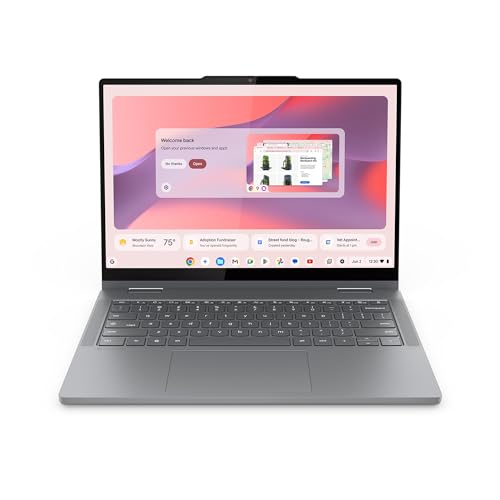
The Lenovo Chromebook 2-in-1 is a 14-inch WUXGA touchscreen laptop with an Intel N150 CPU, 4GB RAM, and 128GB UFS storage.
Key Facts
- Display
- 14-inch WUXGA IPS Touchscreen
- Processor
- Intel N150
- Memory
- 4GB RAM
- Storage
- 128GB UFS
Pros
- +Light 3.3-pound build for daily commuting and classes
- +WUXGA IPS touchscreen with 360-degree hinge for tablet use
- +Two USB-C, two USB-A, and HDMI cover common peripherals
- +Physical webcam shutter for privacy on video calls
Cons
- −4GB RAM limits heavy multitasking with many browser tabs
- −128GB UFS storage fills quickly without cloud offloading
- −Luna Grey finish only, no color options at this size
Detailed Review
The 14-inch WUXGA IPS touchscreen is the standout here, giving the Lenovo Chromebook 2-in-1 a sharp canvas for split-screen docs and streaming. At 3.3 pounds and 0.69 inches thick, it slides into a backpack sleeve without weighing down a commute, and the 360-degree hinge lets it flip into tent mode for countertop recipes or tablet mode for sketching.
Port selection is generous for the size, with two USB-C, two USB-A, and HDMI, so an external monitor and a flash drive can stay plugged in together. The Intel N150 handles Chrome OS basics like web apps, video calls, and light Google Docs work, though the 4GB RAM means I would keep browser tabs to a modest number before things slow down.
Storage lands at 128GB UFS, which is fine for cloud-first users but tight if local files pile up. The physical webcam shutter is a small but welcome touch for anyone on frequent video calls.
HP OmniBook 3 14-inch AI PC with Snapdragon X X1-26-100, 2K OLED display, 8GB RAM, and 256GB SSD.
Key Facts
- Key Spec
- 2K OLED, 1920x1200, up to 300 nits
- Connectivity
- Qualcomm Wi-Fi 6E
- Compatibility
- Windows 11 Home
- Size
- 12.38 x 8.9 x 0.58 inches
Pros
- +OLED display with 1920x1200 resolution and 300 nits brightness
- +Long battery life rated up to 41 hours 45 minutes
- +HP Fast Charge restores 0 to 50% in about 45 minutes
- +Qualcomm Wi-Fi 6E for fast wireless connectivity
Cons
- −8GB RAM limits heavy multitasking and many browser tabs
- −256GB SSD fills quickly with large files and games
- −OLED panel brightness at 300 nits struggles in bright rooms
Detailed Review
The HP OmniBook 3 14 centers on a 2K OLED display at 1920x1200 with up to 300 nits, which suits document work and streaming more than outdoor use. The Snapdragon X X1-26-100 and 8GB of LPDDR5x handle everyday productivity and AI tasks, though heavy multitasking will feel the memory ceiling.
Battery life is the standout figure here, rated at up to 41 hours and 45 minutes with HP Fast Charge reaching 50% in about 45 minutes. This works best for students and remote workers who need a light 3.13-pound machine that lasts through long days away from a charger.
The 256GB PCIe Gen4 NVMe SSD is fast but modest, so plan around external storage if you keep large media libraries. For my money, this suits buyers who prioritize screen quality and endurance over raw storage and memory headroom.
Dell 15 laptop with a 15.6-inch FHD anti-glare display, Intel Core 3 100U, 8GB DDR5 RAM, and 512GB SSD for everyday work.
Key Facts
- Key Spec
- Intel Core 3 100U, 8GB DDR5, 512GB SSD
- Display
- 15.6-inch FHD anti-glare, 300 nits
- Connectivity
- Wi-Fi 6, Bluetooth
- Size
- 14.11 x 9.27 x 0.75 inches
Pros
- +FHD anti-glare panel rated at 300 nits reduces reflections
- +Wi-Fi 6 and Bluetooth built in for cable-free peripherals
- +Full numeric keypad speeds up data entry and calculations
- +Lifted hinge angles the keyboard for wrist comfort
Cons
- −8GB RAM limits heavy multitasking and many browser tabs
- −Integrated Intel UHD graphics not suited to gaming
- −3.57-pound weight makes frequent travel less convenient
Detailed Review
The Dell 15 DC15250 pairs a 15.6-inch FHD anti-glare panel rated at 300 nits with an Intel Core 3 100U, 8GB of DDR5 RAM, and a 512GB SSD. That combination suits coursework, email, documents, and streaming, and the anti-glare finish keeps reflections down under overhead lights.
I see this fitting a student or remote worker who wants a full-size keyboard with a numeric keypad and a lifted hinge for a more natural typing angle. Wi-Fi 6 and Bluetooth cover wireless peripherals, and Dell ComfortView software is included to help reduce blue light during long sessions.
The 8GB of RAM is the main constraint for heavy multitasking, and Intel UHD graphics mean gaming is off the table. At 3.57 pounds it is not the lightest 15-inch option for daily commuting.
HP 14 ultra-light laptop with Intel N150, 4GB RAM, 128GB UFS plus 128GB SD card, and a 14-inch HD anti-glare display.
Key Facts
- Key Spec
- Intel N150, 4GB DDR4 RAM, 128GB UFS + 128GB SD Card
- Connectivity
- USB-C, 2x USB-A, HDMI 1.4, audio combo jack, Wi-Fi 6, Bluetooth 5.4
- Compatibility
- Windows 11 Home in S mode
- Size
- 12.76 x 8.86 x 0.71 inches
Pros
- +Light 3.24-pound build for daily commuting and travel
- +Wi-Fi 6 and Bluetooth 5.4 for modern wireless connections
- +USB-C, dual USB-A, and HDMI 1.4 cover common peripherals
- +One-year Microsoft 365 subscription included for Word, Excel, PowerPoint
Cons
- −4GB RAM limits heavy multitasking and browser tab counts
- −1366 x 768 panel offers less workspace than 1080p screens
- −Windows 11 Home in S mode restricts app installs until switched
Detailed Review
The HP 14 pairs an Intel N150 with 4GB DDR4 RAM and a 14-inch 1366 x 768 anti-glare panel rated at 250 nits. That combination suits a student or home user who mostly writes documents, joins Zoom calls, and streams video rather than running heavy creative software.
Storage arrives as 128GB UFS plus a 128GB SD card, which the disclosure notes is covered by a separate three-year warranty. I see the 3.24-pound shell and 0.71-inch profile working well for someone carrying a laptop between classes or rooms all day.
The 4GB memory ceiling is the honest catch, since several browser tabs plus a video call will feel tight. The 720p webcam and Wi-Fi 6 cover basic remote meetings, and the one-year Microsoft 365 subscription adds Word, Excel, and PowerPoint for schoolwork.
FAQs
Is 4GB of RAM enough for a budget laptop?
Four gigabytes covers light browsing, email, and document editing, but it fills up fast once you add a video call and a dozen browser tabs. For a student running Google Docs and Zoom at the same time, 8GB is the safer floor. Check whether the memory is soldered before you count on upgrading it later.
Should you buy a Chromebook or a Windows laptop under $400?
A Chromebook suits web-based classes and cloud documents, while Windows handles installed software like full Microsoft Office or a statistics package. The Lenovo Chromebook 2-in-1 adds a touchscreen and tablet mode for note-taking. If your course list names a Windows-only program, skip Chrome OS entirely.
What screen size works best for a cheap student laptop?
A 14-inch panel fits most backpacks and lecture-hall desks, while a 15.6-inch screen gives you more room for split windows at the cost of weight. The ASUS Vivobook Go 15 weighs 3.59 lbs, which is manageable for a daily commute. If you walk across campus all day, a 14-inch model is easier on your shoulders.
Do budget laptops have upgradeable storage or RAM?
Most models in this range use soldered memory and onboard flash storage, so buy the capacity you need on day one. The HP 14 includes a 128GB SD card alongside its 128GB of internal storage, which adds room for files. Confirm the memory type and slot layout on the manufacturer’s spec sheet before you buy.
Final Thoughts
The deciding factors in this price range are memory, storage type, and screen quality, not processor branding. A current low-power chip with 8GB of RAM handles coursework and office tasks without stuttering, while 4GB models are best kept to a single job at a time.
The ASUS Vivobook Go 15 Laptop is my overall pick for students and remote workers who want a full HD screen and a hinge that lays flat for sharing. If you want to spend less, the HP 14 14″ Ultra-Light Laptop, Intel N150, 4GB RAM covers light workloads and includes a year of Microsoft 365, though its 4GB of memory limits heavy multitasking. Skip both if you need a dedicated graphics card or a color-accurate display for creative work. For a wider view of what this price bracket offers, the budget laptop category collects the full set of picks. Check the current price on Amazon, and the right pick comes down to matching memory and screen size to how you actually work.

