A flight sim controller that fights your inputs, creeps across the desk mid-turn, or refuses to map the trim wheel turns a relaxing approach into a wrestling match. Plenty of listings lead with a button count and say little about how the axes feel or whether the thing stays put.
The models worth a look pair smooth, non-contact axes with a mounting method that suits your desk and software that recognizes the device without a fight. I compared the Best Flight Sim Controllers on stated axis type, mounting hardware, platform support, and how the throttle and rudder controls are laid out.
My overall pick for best flight sim controllers is the Logitech G X56 H.O.T.A.S Throttle and Joystick. Its twin throttles and adjustable stick force suit combat sims where you are constantly working the throttle and rudder together. My top picks are just below.
Best Flight Sim Controllers at a Glance
| Product | PGH Score | ||
|---|---|---|---|
|
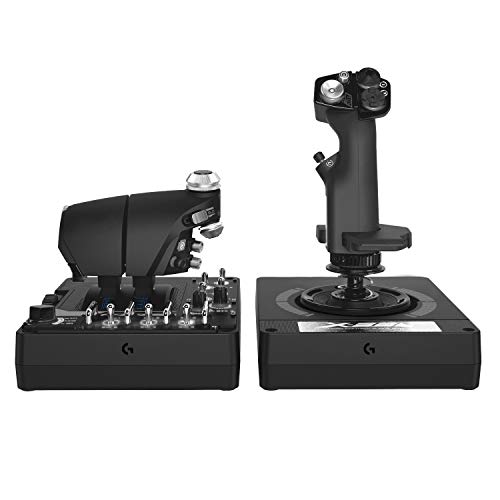
Best Overall Logitech G X56 HOTAS Throttle and Joystick | 9.9 | Check Price on Amazon |

|
Best for Desk Space Honeycomb Echo Aviation Controller for Flight Sims | 9.8 | Check Price on Amazon |
|
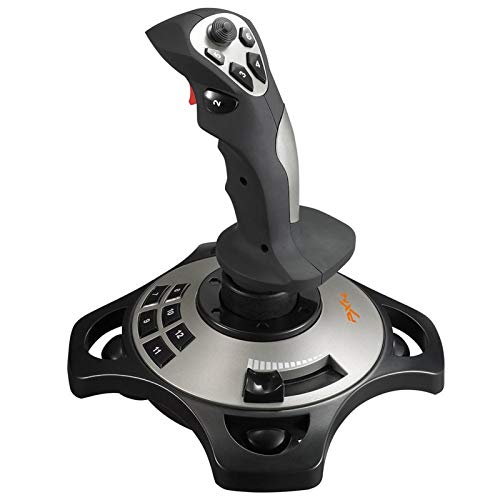
Best for Flight Sims PXN 2113PRO PC Flight Simulator Joystick | 9.7 | Check Price on Amazon |

|
Logitech G Saitek X52 Pro Flight Control System | 9.7 | Check Price on Amazon |

|
Best for Sim Pilots Turtle Beach VelocityOne Flightstick for Xbox | 9.6 | Check Price on Amazon |

|
Best for Beginner Flight Sims Thrustmaster TCA SKY YOKE Flight Sim Controller | 9.4 | Check Price on Amazon |
In-Depth Reviews
Logitech G X56 HOTAS with twin throttles, hall-effect 16-bit axes, and 4-spring adjustable stick force for flight and space sims.
Key Facts
- Key Spec
- 16-bit hall-effect aileron and elevator axes
- Connectivity
- 2x USB 2.0
- Compatibility
- Windows 11, 10, 8.1, 7
- Size
- 11.5 x 12.2 x 9.1 inches
Pros
- +Hall-effect sensors on main axes for smooth, contact-free tracking
- +Adjustable stick force via four included spring options
- +Twin throttle levers with friction adjuster and lock
- +Mini analog sticks for gimballed weapons and lateral movement
Cons
- −Six and a half pound footprint needs a dedicated desk area
- −Two USB 2.0 ports required for joystick and throttle
- −Two-meter cable limits placement distance from the PC
Detailed Review
The Logitech G X56 centers on hall-effect 16-bit aileron and elevator axes and a twin-throttle setup with friction adjuster and lock. Those two details matter most for anyone flying multi-engine aircraft or managing separate thrust vectors in space sims, where one throttle lever cannot cover the job.
The four-spring system lets me tune stick resistance for different aircraft, and the mini analog sticks handle gimballed weapons and lateral movement without reaching for a hat switch. RGB backlighting helps in a dark room, though it is cosmetic next to the control layout.
The 6.9-pound combined footprint and two USB 2.0 connections mean this is a permanent desk fixture, not a grab-and-go controller. I would plan the desk space and cable routing before committing.
Honeycomb Echo Aviation Controller is a wireless flight sim handheld with a 16-bit Hall-Effect stick, rudder pedals, and a 1200 mAh battery rated for 15 hours.
Key Facts
- Key Spec
- 16-bit Hall-Effect thumb stick and rudder pedals
- Connectivity
- Wireless dongle or USB-C wired
- Battery
- 1200 mAh, rated up to 15 hours
- Compatibility
- PC, Microsoft Flight Simulator 2024 and X-Plane
Pros
- +Hall-Effect sensing on stick and rudder resists wear and drift
- +All major inputs on one handheld, no separate throttle needed
- +Wireless dongle and USB-C wired option cover both setups
- +Protective travel case included for transport and storage
Cons
- −Console-style layout trades some realism for compact size
- −Sliders and switches are assignable but not full axis levers
- −Battery rated for 15 hours, so long sessions need a charge
Detailed Review
The Echo Aviation Controller packs pitch, roll, rudder, trim, throttle, flaps, and landing gear into a single handheld, which is a lot of cockpit for something you can hold. Its 16-bit Hall-Effect thumb stick and mechanically linked rudder pedals are the standout details, since Hall sensing avoids the drift that eventually shows up on potentiometer sticks. I like that combination for Microsoft Flight Simulator 2024 and X-Plane pilots who want coordinated turns without a full yoke and pedal rig on the desk.
Four detented sliders with interchangeable caps handle throttle, flaps, and speed brakes, and the 1200 mAh battery is rated for up to 15 hours of flight time with a charge indicator in the Honeycomb button. A wireless dongle covers low-latency input, and USB-C wired is there when you would rather not think about charging.
The trade-off is the console-style layout, which is compact but not a substitute for a full HOTAS or dedicated quadrant. For a sim pilot short on desk space, that is the point, and the included travel case makes it easy to pack away.
PXN 2113PRO PC joystick with vibration, throttle, 4 axes, 8-way hat switch, 12 programmable buttons. Windows 7/8/10/11 only.
Key Facts
- Connectivity
- USB
- Compatibility
- Windows 7, 8, 10, 11
- Controls
- 4-axis, 8-way hat switch, 12 programmable buttons
- Size
- 7.28 x 7.28 x 8.86 inches
Pros
- +Vibration switch at bottom adds tactile feedback
- +Twelve programmable buttons and keyboard mapping software
- +Four suction cups keep base planted on smooth surfaces
- +Plug-and-play on Windows 7, 8, 10, and 11
Cons
- −No Mac, PlayStation, Xbox, or Switch compatibility
- −Force feedback, Minecraft, and Ace Combat 7 unsupported
- −Vibration feels weak below 50% driver strength
Detailed Review
The PXN 2113PRO is a Windows-only USB joystick with a vibration switch tucked underneath the base and a single-hand throttle layout. Its four-axis control and 8-way hat switch cover pitch, roll, yaw, and throttle without reaching for a second peripheral.
Twelve programmable buttons plus keyboard mapping software give flight sim players enough inputs for gear, flaps, and camera views, and the four suction cups hold the base steady on a smooth desk. I would point this at a student or casual simmer flying War Thunder or Microsoft Flight Simulator on a single monitor, not at anyone chasing force feedback.
The catch is platform lock. It runs only on Windows 7 through 11, and the vibration needs driver strength set at 50% or higher before it registers, so Mac, console, and low-vibration setups are out.
The Logitech G Saitek X52 Pro is a PC flight control system with an LCD multi-function display, illuminated buttons, and a 5-position handle adjustment.
Key Facts
- Key Spec
- 5-position handle adjustment, LCD multi-function display, progressive throttle with detents
- Connectivity
- 2x USB 2.0
- Compatibility
- Windows 10, Windows 8.1, Windows 7
- Size
- Stick: 6.7 x 6.7 x 10.9 in (17 x 17 x 27.8 cm)
Pros
- +LCD screen shows flight data without looking away
- +Handle adjusts to five positions for hand comfort
- +Throttle detents mark afterburner and idle positions
- +Illuminated buttons aid visibility in dim rooms
Cons
- −Requires two USB 2.0 ports, limiting port availability
- −5.1 pound weight makes repositioning a chore
- −Software download needs an internet connection
Detailed Review
The LCD multi-function display on this X52 Pro is the standout detail, showing flight data without forcing a glance away from the screen. The handle adjusts across five positions, which helps when hand size varies between players sharing a sim rig.
Throttle control gets real attention here. Afterburner and idle detents give physical reference points, while the constant spring force and contactless X and Y axes aim for smooth input. I see this suiting sim pilots who want tactile feedback over a plain stick.
Two USB 2.0 ports are required, and the 5.1 pound weight keeps it planted but hard to move. The software needs an internet connection for the optional download.
Turtle Beach VelocityOne Flightstick is a universal sim controller for Xbox and PC with 27 programmable buttons, Hall-effect main axes, and an OLED flight display.
Key Facts
- Key Spec
- 27 Programmable Buttons, 8 Axes, POV Hat
- Connectivity
- Wired USB
- Compatibility
- Xbox Series X|S, Xbox One, PC
- Size
- 6.46 x 8.54 x 9.07 inches
Pros
- +Hall-effect axes eliminate contact wear for consistent input
- +27 programmable buttons cover complex sim commands
- +OLED display keeps flight data visible during play
- +Ambidextrous shape fits left- and right-handed sim pilots
Cons
- −1.81-pound body adds heft for desktop mounting
- −No force feedback or vibration haptics for tactile response
- −Wired connection limits placement away from the console
Detailed Review
The Turtle Beach VelocityOne Flightstick centers on Hall-effect main axes, which use non-contact sensing instead of potentiometers. That matters for sim pilots who log long sessions and want consistent input without the drift that can develop in contact-based sticks over time. The 27 programmable buttons and 8 axes give enough mapping for air and space combat sims where reaching for a keyboard breaks immersion.
An integrated OLED flight management display and a configuration wheel let me see and change settings without leaving the cockpit view. The ambidextrous shape is a smart call for left-handed pilots, and the multi-function throttle and flap levers add control for airliner-style flying. I would pair this with a PC or Xbox setup where the stick sits on a desk or mount, since the 1.81-pound body has some heft.
Two trade-offs stand out. There is no force feedback or vibration, so tactile cues come only from the stick's own resistance. The wired connection also limits where the stick can sit relative to the console. For sim pilots who want a feature-dense stick without paying for haptics, this is a practical fit.
Thrustmaster TCA SKY YOKE is a flight yoke and throttle for PS5 and PC with 7 axes, a built-in trim wheel, and rudder controls.
Key Facts
- Key Spec
- 7 axes, 24 action buttons, built-in trim wheel and rudder control
- Connectivity
- Wired USB
- Compatibility
- PS5, PC, iOS, Android; Microsoft Flight Simulator 2024 and Infinite Flight
- Size
- About 20.3 x 17.2 x 9 inches
Pros
- +Seven axes cover throttle, trim, and rudder without extra gear
- +H.E.A.R.T. magnetic sensors with 16-bit resolution on every axis
- +Twenty-four buttons keep controls within finger reach
- +Dual control mode connects two yokes for instructor and student
Cons
- −Ten point six pound base takes up desk space
- −Rudder pedals and quadrant sold separately for full setup
- −Wired connection limits placement away from the console or PC
Detailed Review
The TCA SKY YOKE packs seven axes into one unit, covering throttle, trim wheel, and rudder controls so a beginner does not need to buy separate pieces to start flying. Its steel pitch axis uses a self-centering damping mechanism, which matters for smooth transitions between climb and descent without a dead zone.
Thrustmaster's H.E.A.R.T. magnetic technology and 16-bit resolution run across all seven axes, and the 24 action buttons sit within finger reach so hands stay on the yoke. It makes the most sense for a first-time flight simmer on PS5 or PC who wants preconfigured controls in Microsoft Flight Simulator 2024 and Infinite Flight.
The 10.6-pound base is heavy and takes up desk space, and the rudder pedals and TCA SKY QUADRANT are sold separately. A wired connection also ties the yoke to the console or PC.
FAQs
Do you need rudder pedals with a flight sim controller?
A twist axis or a thumb slider covers yaw well enough for casual flying, and pedals matter more once you are holding coordinated turns in combat sims. The Honeycomb Echo and Thrustmaster TCA SKY YOKE build rudder control into the unit, so you can start without a separate pedal set. Add pedals later if you fly airliners or helicopters often.
Is a HOTAS better than a yoke for Microsoft Flight Simulator?
A HOTAS suits fighter jets and space combat, where you want the throttle and stick under separate hands, while a yoke feels more natural for airliners and general aviation. The Logitech G X56 and Turtle Beach VelocityOne are HOTAS layouts. The Thrustmaster TCA SKY YOKE is the yoke option here. Pick the one that matches the aircraft you fly most.
Will a flight sim controller work on Xbox or PlayStation?
Platform support varies by model and you should confirm it on the manufacturer’s spec sheet before buying. The Turtle Beach VelocityOne lists Xbox Series X|S, Xbox One, and PC, and the Thrustmaster TCA SKY YOKE lists PS5 and PC. The PXN 2113PRO is PC only and the listing states it does not support Mac, Xbox, or PlayStation.
How do you keep a flight stick from sliding on the desk?
Suction cups and weighted bases help on smooth surfaces, and a stable desk or cockpit mount matters more than any single feature. The PXN 2113PRO uses four suction cups, which grip best on glass or finished wood. On a textured or fabric-topped desk, plan on a mount or a non-slip mat instead. A clamp or rig should sit on a stable surface.
Final Thoughts
Axis feel, mounting, and platform support decide whether a flight sim controller disappears into the background or keeps interrupting your approach. The Logitech G X56 H.O.T.A.S Throttle and Joystick is the best overall choice for combat and space sim pilots who want twin throttles, an adjustable stick force, and a control layout that keeps everything under the fingers. If you fly airliners and prefer a yoke, the Thrustmaster TCA SKY YOKE is the better shape for that.
For a lower-cost entry, the PXN 2113PRO PC Joystick USB Gaming Flight is the best value pick, with a single-stick layout, vibration, and suction-cup mounting for PC-only flyers. Skip it if you need console support or force feedback. If you also fly space combat, a dedicated space sim controller may suit the cockpit better. Check the current price on Amazon, and the right pick removes the guesswork about what actually maps and mounts.