


A Chromebook that boots slowly, has a dim screen, or hides the keys in a cramped layout turns a simple email check into a chore. For an older parent or grandparent, the right machine should open quickly, show large text clearly, and survive being carried from the kitchen table to the living room.
I looked at 6 Chromebooks aimed at everyday use, focusing on screen size, keyboard comfort, weight, and how much storage comes built in. I compared the stated specs, port layouts, and buyer feedback to find models that keep things straightforward. My overall pick for best chromebooks for seniors is the ASUS Chromebook CM15 Laptop, 15.6″ FHD Display. Its large Full HD screen and light body make it easy to read and carry around the house. My top picks are just below.
Best Chromebooks for Seniors at a Glance

In-Depth Reviews

The ASUS Chromebook CM15 is a 15.6-inch FHD ChromeOS laptop with a MediaTek Kompanio 540 processor, 4GB RAM, and 64GB of storage.
Key Facts
- Key Spec
- 15.6-inch FHD (1920 x 1080), MediaTek Kompanio 540, 4GB RAM, 64GB Storage
- Connectivity
- 1x USB 3.2 Gen 1 Type-A, 2x USB 3.2 Gen 1 Type-C (display/power delivery), 1x HDMI 1.4, 1x 3.5mm combo audio jack
- Compatibility
- ChromeOS
- Size
- 14.15 x 0.78 x 9.14 inches
Pros
- +15.6-inch FHD display with 87% screen-to-body ratio
- +Two USB-C ports that carry display and power
- +3.26 lb body rated to US MIL-STD 810H
- +Titan C2 security chip built into ChromeOS
Cons
- −4GB RAM limits heavy multitasking
- −64GB storage fills quickly with local files
- −ARM Kompanio 540 chip favors light daily work
Detailed Review
The ASUS Chromebook CM15 leans on a 15.6-inch FHD panel with an 87% screen-to-body ratio, so documents and video fill most of the lid. A MediaTek Kompanio 540 ARM chip and 4GB of RAM set the ceiling at browsing, Docs, and streaming rather than heavy tabs.
At 3.26 lb it stays easy to carry, and the body is built to meet US MIL-STD 810H. Two USB-C ports, one USB-A, HDMI 1.4, and a 3.5mm jack cover everyday connections, with the USB-C ports supporting display and power delivery.
I would point this at a student or remote worker who lives in the browser. The 64GB of storage is the real pinch point for local files, and the 4GB of RAM keeps parallel apps modest.
HP Chromebook 15 with Intel N200, 8GB DDR5 RAM, and 192GB storage split between 64GB eMMC and a 128GB SD card.
Key Facts
- Processor
- Intel N200, 4 cores
- Memory
- 8GB DDR5
- Storage
- 64GB eMMC + 128GB SD card
- Display
- 15.6-inch HD 1366x768, 250 nits, anti-glare
Pros
- +Quad-core Intel N200 suits web apps and document work
- +8GB DDR5 memory for several tabs at once
- +192GB storage split across eMMC and SD card
- +Webcam privacy shutter for calls in shared rooms
Cons
- −1366x768 panel is low resolution for a 15.6-inch screen
- −3.3 pounds makes this a desk-bound Chromebook
- −Chrome OS runs Android and web apps, not Windows software
Detailed Review
The HP Chromebook 15 pairs an Intel N200 quad-core processor with 8GB of DDR5 memory, which is a sensible combination for browser tabs, Google Docs, and video calls rather than heavy local software. Its 192GB of storage is split between 64GB of eMMC and a bundled 128GB SD card, so the fast internal space stays small while bulk files live on removable media.
The 15.6-inch anti-glare panel runs at 1366x768 and 250 nits, which is fine for indoor study and office work but not sharp enough for detailed photo editing. I would point students and remote workers toward this machine for coursework and Zoom meetings, where the numeric keypad and full-size chassis help with data entry.
Two USB-C ports at 5Gbps with DisplayPort 1.4 output let you drive one external 4K monitor at 60Hz without a dock, which is a genuine plus for a home desk. The trade-offs are the 3.3-pound weight and Chrome OS, so anyone needing Windows-only applications should look elsewhere.

Acer Chromebook 315 is a 15.6-inch laptop with Intel Celeron N4020, 4GB RAM, 64GB eMMC storage, and a rated 12.5-hour battery.
Key Facts
- Processor
- Intel Celeron N4020 Dual-Core up to 2.80 GHz
- Memory
- 4GB RAM
- Storage
- 64GB eMMC
- Display
- 15.6-inch HD anti-glare, 0.37-inch bezel
Pros
- +Large 15.6-inch HD display with anti-glare coating
- +Rated 12.5-hour battery life for all-day classes
- +Two USB-C and two USB-A ports plus headphone jack
- +Integrated numeric keypad for faster number entry
Cons
- −Dual-core Celeron N4020 limits heavy multitasking
- −4GB RAM and 64GB eMMC leave little headroom
- −3.59 pounds is heavy for daily commuting
Detailed Review
The Acer Chromebook 315 centers on a 15.6-inch HD anti-glare panel with a narrow 0.37-inch bezel, which gives it a wider workspace than most 11-inch Chromebooks for reading documents or split-screen browsing. The Intel Celeron N4020 dual-core chip and 4GB of RAM are built for light Chrome OS work, so I would keep this to a handful of tabs and a single document rather than a dozen.
Storage is 64GB of eMMC, and the rated 12.5-hour battery is the standout figure for a student carrying it between classes. Ports cover 2x USB-C 3.1, 2x USB-A 3.1, and a headphone jack, which is more than most budget Chromebooks offer.
At 3.59 pounds and 0.8 inches thick, it is a desk-first machine rather than a true featherweight. The integrated numeric keypad helps anyone entering figures, and the anti-glare screen handles a bright classroom or kitchen table. I would point this at a student or home user who wants a large screen and long rated runtime for basic Chrome OS tasks.
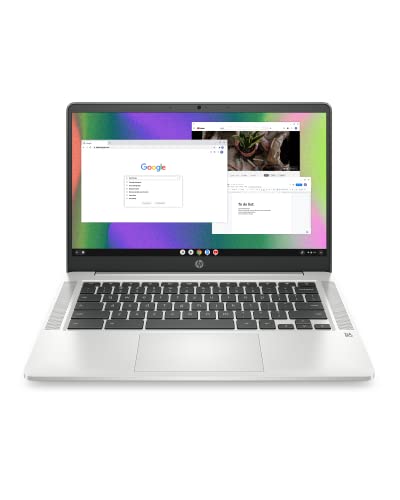
The HP Chromebook 14 is a 3.24-pound laptop with a 14-inch HD display, Intel Celeron N4120, 4GB RAM, and 64GB eMMC storage.
Key Facts
- Processor
- Intel Celeron N4120
- Memory
- 4 GB RAM
- Storage
- 64 GB eMMC
- Display
- 14-inch HD (1366 x 768) anti-glare
Pros
- +Light 3.24-pound frame for daily backpack carry
- +Micro-edge anti-glare 14-inch HD display
- +Quad-core Intel Celeron N4120 for basic multitasking
- +802.11ac Wi-Fi and Bluetooth combo for wireless peripherals
Cons
- −4GB RAM limits heavy browser tab loads
- −64GB eMMC storage fills quickly with local files
- −1366 x 768 resolution looks soft for text work
Detailed Review
The HP Chromebook 14a-na0226nr keeps its footprint small at 3.24 pounds and 0.7 inches thick, which suits a backpack commute or a shared kitchen table. Its 14-inch anti-glare panel runs at 1366 x 768, a resolution I would only pair with light document and browser work rather than side-by-side windows.
Inside, the quad-core Intel Celeron N4120 and 4GB of RAM cover Chrome OS basics like email, docs, and streaming, and the 64GB eMMC holds the operating system with room for a modest app set. The 802.11ac Wi-Fi and Bluetooth combo lets me pair a wireless mouse without a dongle, and HP rates battery life up to 14 hours with a 0-to-50% charge in about 45 minutes.
For a student or remote worker who lives in a browser and cloud storage, this fits a light daily routine. Anyone needing local video editing or many simultaneous tabs should look at a machine with more memory and a higher-resolution screen.

Lenovo Chromebook m 14" with a MediaTek Kompanio 540 CPU, 8GB RAM, 64GB UFS storage, and a 14" WUXGA IPS display.
Key Facts
- Key Spec
- 14" WUXGA IPS, 1920x1200, 16:10
- Connectivity
- USB-C, USB-A, HDMI
- Size
- 8.79 x 12.57 x 0.78 inches
- Weight
- 1.35 pounds
Pros
- +WUXGA 16:10 panel adds vertical workspace for docs
- +USB-C, USB-A, and HDMI ports cover common connections
- +Under 3lb weight suits daily carrying
- +Webcam privacy shutter for calls and meetings
Cons
- −64GB UFS storage fills quickly with local files
- −MediaTek Kompanio 540 CPU limits heavier multitasking
- −8GB RAM caps how many browser tabs stay open
Detailed Review
The Lenovo Chromebook m 14" leans on a 14-inch WUXGA IPS panel at 1920x1200, and that 16:10 shape is the detail I keep coming back to. It gives documents and browser windows more vertical room than a 16:9 screen of the same width, which matters for reading and split-screen work.
Underneath, a MediaTek Kompanio 540 CPU pairs with 8GB RAM and 64GB UFS storage, and that combination sets the ceiling for the machine. I would steer students and remote workers who live in a handful of tabs and cloud apps toward it rather than anyone editing video or juggling heavy local files.
Ports are the other practical strength, with USB-C, USB-A, and HDMI all on board, so presenting and charging do not need a dongle. The 64GB of onboard storage is the trade-off I would flag first, since local files, photos, and downloads add up fast.

HP Chromebook 14 x360 Plus is a 2-in-1 laptop with Intel N150, 4GB LPDDR5, 128GB UFS, and a 14-inch WUXGA touchscreen.
Key Facts
- Key Spec
- Intel N150, 4GB LPDDR5, 128GB UFS
- Connectivity
- USB-C, USB-A, combo audio jack, Wi-Fi 6, Bluetooth 5.4
- Compatibility
- Chrome OS
- Size
- 14-inch WUXGA touchscreen
Pros
- +360-degree hinge for four usage modes
- +14-inch anti-glare touchscreen with 300 nits
- +Wi-Fi 6 and Bluetooth 5.4 connectivity
- +MIL-STD 810H tested for durability
Cons
- −4GB soldered memory limits heavy multitasking
- −No HDMI or SD card slot on board
- −Resealed unit voids original packaging
Detailed Review
The HP Chromebook 14 x360 Plus pairs a 360-degree hinge with a 14-inch WUXGA touchscreen, so it is at its best for students who need one device for notes and streaming. The anti-glare coating and 300 nits brightness help in bright rooms, and the Intel N150 with 4GB LPDDR5 handles Chrome OS basics like Docs and video calls.
Storage is 128GB UFS, which is faster than eMMC but still modest for local files. The 4GB of soldered memory is the real ceiling here, so heavy multitasking with many tabs will feel tight. Wi-Fi 6 and Bluetooth 5.4 cover modern wireless needs, and the MIL-STD 810H rating adds some confidence for backpacks and dorm life.
For my money, this suits K-12 or home use where cloud storage is the norm. The one-year HP warranty on remaining components is worth noting, and the resealed upgrade means the original box is not factory sealed.
FAQs
What size Chromebook is easiest for older eyes?
A 15.6-inch screen gives you the most room for large text and fewer cramped windows, which helps if reading small fonts is tiring. A 14-inch model is lighter to carry but shows less at once. If the laptop stays on a desk most of the day, go with the larger display.
Do you need a numeric keypad on a Chromebook?
A numeric keypad is useful for entering phone numbers, passwords, or budgeting in a spreadsheet, and it comes on most 15-inch models. If you mostly type emails and browse, a 14-inch keyboard without the number pad is fine and keeps the laptop smaller. Check the product photos to confirm the layout before buying.
Is 4GB of RAM enough for a Chromebook?
4GB of RAM handles email, web browsing, video calls, and streaming without much trouble, which covers most everyday use. If you keep a dozen tabs open or run several apps at once, 8GB gives more headroom. Chromebooks sold with 4GB are usually not upgradeable, so pick the memory you need up front.
Can a Chromebook run Windows programs?
Chromebooks run ChromeOS, so Windows software like Microsoft Office desktop apps or TurboTax installed from a disc will not work. You can use web versions of many programs and Android apps from the Play Store. If a specific Windows-only program is required, a Windows laptop is the better fit.
Final Thoughts
The right Chromebook for an older user comes down to a readable screen, a comfortable keyboard, and a weight that is easy to move from room to room. My overall pick is the ASUS Chromebook CM15 Laptop, 15.6″ FHD Display. Its 15.6-inch Full HD panel and 3.26-pound body suit someone who wants a large, clear display without a heavy machine, and the listing states it meets US MIL-STD 810H durability testing.
For a lower-cost option, the HP Chromebook 14 Laptop, Intel Celeron N4120 covers the basics with a 14-inch anti-glare screen and a thin design that fits easily in a bag. If you need a specific Windows program or a touchscreen for drawing, look at a different category. You can browse more Chromebooks for everyday use to compare other models. Check the current price on Amazon, and the right pick will remove the guesswork about which machine is simple enough for daily use.
