An engineering student’s laptop has to survive a schedule that swings between a 40-tab research session, a SolidWorks assembly that refuses to rotate smoothly, and a late-night MATLAB run. The wrong machine turns every one of those into a waiting game, and the spec sheet rarely tells you which one that will be.
I looked at 8 machines aimed at engineering coursework and compared them on processor class, RAM ceiling, graphics hardware, display, and how upgradeable each one is. The goal was to separate the laptops that can actually run CAD and simulation software from the ones that only look the part on a product page.
My overall pick for best laptops for engineering students is the HP 2027 Laptop, Intel Processor. It pairs a low-power Intel N150 with a 14-inch anti-glare display and enough storage for coursework, and it weighs just over three pounds, which matters when you are carrying it across campus between labs. My top picks are just below.
Best Laptops for Engineering Students at a Glance
| Product | PGH Score | ||
|---|---|---|---|

|
Best Overall HP 2027 Laptop 14-Inch with Intel N150 and 628GB | 9.9 | Check Price on Amazon |
|
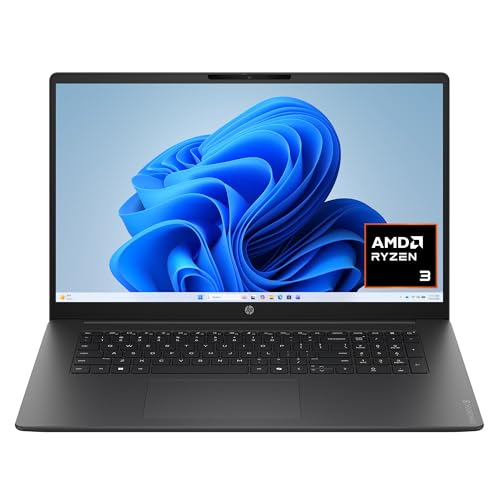
Best for Big-Screen Basics HP OmniBook 3 17.3-inch Laptop with Ryzen 3 | 9.9 | Check Price on Amazon |
|
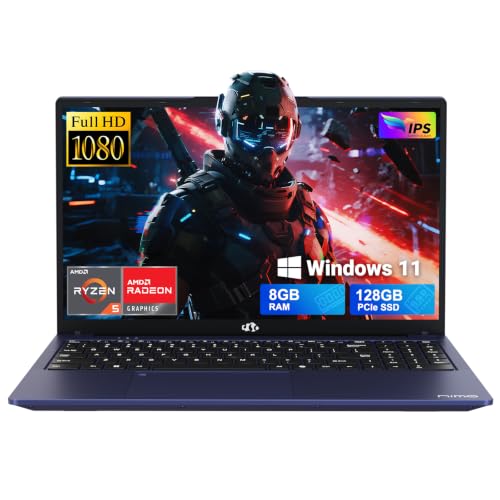
Best for Student Work NIMO 15.6" FHD Student Laptop with AMD Ryzen 5 | 9.8 | Check Price on Amazon |

|
Best for Students Dell 15.6 Laptop with Intel Core Ultra 5 225U | 9.7 | Check Price on Amazon |

|
Best for Office Work Dell Inspiron 15.6" Touchscreen Laptop with i5 | 9.6 | Check Price on Amazon |

|
Best for CAD Work HP ZBook 8 G1i Mobile Workstation with RTX 500 Ada | 9.5 | Check Price on Amazon |

|
Lenovo Laptop 2026 with 16" WUXGA IPS | 9.4 | Check Price on Amazon |

|
HP ZBook Power G11 A Mobile Workstation with RTX | 9.4 | Check Price on Amazon |
In-Depth Reviews
HP 2027 14-inch HD laptop with Intel N150, 4GB LPDDR5, and 628GB total storage across 128GB UFS and a 500GB external HDD.
Key Facts
- Processor
- Intel N150, 4-core, 4-thread, up to 3.6GHz
- Memory
- 4GB LPDDR5-4800
- Storage
- 128GB UFS plus 500GB external HDD
- Display
- 14-inch HD 1366 x 768, 250 nits, anti-glare
Pros
- +Wi-Fi 6 and Bluetooth 5.4 cover modern wireless gear
- +USB-C at 10Gbps with DisplayPort 1.2 for external displays
- +Light 3.24 lb frame at 0.71 inches for daily carry
- +1-year Microsoft 365 Personal subscription included
Cons
- −4GB soldered LPDDR5 RAM limits heavy multitasking
- −128GB UFS boot drive fills fast with local files
- −1366 x 768 panel at 62.5% sRGB suits basic work only
Detailed Review
The HP 2027 pairs an Intel N150 4-core processor with 4GB of soldered LPDDR5-4800 and a 128GB UFS boot drive, so web browsing, email, and document editing sit inside its comfort zone. I would steer students and remote workers toward it for exactly that kind of light daily load rather than anything heavier.
The 14-inch anti-glare panel runs 1366 x 768 at 250 nits and 62.5% sRGB, which is fine for indoor reading and video calls but not for color work or bright rooms. Wi-Fi 6 and Bluetooth 5.4 cover current routers and peripherals, and the USB-C port at 10Gbps with DisplayPort 1.2 drives an external monitor.
At 3.24 lb and 0.71 inches thick it slips into a backpack easily, and the 45W adapter refills it on the go. The 500GB external HDD pads storage, but the internal 128GB drive and 4GB of RAM are the real ceilings to plan around.
A 17.3-inch FHD laptop with AMD Ryzen 3, 8GB LPDDR5 RAM, 512GB SSD, and Radeon 610M graphics for everyday work and streaming.
Key Facts
- Key Spec
- 17.3-inch FHD IPS, AMD Ryzen 3 30, 8GB LPDDR5, 512GB SSD
- Connectivity
- Wi-Fi 6, Bluetooth 5.4
- Compatibility
- Windows 11 Home
- Size
- 15.65 x 10.09 x 0.65 inches
Pros
- +Large 17.3-inch FHD IPS screen with wide viewing angles
- +512GB NVMe SSD and 8GB LPDDR5 memory
- +Wi-Fi 6 and Bluetooth 5.4 wireless connectivity
- +FHD camera with HDR auto-switch and AI noise reduction
Cons
- −4.43-pound weight makes frequent travel less comfortable
- −8GB RAM limits heavy multitasking and future headroom
- −Radeon 610M graphics not suited for demanding 3D games
Detailed Review
The 17.3-inch FHD IPS display with 178-degree viewing angles is the standout here, giving students and remote workers a roomy canvas for documents, spreadsheets, and streaming. The AMD Ryzen 3 30 processor and 8GB of LPDDR5 memory handle everyday multitasking, photo editing, and casual gaming without drama.
Storage comes from a 512GB PCIe NVMe M.2 SSD, which keeps boot times and file access quick for a machine in this class. Wi-Fi 6 and Bluetooth 5.4 cover modern wireless needs, and the FHD camera with HDR auto-switch plus AI noise reduction is a practical touch for video calls.
For my money, this suits a student or home-office user who wants a big screen and stays near a desk. The 4.43-pound weight and 8GB RAM ceiling are the real trade-offs to weigh before buying.
NIMO 15.6-inch FHD laptop with AMD Ryzen 5 4-core processor, 8GB DDR4 RAM, 128GB SSD, expandable to 32GB RAM and 4TB SSD.
Key Facts
- Key Spec
- AMD Ryzen 5, 4 cores 8 threads, up to 3.7GHz boost
- Memory and Storage
- 8GB DDR4 RAM, 128GB SSD, expandable to 32GB and 4TB
- Display
- 15.6-inch FHD, 16:9
- Weight
- 3.75 pounds
Pros
- +Ryzen 5 4-core 8-thread CPU for daily coursework and office work
- +Two RAM slots and one M.2 slot allow later upgrades
- +15.6-inch 16:9 screen with roughly 175-degree hinge range
- +Fingerprint reader and backlit keyboard ease daily sign-in
Cons
- −8GB RAM and 128GB SSD fill fast under coursework and photos
- −3.75-pound body is heavy for daily carry between classes
- −Radeon Vega 8 graphics limit heavier creative and gaming work
Detailed Review
The NIMO 15.6-inch laptop centers on an AMD Ryzen 5 chip with 4 cores, 8 threads and up to 3.7GHz boost, paired with Radeon Vega 8 graphics across 8 cores. That combination suits document editing, web apps, slide decks and basic photo viewing rather than heavy creative work.
What stands out for a student machine is the upgrade path. Two DDR4 SO-DIMM slots take memory to 32GB and the single M.2 PCIe 3.0 x4 2280 slot accepts an SSD up to 4TB, so a 128GB drive is a starting point, not a ceiling. I would pair it with a larger SSD early, since 8GB of RAM and 128GB of storage fill quickly once assignments and photo libraries pile up.
The 3.75-pound body and 0.76-inch thickness make it a desk-first machine more than a daily commuter. For a dorm room or home office setup, the roughly 175-degree hinge helps find a usable screen angle.
Dell 15.6-inch FHD laptop with an Intel Core Ultra 5 225U, 16GB DDR5 RAM, and a 512GB SSD. It weighs 3.67 pounds and has a backlit keyboard.
Key Facts
- Key Spec
- Intel Core Ultra 5 225U, 16GB DDR5 RAM, 512GB SSD
- Display
- 15.6-inch FHD, 300 nits, anti-glare, 3-sided narrow bezel
- Connectivity
- Wi-Fi 6, dedicated Copilot key
- Size
- 9.27 x 14.11 x 0.74 inches
Pros
- +16GB DDR5 RAM for heavy multitasking
- +512GB SSD for project and app storage
- +Anti-glare 300-nit panel resists window glare
- +Backlit keyboard aids dim-room typing
Cons
- −Integrated Intel Graphics limits gaming and 3D work
- −No discrete GPU option for GPU-accelerated tasks
- −3.67 pounds is heavy for frequent one-hand carry
Detailed Review
The Intel Core Ultra 5 225U and 16GB of DDR5 RAM are the core of this Dell 15.6-inch, and that pairing is what makes the machine credible for browser-heavy work, spreadsheets, and light photo editing rather than gaming. The 300-nit anti-glare panel with a 3-sided narrow bezel is the more practical spec for a desk near a window, where reflections usually ruin a glossy screen.
Storage lands at a 512GB SSD, which is enough for a working project library and a stack of apps but not a large game collection. The backlit keyboard and lifted hinges are small details that matter in a dorm room or a dim home office, where a flat deck and unlit keys get tiring after a few hours.
I would point this at students and remote workers who want a 15.6-inch Windows machine and do not need a discrete GPU. The integrated Intel Graphics is the honest ceiling here, so anyone planning to game or render should look elsewhere.
Dell Inspiron 15.6-inch touchscreen laptop with Intel i5-1155G7, 32GB RAM, 1TB SSD, and Windows 11 Pro.
Key Facts
- Processor
- Intel Core i5-1155G7 (4 cores, 8 threads, up to 4.5GHz)
- Memory
- 32GB RAM
- Storage
- 1TB SSD
- Display
- 15.6-inch Full HD (1920x1080) IPS touch, 220 nits, anti-glare
Pros
- +32GB RAM handles dozens of browser tabs
- +1TB SSD provides ample storage for projects
- +Full HD IPS touchscreen with anti-glare finish
- +Numeric keypad for faster data entry
Cons
- −220-nit panel struggles in bright rooms
- −Wi-Fi 5 is older than Wi-Fi 6 standard
- −Integrated UHD graphics limit gaming and 3D work
Detailed Review
The 15.6-inch Full HD IPS touchscreen on this Inspiron is the first thing I notice, and the anti-glare coating matters more than the touch layer for long work sessions. At 220 nits, it is not built for direct sunlight, so I would keep it away from bright windows.
Inside, the Intel i5-1155G7 pairs with 32GB of RAM and a 1TB SSD, which is a lot of memory and storage for a mainstream business laptop. That combination suits heavy browser use, large spreadsheets, and local project files better than the integrated UHD graphics suit gaming or 3D rendering.
Connectivity covers two USB 3.2 Type-A ports, one USB 2.0 Type-A port, HDMI 1.4, an SD card reader, and a headphone/microphone combo jack. Wi-Fi 5 is the weakest link for anyone on a crowded network, but for a student or office worker who mostly plugs in, this configuration is hard to beat at this size.
The HP ZBook 8 G1i is a 16-inch mobile workstation with an Intel Core Ultra 7 255H, NVIDIA RTX 500 Ada graphics, 32GB DDR5, and a 1TB SSD.
Key Facts
- Processor
- Intel Core Ultra 7 255H, 16 cores, up to 5.1GHz
- Graphics
- NVIDIA RTX 500 Ada, 4GB GDDR6
- Memory and Storage
- 32GB DDR5, 1TB PCIe NVMe M.2 SSD
- Display
- 16-inch 1920x1200 touchscreen, 300 nits, anti-glare
Pros
- +16-core Ultra 7 255H for rendering and simulation workloads
- +Two Thunderbolt 4 ports plus HDMI 2.1 and RJ-45 Ethernet
- +32GB DDR5 and 1TB NVMe SSD handle large project files
- +16-inch anti-glare touchscreen with 1920x1200 resolution
Cons
- −4GB VRAM limits larger 3D scenes and AI model sizes
- −300-nit panel is dim for outdoor or bright-room work
Detailed Review
The HP ZBook 8 G1i pairs a 16-core Intel Ultra 7 255H with NVIDIA RTX 500 Ada graphics and 32GB of DDR5, a combination aimed at CAD, simulation, and AI development rather than casual use. The 16-inch 1920x1200 anti-glare touchscreen keeps reflections down in office lighting, and two Thunderbolt 4 ports plus HDMI 2.1 and RJ-45 Ethernet cover docking and wired networks without dongles.
I rate this a fit for engineers and designers running SolidWorks, AutoCAD, or Revit who need ISV-certified drivers and a 3.79-pound chassis that travels. The 4GB of GDDR6 on the RTX 500 Ada is the real ceiling here, so large 3D scenes or local AI models will want more VRAM than this card offers.
Lenovo 16-inch laptop with Intel i5-13420H, 16GB DDR5, 512GB SSD, and a 1920x1200 anti-glare IPS panel with privacy shutter.
Key Facts
- Key Spec
- Intel Core i5-13420H, 8 cores, 12 threads, up to 4.60 GHz
- Connectivity
- WiFi 6, Bluetooth 5.2, 2x USB-A 3.2 Gen 1, USB-C with Power Delivery and DisplayPort 1.2, HDMI 1.4, SD card reader, headphone jack
- Size
- 14.17 x 9.88 x 0.7 inches
- Weight
- 3.70 lbs
Pros
- +1920x1200 IPS screen gives extra vertical workspace
- +16GB DDR5 and 512GB NVMe SSD for fast boots
- +Numeric keypad and privacy shutter for work calls
- +WiFi 6, Bluetooth 5.2, and USB-C with Power Delivery
Cons
- −60Hz refresh rate limits smoothness in fast games
- −HDMI 1.4 caps external display refresh and resolution
- −Integrated graphics restrict gaming to older titles
Detailed Review
The Lenovo Laptop 2026 pairs an Intel i5-13420H with a 16-inch 1920x1200 IPS panel, giving spreadsheets and documents extra vertical room over a standard 1080p screen. The anti-glare coating and 300 nits brightness help in bright rooms, though 300 nits is modest for direct sunlight.
16GB of DDR5 at 4800 MHz and a 512GB PCIe NVMe SSD cover browser tabs, video calls, and office apps without strain. The 60Hz refresh rate and integrated graphics mean this is not a gaming-first machine, and HDMI 1.4 limits external monitor options.
I see this fitting students and remote workers who want a numeric keypad, privacy shutter, and USB-C with Power Delivery in a 3.70-pound chassis. For gaming or creative work, the display and graphics are the trade-offs to weigh.
HP ZBook Power G11 A mobile workstation with a Ryzen 7 PRO 8845HS, RTX 1000 Ada 6GB graphics, 32GB DDR5, and a 16-inch 1920x1200 IPS display.
Key Facts
- Processor
- AMD Ryzen 7 PRO 8845HS, 8 cores, 16 threads, up to 5.1GHz
- Graphics
- NVIDIA RTX 1000 Ada, 6GB GDDR6
- Memory and Storage
- 32GB DDR5, 1TB PCIe NVMe M.2 SSD
- Display
- 16-inch WUXGA 1920x1200 IPS, 400 nits, anti-glare
Pros
- +8-core Ryzen 7 PRO 8845HS with 16 threads for heavy multitasking
- +32GB DDR5 and 1TB NVMe SSD handle large project files
- +Two Thunderbolt 4 ports plus HDMI 2.1 and RJ45 Ethernet
- +16-inch 1920x1200 anti-glare IPS panel at 400 nits
Cons
- −4.5 pounds makes daily carry a chore
- −6GB VRAM limits very large 3D scenes and AI models
- −Three-year warranty covers only the upgraded SSD
Detailed Review
The HP ZBook Power G11 A pairs an 8-core Ryzen 7 PRO 8845HS with an RTX 1000 Ada GPU carrying 6GB of GDDR6, so CAD assemblies and AI workloads get real headroom. I see this fitting engineers and designers who need ISV-certified apps like SolidWorks and Revit running away from a desk.
The 16-inch 1920x1200 anti-glare IPS panel at 400 nits stays readable under office lighting, and two Thunderbolt 4 ports plus HDMI 2.1 push up to 8K at 60Hz across three displays. A 5MP IR webcam with a privacy shutter and a fingerprint reader round out the security side.
At 4.5 pounds this is not a grab-and-go machine, and the 6GB of VRAM will pinch on very large 3D scenes or local AI models. For my money, the 32GB of DDR5 and 1TB SSD matter more day to day than the GPU ceiling.
FAQs
How much RAM does an engineering student need?
16GB is the practical floor for CAD and simulation work, and 32GB gives you headroom for large assemblies and virtual machines. If you plan to run SolidWorks, ANSYS, or MATLAB alongside a browser and a chat app, check whether the RAM is soldered or upgradeable before you buy, because that decision locks in your ceiling for the life of the machine.
Can a laptop without a dedicated GPU run engineering software?
Integrated graphics handle 2D drafting, coding, and lighter CAD work, but 3D rendering and simulation benefit from a dedicated GPU with its own video memory. The HP ZBook models here carry NVIDIA RTX Ada graphics, which the listings position for rendering and AI workloads. For anything beyond coursework, confirm the software vendor’s certified hardware list before you commit.
Is it worth buying a mobile workstation over a regular laptop?
A mobile workstation makes sense when your coursework depends on ISV-certified software and you need the machine to stay stable through long renders. The trade-off is weight and cost. A standard laptop with a strong processor and 16GB of RAM covers most first and second-year engineering work, and you can offload heavy jobs to a campus lab.
What should you check before buying an engineering laptop?
Confirm the processor generation, the RAM configuration and whether it is upgradeable, the storage type, and the port layout for external monitors. If your program uses GPU-accelerated tools, check the graphics card maker’s recommended driver and power requirements, and verify the laptop’s display and battery claims against the manufacturer’s spec sheet rather than the listing summary.
Final Thoughts
The deciding factor for engineering coursework is not raw clock speed but whether the machine can hold up under the specific software your program uses. RAM ceiling, graphics hardware, and upgrade paths matter more than a thin chassis or a high refresh rate, and those are the things worth verifying before you buy.
For most students, the HP 2027 Laptop, Intel Processor is the best overall choice. It is light enough to carry all day, has a 14-inch anti-glare screen that is easier on the eyes during long study sessions, and ships with Windows 11 and Microsoft 365 already installed. If you want to spend less, the NIMO 15.6″ FHD R5 AI Student Laptop is the best value pick: its two SO-DIMM slots and single M.2 slot let you expand memory and storage later, which stretches the machine across more semesters. Skip both if your program requires a certified GPU for 3D rendering or simulation, and look at a mobile workstation instead. You can compare the full list of student laptops for engineering to see how the options stack up. Check the current price on Amazon before you decide, and remember that matching the laptop to your actual software list removes most of the guesswork.