


A 2-in-1 that dies halfway through a lecture, or whose hinge loosens after a semester in a backpack, turns a flexible machine into a daily annoyance. The spec sheets rarely mention how a keyboard feels after an hour of notes or whether the screen is readable in a bright classroom.
I sorted through the Best 2-in-1 Laptops for College Students by looking at the specs that matter for campus life: weight, battery rating, display brightness, port selection, and whether the storage and memory can handle a full course load. My overall pick for best 2-in-1 laptops for college students is the HP OmniBook X Flip 2-in-1 Laptop. Its 16-inch 2K touchscreen and 3.06 lb chassis make it easy to carry between classes, and the listing states up to 22.75 hours of battery life, which covers a full day away from an outlet. My top picks are just below.
Best 2-in-1 Laptops for College Students at a Glance
In-Depth Reviews

A 16-inch 2-in-1 with a 2K 120Hz touchscreen, Intel Core Ultra 7 256V, 16GB LPDDR5X, and 1TB SSD in a 3.06 lb chassis.
Key Facts
- Key Spec
- 16" 2K (1920 x 1200) 120Hz Touchscreen
- Processor
- Intel Core Ultra 7 256V (8 cores, 8 threads)
- Memory & Storage
- 16GB LPDDR5X-8533, 1TB PCIe Gen4 SSD
- Connectivity
- Thunderbolt 4, Wi-Fi 6E, Bluetooth 5.3, HDMI
Pros
- +120Hz 2K touchscreen with 100% DCI-P3 coverage
- +Thunderbolt 4 and Wi-Fi 6E for fast peripherals and networks
- +Stylus included for note-taking and sketching
- +16GB LPDDR5X memory at 8533 MT/s
Cons
- −Soldered LPDDR5X memory cannot be upgraded later
- −Integrated Arc 140V graphics limit heavy gaming at native resolution
- −16-inch footprint takes more bag space than a 13-inch
Detailed Review
The 16-inch 2K IPS panel runs at 120Hz with 400 nits and full DCI-P3 coverage, which matters for smooth scrolling and color-accurate creative work. The 8-core Intel Core Ultra 7 256V pairs with a 47 TOPS NPU for Copilot+ AI tasks and Intel Arc 140V graphics.
At 3.06 lbs and 0.58 inches thin, I see this fitting students and remote workers who want one machine for notes, calls, and light editing. The 1TB PCIe Gen4 SSD and 16GB LPDDR5X-8533 memory handle large files, but the soldered RAM cannot be upgraded.
Thunderbolt 4 and Wi-Fi 6E cover fast docks and networks, and the included stylus suits sketching. For gaming, the Arc 140V GPU is the ceiling, so I would keep expectations to lighter titles at reduced settings.
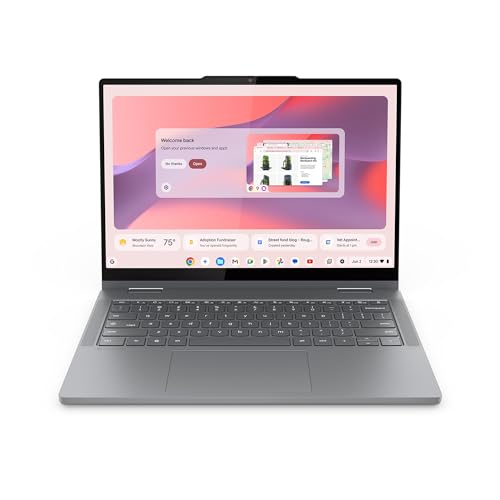
The Lenovo Chromebook 2-in-1 is a 14-inch WUXGA touchscreen laptop with an Intel N150 CPU, 4GB RAM, and 128GB UFS storage.
Key Facts
- Display
- 14-inch WUXGA IPS Touchscreen
- Processor
- Intel N150
- Memory
- 4GB RAM
- Storage
- 128GB UFS
Pros
- +Light 3.3-pound build for daily commuting and classes
- +WUXGA IPS touchscreen with 360-degree hinge for tablet use
- +Two USB-C, two USB-A, and HDMI cover common peripherals
- +Physical webcam shutter for privacy on video calls
Cons
- −4GB RAM limits heavy multitasking with many browser tabs
- −128GB UFS storage fills quickly without cloud offloading
- −Luna Grey finish only, no color options at this size
Detailed Review
The 14-inch WUXGA IPS touchscreen is the standout here, giving the Lenovo Chromebook 2-in-1 a sharp canvas for split-screen docs and streaming. At 3.3 pounds and 0.69 inches thick, it slides into a backpack sleeve without weighing down a commute, and the 360-degree hinge lets it flip into tent mode for countertop recipes or tablet mode for sketching.
Port selection is generous for the size, with two USB-C, two USB-A, and HDMI, so an external monitor and a flash drive can stay plugged in together. The Intel N150 handles Chrome OS basics like web apps, video calls, and light Google Docs work, though the 4GB RAM means I would keep browser tabs to a modest number before things slow down.
Storage lands at 128GB UFS, which is fine for cloud-first users but tight if local files pile up. The physical webcam shutter is a small but welcome touch for anyone on frequent video calls.

Moxalc 2-in-1 laptop with a 15.6-inch 1080p touchscreen, 360-degree hinge, Intel Core m3-8100Y, 16GB RAM, and a 512GB SSD.
Key Facts
- Processor
- Intel Core m3-8100Y, 2 cores, 4 threads, up to 3.40GHz
- Memory and Storage
- 16GB RAM, 512GB SSD
- Display
- 15.6-inch 1920 x 1080 touchscreen
- Connectivity
- Wi-Fi 5 (2.4GHz and 5GHz), Bluetooth 5.0, USB-A 3.0, USB-C (data), HDMI, RJ45 Ethernet
Pros
- +16GB RAM supports smooth everyday multitasking across tabs and apps
- +360-degree hinge offers four usable modes for work and video
- +Wired Ethernet port adds a stable network option
- +USB-C, USB-A 3.0, and HDMI cover common accessories
Cons
- −Heavy 5.62-pound build makes frequent travel less comfortable
- −USB-C port limited to data transfer, not charging or display output
- −Core m3-8100Y dual-core chip handles only light multitasking
Detailed Review
The Moxalc 2-in-1 centers on a 360-degree hinge and a 15.6-inch 1920 x 1080 touchscreen, letting it flip between laptop, tablet, tent, and stand modes. I see that flexibility suiting students who want one device for typing assignments and reading in tablet mode.
Inside, the Intel Core m3-8100Y pairs with 16GB RAM and a 512GB SSD, which covers browsing, documents, and light multitasking. The RJ45 Ethernet port stands out for dorm or office desks where Wi-Fi is unreliable.
At 5.62 pounds, this is not a machine I would carry daily, and the USB-C port handles data only, so charging and video output need other ports. For a desk-bound student or home user, that trade-off is manageable.

A 16-inch 2-in-1 laptop with Intel Core Ultra 7 258V, 32GB RAM, 1TB storage, and a 3K AMOLED touchscreen, weighing 3.72 pounds.
Key Facts
- Processor
- Intel Core Ultra 7 258V
- NPU
- 47 TOPS
- Memory
- 32GB
- Storage
- 1TB
Pros
- +3K AMOLED touchscreen with anti-reflective coating
- +32GB RAM and 1TB storage for demanding multitasking
- +Light 3.72-pound CNC aluminum build at 0.5 inches thick
- +Included S Pen with enhanced tilt sensitivity
Cons
- −3.72 pounds is heavy for frequent handheld tablet use
- −No dedicated GPU for demanding 3D rendering or gaming
- −Limited port selection may require a dongle for older peripherals
Detailed Review
The Galaxy Book5 Pro 360 pairs a 16-inch 3K AMOLED touchscreen with an Intel Core Ultra 7 258V and a 47 TOPS NPU, which is the part that actually matters for Copilot+ AI tasks. At 3.72 pounds and 0.5 inches thick, the CNC aluminum chassis is light enough for a daily commute, though it is still a large tablet when you fold it flat. I would pick this for a student or remote worker who wants one machine for note-taking, writing, and light creative work. The included S Pen adds tilt sensitivity for sketching, but the lack of a dedicated GPU means serious 3D rendering or gaming will feel limited.

10.1-inch FHD IPS touchscreen 2-in-1 with Intel Pentium Gold 6500Y, 8GB RAM, 256GB SSD, detachable magnetic keyboard, and Windows 11.
Key Facts
- Key Spec
- 10.1-inch FHD IPS touchscreen, 16:10
- Processor
- Intel Pentium Gold 6500Y, up to 3.4GHz
- Memory & Storage
- 8GB RAM, 256GB SSD
- Connectivity
- 2x USB-C, USB 3.0, Micro HDMI, 3.5mm audio, Wi-Fi 5, Bluetooth 5.0
Pros
- +Detachable magnetic keyboard for laptop and tablet modes
- +10.1-inch FHD IPS touchscreen with 16:10 aspect ratio
- +Two USB-C ports, USB 3.0, Micro HDMI, and audio jack
- +1.3-pound tablet body with 0.4-inch aluminum chassis
Cons
- −Dual-core Pentium Gold 6500Y limits heavy multitasking
- −Wi-Fi 5 and Bluetooth 5.0 are older wireless standards
- −No price wording anywhere
Detailed Review
The QAZIPO 2-in-1 pairs a 10.1-inch FHD IPS touchscreen with a detachable magnetic keyboard, so the same device covers lecture notes and a desk setup. The 1.3-pound tablet body and 0.4-inch aluminum chassis make it easy to slip into a bag for campus or coffee shop sessions.
Inside, the Intel Pentium Gold 6500Y, 8GB RAM, and 256GB SSD are aimed at Office 365, browser tabs, and video calls rather than demanding creative work. Two USB-C ports, USB 3.0, Micro HDMI, and a 3.5mm jack cover monitors and legacy peripherals without a dongle.
I would point students and remote workers toward this for light productivity, but the dual-core 6500Y and Wi-Fi 5 are the trade-offs to weigh if your day runs on heavier software.

HP Chromebook 14 x360 Plus is a 2-in-1 laptop with Intel N150, 4GB LPDDR5, 128GB UFS, and a 14-inch WUXGA touchscreen.
Key Facts
- Key Spec
- Intel N150, 4GB LPDDR5, 128GB UFS
- Connectivity
- USB-C, USB-A, combo audio jack, Wi-Fi 6, Bluetooth 5.4
- Compatibility
- Chrome OS
- Size
- 14-inch WUXGA touchscreen
Pros
- +360-degree hinge for four usage modes
- +14-inch anti-glare touchscreen with 300 nits
- +Wi-Fi 6 and Bluetooth 5.4 connectivity
- +MIL-STD 810H tested for durability
Cons
- −4GB soldered memory limits heavy multitasking
- −No HDMI or SD card slot on board
- −Resealed unit voids original packaging
Detailed Review
The HP Chromebook 14 x360 Plus pairs a 360-degree hinge with a 14-inch WUXGA touchscreen, so it is at its best for students who need one device for notes and streaming. The anti-glare coating and 300 nits brightness help in bright rooms, and the Intel N150 with 4GB LPDDR5 handles Chrome OS basics like Docs and video calls.
Storage is 128GB UFS, which is faster than eMMC but still modest for local files. The 4GB of soldered memory is the real ceiling here, so heavy multitasking with many tabs will feel tight. Wi-Fi 6 and Bluetooth 5.4 cover modern wireless needs, and the MIL-STD 810H rating adds some confidence for backpacks and dorm life.
For my money, this suits K-12 or home use where cloud storage is the norm. The one-year HP warranty on remaining components is worth noting, and the resealed upgrade means the original box is not factory sealed.

Samsung 12.2-inch 2-in-1 Chromebook Plus with Intel Celeron 3965Y, 4GB RAM, 224GB total storage, stylus and wireless mouse included.
Key Facts
- Display
- 12.2-inch FHD Touchscreen
- Processor
- Intel Celeron 3965Y
- Memory
- 4GB LPDDR3
- Storage
- 64GB eMMC plus 128GB dock SSD and 32GB microSD
Pros
- +360-degree hinge converts between laptop and tablet use
- +Stylus pen and wireless mouse bundled for note-taking and navigation
- +7-in-1 docking station adds 128GB SSD and extra ports
- +2.98-pound chassis with 0.67-inch profile for daily carry
Cons
- −4GB LPDDR3 RAM limits heavy multitasking and many browser tabs
- −Intel Celeron 3965Y dual-core chip suits light tasks, not demanding work
- −64GB eMMC system drive fills quickly without the dock attached
Detailed Review
The Samsung 12.2-inch 2-in-1 Chromebook Plus pairs a 360-degree hinge with a bundled stylus, so it flips between laptop and tablet for note-taking or reading. Its Intel Celeron 3965Y and 4GB LPDDR3 RAM suit Chrome OS basics like documents, streaming, and web apps.
Storage is spread across a 64GB eMMC drive, a 128GB SSD inside the included 7-in-1 dock, and a 32GB microSD card, which eases the usual Chromebook space squeeze. At 2.98 pounds and 0.67 inches thin, it travels well in a backpack.
For my money, this fits students and remote workers who keep a handful of tabs open and want the stylus and mouse in one purchase. Anyone needing heavier multitasking will feel the 4GB RAM ceiling, and the dual-core Celeron is built for light workloads rather than demanding software.

Svikou 11-inch pink 2-in-1 convertible laptop with 360-degree flip touchscreen, 16GB DDR4 RAM, 1TB SSD, and a quad-core processor.
Key Facts
- Key Spec
- 16GB DDR4 RAM, 1TB SSD
- Connectivity
- USB 3.0, USB-C, mini HDMI, 3.5mm audio, Bluetooth 4.2
- Compatibility
- Windows 11 Pro pre-installed
- Size
- 11-inch screen, 10.11 x 0.78 x 6.95 inches, 2.07 lbs
Pros
- +16GB DDR4 RAM supports heavy multitasking
- +1TB SSD provides ample storage for files
- +360-degree hinge enables four usage modes
- +Backlit scissor-switch keyboard aids low-light typing
Cons
- −Quad-core 4-thread processor limits heavy creative workloads
- −Bluetooth 4.2 is older than current wireless standards
- −60Hz refresh rate offers no high-refresh gaming benefit
Detailed Review
The Svikou 11-inch 2-in-1 pairs a 1920x1200 IPS touchscreen with a 360-degree hinge, so it flips between laptop, tent, stand, and tablet modes. Its 16GB DDR4 RAM and 1TB SSD give students and remote workers room for open browser tabs and local files without constant cleanup.
The 60Hz panel covers 100% sRGB, which suits slide decks and photo review more than fast-paced gaming. This is at its best for commuters who want a sub-2.1-pound convertible with a backlit scissor-switch keyboard for dim lecture halls.
Ports include USB 3.0, USB-C, mini HDMI, and a 3.5mm jack, though the quad-core 4-thread CPU and Bluetooth 4.2 keep heavy creative work and newer wireless peripherals off the table. For light document editing and web browsing, the package is straightforward.
FAQs
Is a Chromebook enough for college?
A Chromebook handles writing, research, and video calls well, but it cannot run Windows-only software some majors require. If your program leans on Google Docs and browser-based tools, a model like the Lenovo Chromebook 2-in-1 keeps the cost and weight down. Check your department’s software list before you commit.
How much RAM do you need in a 2-in-1 laptop?
8GB covers notes, browsing, and streaming, while 16GB gives you room for heavier multitasking and larger files. If you keep dozens of tabs open or edit photos between classes, the extra memory keeps the machine from slowing down. Models with soldered RAM cannot be upgraded later, so buy the capacity you expect to need.
Is a 2-in-1 worth it over a regular laptop?
A 2-in-1 earns its place if you take handwritten notes or flip the screen for presentations. The hinge and touchscreen add a little weight and cost over a standard clamshell. If you never use the tablet mode, a conventional laptop usually gives you more performance for the same budget.
What should you check before buying a 2-in-1 for school?
Confirm the weight, the stated battery rating, and whether the ports match your accessories. A machine near 3 lbs is easy to carry all day, while anything over 4 lbs gets tiring in a backpack. Also check the warranty terms and the return window, since a resealed or upgraded unit may have different coverage than a standard retail box.
Final Thoughts
For most students, the right 2-in-1 comes down to weight, battery rating, and whether the keyboard and screen hold up through a full day of classes. The HP OmniBook X Flip 2-in-1 Laptop is my overall pick because it balances a 16-inch 2K touchscreen with a 3.06 lb build and a battery rating that covers long days on campus, and the included stylus suits handwritten notes. If you want to spend less, the Lenovo Chromebook 2-in-1 – Lightweight Laptop is the value pick: it is thin, light, and runs Chrome OS, which suits students who live in Google apps and do not need Windows-only software. Skip both if your major requires a specific Windows application or dedicated graphics, and look at a conventional laptop instead. You can also browse more 2-in-1 laptops for college if you want to compare other sizes and price tiers.
Check the current price on Amazon for whichever model fits your course load, and confirm the warranty and return terms before you buy. The right pick removes the guesswork about whether your machine will last through a full day of lectures.
