A 4K monitor that looks sharp in a screenshot but smears during a fast flick in a shooter is a frustrating buy. The listings rarely make that tradeoff obvious, and the spec sheet hides it behind a big resolution number and a refresh rate that only applies in a lower mode.
I looked at the Best 4K Gaming Monitors under $500 by reading the stated panel type, refresh behavior in each mode, response time, HDR tier, and port layout, then comparing those against how people actually use a 27-inch or 32-inch screen for shooters, single-player games, and creative work. The picks below are the ones with clearly stated specs and a mode that fits more than one kind of use.
My overall pick for best 4k gaming monitors under $500 is the InnoView 27 Inch Monitor Dual Mode 4K UHD. Its dual-mode design lets you run 4K at 120Hz for detail-heavy games and drop to a higher refresh mode when you want less tearing in competitive play. My top picks are just below.
Best 4K Gaming Monitors under $500 at a Glance
| Product | PGH Score | ||
|---|---|---|---|

|
Best Overall InnoView 27 Inch Dual Mode 4K 120Hz Gaming Monitor | 9.9 | Check Price on Amazon |

|
Best for Competitive FPS Acer Predator X27 27in 4K QD-OLED Gaming Monitor | 9.9 | Check Price on Amazon |

|
Best for 4K Gaming ASUS ROG Strix XG27UCS 27" 4K 160Hz Gaming Monitor | 9.8 | Check Price on Amazon |

|
Best for Dual-Mode Gaming Alienware AW2725QF 27" 4K 180Hz Gaming Monitor | 9.8 | Check Price on Amazon |

|
MSI MPG 274URDFW E16M 27-Inch 4K Gaming Monitor | 9.8 | Check Price on Amazon |

|
Best for Dual Mode Gaming Samsung Odyssey G7 27" 4K Gaming Monitor | 9.7 | Check Price on Amazon |
|
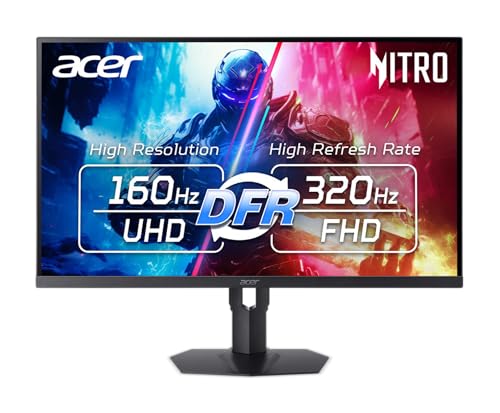
Best for 4K HDR Gaming Acer Nitro XV325QK 31.5-Inch 4K MiniLED | 9.6 | Check Price on Amazon |

|
ASUS ROG XG27UCG 27 Inch 4K Gaming Monitor | 9.4 | Check Price on Amazon |
In-Depth Reviews
27-inch monitor switching between 4K at 120Hz and 1080p at 288Hz, with USB-C and HDMI inputs plus built-in speakers.
Key Facts
- Key Spec
- 4K 120Hz / 1080p 288Hz dual mode
- Connectivity
- Two USB-C, one HDMI, 3.5mm audio
- Size
- 27-inch, 0.72 x 14.73 x 24.16 inches
- Rating
- 100% sRGB, 500 nits, HDR
Pros
- +Dual-mode panel covers both 4K work and 288Hz play
- +Two USB-C ports simplify laptop and phone hookups
- +100% sRGB and 500 nits suit color and editing tasks
- +Kickstand and VESA mount cover desk and wall setups
Cons
- −9.5-pound metal body rules out frequent travel use
- −1080p mode drops resolution for the 288Hz refresh rate
Detailed Review
The standout feature here is the dual-mode panel, which runs at 4K 120Hz for editing and movies, then drops to 1080p 288Hz for fast competitive play. That flexibility is rare at this size, and it means one screen can cover both a color-sensitive workflow and a high-refresh gaming session without a second display.
I like the 100% sRGB coverage and 500 nits brightness for creator work, since accurate color and enough brightness to fight glare matter more than raw resolution for photo or video editing. The two USB-C ports and HDMI input keep laptop, phone, and console hookups simple, and the built-in speakers plus 3.5mm jack handle basic audio without extra gear.
Portability is where expectations need adjusting. At 9.5 pounds and 0.7 inches thick, this is a desk or wall-mounted display rather than a bag-friendly travel monitor, and the 1080p mode trades resolution for that 288Hz refresh. For a fixed desk setup that needs both work and gaming modes, I rate this a practical fit.
The Acer Predator X27 is a 26.5-inch 4K QD-OLED gaming monitor with a 165Hz refresh rate, 0.03ms response time, and AMD FreeSync Premium Pro support.
Key Facts
- Key Spec
- 165Hz Refresh Rate, 0.03ms Response
- Connectivity
- 2x HDMI 2.1, 2x DisplayPort 1.4, 1x Audio Out
- Size
- 26.5 inches
- Rating
- VESA DisplayHDR True Black 400
Pros
- +165Hz refresh rate with 0.03ms response time
- +4K QD-OLED panel with DCI-P3 99% and Delta E<2
- +AMD FreeSync Premium Pro and G-Sync Compatible
- +Ergo stand offers tilt, swivel, pivot, and height adjustment
Cons
- −Typical brightness of 250 nits may limit daytime visibility
- −No USB hub or USB-C port for peripherals
- −Speakers are only 3W each, likely weak for gaming
Detailed Review
The Acer Predator X27 packs a 26.5-inch 4K QD-OLED panel with a 165Hz refresh rate and 0.03ms G to G response time. I see this as a strong fit for competitive players who want sharp detail and fast motion.
With DCI-P3 99% and Delta E<2, colors stay accurate for creative work. The Ergo stand adds tilt, swivel, pivot, and height adjustment, which helps dial in comfort for long sessions.
Typical brightness is 250 nits, so bright rooms may wash out the image. The 3W speakers are modest, and there is no USB hub, so plan for external audio and peripherals.
The ASUS ROG Strix XG27UCS is a 27-inch 4K Fast IPS gaming monitor with a 160Hz refresh rate and 1ms response time for high-frame-rate play.
Key Facts
- Key Spec
- 160Hz Refresh Rate, 1ms GTG
- Connectivity
- USB-C, DisplayPort, HDMI
- Size
- 27-inch, 3840 x 2160
- Warranty
- 3 Years
Pros
- +160Hz refresh rate on a 4K panel
- +Fast IPS panel rated at 1ms GTG
- +USB-C port for video and data
- +Tripod socket for streaming accessories
Cons
- −27-inch size limits 4K desktop scaling comfort
- −No HDMI 2.1 or DisplayPort 2.1 for console 4K 120Hz
- −14.5-pound weight makes frequent repositioning awkward
Detailed Review
The ASUS ROG Strix XG27UCS pairs a 27-inch 3840 x 2160 panel with a 160Hz refresh rate, which is a rare combination at this size. The Fast IPS panel is rated for a 1ms response time and covers 95% DCI-P3, so color work and fast-paced games both get solid treatment. This works best for a desk where one screen handles both creative apps and competitive shooters.
USB-C connectivity means a laptop can drive the display and carry data over one cable, and the tripod socket is a practical touch for a webcam or compact streaming light. ELMB Sync combines blur reduction with variable refresh, which helps in fast panning scenes. The main trade-off is the 27-inch footprint, since 4K at this size pushes text and UI elements quite small without scaling. For my money, this suits a desk that needs one sharp, quick panel for work and play.
Alienware AW2725QF is a 27-inch dual-resolution IPS gaming monitor with native 4K at 180Hz or FHD at 360Hz for flexible play.
Key Facts
- Key Spec
- 4K 180Hz / FHD 360Hz dual-resolution IPS
- Connectivity
- HDMI, DisplayPort, USB 3.2 Gen1
- Rating
- VESA DisplayHDR 600
- Size
- 27 inches
Pros
- +Dual native modes cover 4K detail and 360Hz FHD speed
- +95% DCI-P3 with Delta E<2 suits color-sensitive work
- +AdaptiveSync and G-SYNC Compatible cut tearing in both modes
- +USB 3.2 Gen1 hub adds convenient port access
Cons
- −Overclocked refresh rates need supported GPU and cables
- −No USB-C video input limits single-cable laptop docking
- −HDR 600 falls short of true high-dynamic-range impact
Detailed Review
A 27-inch IPS panel that runs native 4K at 180Hz or FHD at 360Hz gives me two distinct monitors in one frame. The dual-mode design means a single display can serve both detailed open-world games and fast competitive shooters without swapping hardware. Color coverage of 95% DCI-P3 with Delta E under 2 also makes it viable for photo and video editing.
NVIDIA G-SYNC Compatible and VESA AdaptiveSync certification address tearing in both modes, which matters when frame rates swing between 4K and FHD targets. Dolby Vision and VESA DisplayHDR 600 certification add contrast headroom for HDR content, though I would not expect the same impact as a full-array local dimming panel at this price.
The biggest trade-off is the lack of USB-C video input, so laptop users still need HDMI or DisplayPort plus a separate USB cable for the hub. I see this fitting a desktop gamer who wants one screen for both 4K strategy games and 360Hz FPS play, provided the GPU can drive the higher modes.
The MSI MPG 274URDFW E16M is a 27-inch 4K gaming monitor with a 320Hz refresh rate and Mini-LED backlight with 1,152 dimming zones.
Key Facts
- Screen Size
- 27 inches
- Resolution
- 3840 x 2160 (UHD)
- Refresh Rate
- 320Hz
- Response Time
- 0.5ms (GtG, Min.)
Pros
- +1,152-zone Mini-LED backlight for improved HDR contrast
- +320Hz refresh rate suits competitive shooters and fast-paced games
- +0.5ms GtG response time reduces visible motion blur
- +AI Dual Mode simplifies switching between resolutions
Cons
- −18.08 pounds makes it heavy for frequent repositioning
- −VESA mount required for arm or wall mounting, not included
- −No USB-C or DisplayPort listed in the provided connectivity details
Detailed Review
The MSI MPG 274URDFW E16M pairs a 27-inch 4K panel with a 320Hz refresh rate, a combination that suits both high-detail single-player games and fast competitive titles. Its Mini-LED backlight uses 1,152 local dimming zones, which helps HDR content show deeper blacks and brighter highlights than edge-lit panels.
The 0.5ms GtG response time and Rapid IPS panel keep motion clear and colors consistent, while AI Dual Mode automatically adjusts the refresh rate when you change resolution. I see this working well for a desk where one monitor handles both work and play, though the 18.08-pound weight makes it a set-and-forget display rather than one you move often.
VESA mounting is supported if you want to free up desk space, but the stand and mounting hardware are not listed as included. For a builder eyeing a 4K screen that can also run high frame rates, this is a practical centerpiece, provided your graphics card can drive 4K at those refresh rates.
Samsung's 27-inch Odyssey G7 gaming monitor with a Fast IPS panel that runs 180Hz at 4K UHD or 360Hz at Full HD in dual mode.
Key Facts
- Screen Size
- 27-inch
- Refresh Rate
- 180Hz at 4K UHD, 360Hz at Full HD
- Panel Type
- Fast IPS
- Response Time
- 1ms GtG
Pros
- +Dual mode covers 4K detail and high refresh play
- +Fast IPS panel with wide viewing consistency
- +G-Sync and FreeSync Premium reduce tearing
- +Ergonomic stand with tilt, height, and pivot
Cons
- −Reaching 360Hz requires dropping to Full HD
- −8.59-pound panel adds weight to desk mounts
- −Auto Source Switch+ handles input switching only
Detailed Review
The 27-inch Odyssey G7 G70F centers on a dual-mode Fast IPS panel that runs 180Hz at 4K UHD or 360Hz at Full HD. That flexibility suits a mixed desk, where 4K serves creative work and the 360Hz mode feeds fast-paced shooters.
1ms GtG response time and HDR10 support keep motion and contrast in step with the panel's refresh ceiling. G-Sync compatibility and AMD FreeSync Premium both work to cut tearing and choppiness, which matters when frame pacing varies.
At 8.59 pounds, the panel carries real heft for a 27-inch display, so a sturdy arm or desk is worth planning for. I see this fitting a player who wants one screen for both high-detail work and competitive play, provided they accept the resolution trade-off for 360Hz.
Acer Nitro XV325QK is a 31.5-inch 4K MiniLED gaming monitor with 160Hz refresh, 320Hz DFR mode, and 1152 local dimming zones.
Key Facts
- Key Spec
- 31.5-inch 4K MiniLED, 160Hz native, 320Hz DFR, 0.5ms GTG
- Connectivity
- 2x HDMI 2.1, 2x DisplayPort
- Rating
- VESA DisplayHDR 1000, AMD FreeSync Premium
- Size
- 8.8 x 28.31 x 21 inches
Pros
- +1152 local dimming zones for strong HDR contrast
- +160Hz native and 320Hz DFR modes cover both work and esports
- +Two HDMI 2.1 and two DisplayPort inputs for multiple devices
- +Ergo stand with tilt, swivel, pivot, and height adjustment
Cons
- −15.21-pound panel is heavy for frequent repositioning
- −MiniLED dimming can show blooming around bright objects on dark scenes
- −No USB-C port for single-cable laptop docking
Detailed Review
The Acer Nitro XV325QK pairs a 31.5-inch 4K IPS panel with 1152 MiniLED local dimming zones and VESA DisplayHDR 1000 certification, so bright highlights and deep blacks land with real punch in HDR games and movies. Its dual-mode design lets me run 160Hz at 4K for immersive titles or drop to 320Hz DFR for competitive shooters where frame rate matters more than pixel count.
AMD FreeSync Premium keeps the panel and graphics card in step to cut tearing, and the 0.5ms GTG rating suits fast motion. Two HDMI 2.1 and two DisplayPort inputs cover a PC plus a console without swapping cables, and the ergo stand adds tilt, swivel, pivot, and height adjustment for a comfortable desk setup.
At 15.21 pounds the panel is heavy to reposition, and MiniLED dimming can produce blooming around bright objects on dark backgrounds. There is also no USB-C input, so laptop users will need a separate dock or adapter. I would pair this with a desk that can handle its footprint and a graphics card that can drive 4K frames.
ASUS ROG XG27UCG is a 27-inch 4K gaming monitor with dual mode 160Hz or 320Hz at FHD, Fast IPS, and USB-C connectivity.
Key Facts
- Key Spec
- 4K 160Hz / FHD 320Hz Dual Mode
- Connectivity
- USB-C
- Size
- 27 inches
- Warranty
- 3 Year with Advanced Replacement
Pros
- +Dual mode 4K 160Hz and FHD 320Hz for different games
- +Fast IPS 1ms response time minimizes motion blur
- +USB-C port for video and data with one cable
- +95% DCI-P3 coverage for vibrant colors
Cons
- −No HDMI 2.1 or DisplayPort 2.1 stated for console 4K 120Hz
- −14.6 pounds heavy for frequent LAN moves
- −No built-in speakers or headphone jack mentioned
Detailed Review
The ASUS ROG XG27UCG packs a 27-inch 4K panel at 160Hz that can switch to FHD at 320Hz for competitive titles, a rare dual-mode trick. Fast IPS keeps response at 1ms, and ELMB Sync cuts ghosting without dropping variable refresh. USB-C handles video and data over one cable, which cleans up a desk. I rate the 95% DCI-P3 coverage as a real plus for editing clips between matches. The 14.6-pound weight makes it a poor fit for frequent LAN moves, and the lack of stated HDMI 2.1 or DisplayPort 2.1 means console 4K 120Hz is not covered. For a fixed desk setup, this monitor suits mixed 4K work and high-refresh play.
FAQs
Can a 4K gaming monitor under $500 hit high frame rates?
Yes, several of these run a dual-mode setup that switches to a lower resolution for a much higher refresh rate, which is how they stay fast in competitive games. In 4K mode the ceiling is lower, so a strong graphics card still matters. Check the card maker’s recommended power supply wattage and the connectors it needs before you buy.
Is a 27-inch or 32-inch 4K monitor better for gaming?
A 27-inch 4K panel gives you very dense pixels and a compact footprint, which suits a shallow desk and close seating. A 32-inch model spreads those pixels over more area, so text and UI elements are easier to read at a normal distance. Measure your desk depth and viewing distance first.
Do you need HDR on a 4K gaming monitor?
HDR helps most in single-player games with strong contrast, and the tier matters more than the label. A DisplayHDR 400 panel is a modest step, while a Mini LED model with local dimming zones pushes highlights and blacks further. If you mostly play bright competitive shooters, HDR is a smaller factor.
What is the difference between 4K and dual-mode monitors?
A standard 4K monitor runs one resolution at one refresh rate. A dual-mode model lets you toggle between 4K for detail and a lower resolution for a higher refresh rate, so you can match the screen to the game. That flexibility is the main reason these picks are worth a look.
Final Thoughts
The deciding factor in this range is not the resolution number, it is how the panel behaves in the mode you will actually use. A dual-mode screen that drops to a fast refresh rate for shooters and returns to 4K for slower games covers more ground than a fixed panel, and the port layout and stand adjustments matter just as much once it is on your desk.
For most people, the InnoView 27 Inch Monitor Dual Mode 4K UHD is the best overall choice. It suits a mixed-use desk where you edit or watch in 4K and then switch modes for faster play, and the built-in stand and VESA mounting give you options for placement. If you want to spend less, the ASUS ROG Strix 27” 4K HDR400 USB-C is the best value pick, with a Fast IPS panel and USB-C connectivity that simplifies a single-cable laptop setup. Skip both if you need a 32-inch screen for a deeper desk, or if you want the deepest blacks an OLED panel can offer.
Check the current price on Amazon, and pick the mode that matches the games you play most. Getting that one decision right removes most of the confusion around buying a 4K gaming monitor.