


You hit record, talk for twenty minutes, and play it back to find a low hum from the PC fan sitting under every sentence. A condenser microphone picks up whatever is in the room, which is exactly why the cheap ones sound worse than their spec sheets suggest.
What separates a usable podcasting mic from a frustrating one comes down to three things: a cardioid pattern that favors your voice over the room, controls you can reach without opening software, and a mount that does not transmit every desk tap into the recording. I compared the Best Condenser Microphones for Podcasting by reading manufacturer spec sheets, cross-referencing stated pickup patterns and frequency responses, and working through verified buyer feedback on build and setup.
My overall pick for best condenser microphones for podcasting is the ZealSound Podcast Microphone for PC. Its top-addressed capsule and physical gain, monitoring, and echo knobs put the adjustments you actually use during a session within arm’s reach. My top picks are just below.
Best Condenser Microphones for Podcasting at a Glance
| Product | PGH Score | ||
|---|---|---|---|

|
Best Overall ZealSound K66 USB Podcast Microphone with Noise | 9.8 | Check Price on Amazon |

|
Best for Streaming FIFINE K669B USB Condenser Mic with Volume Knob | 9.7 | Check Price on Amazon |
|
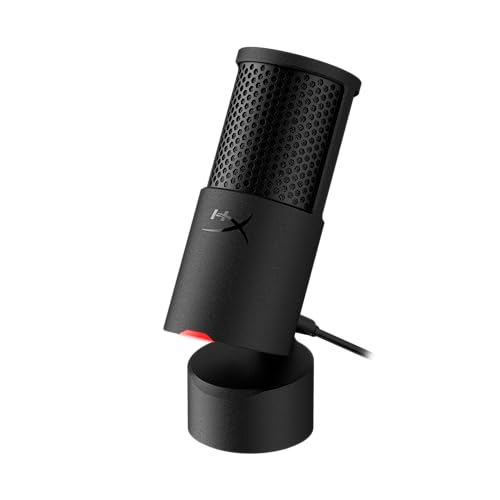
Best for Solo Streaming HyperX SoloCast 2 USB Condenser Gaming Microphone | 9.6 | Check Price on Amazon |
|
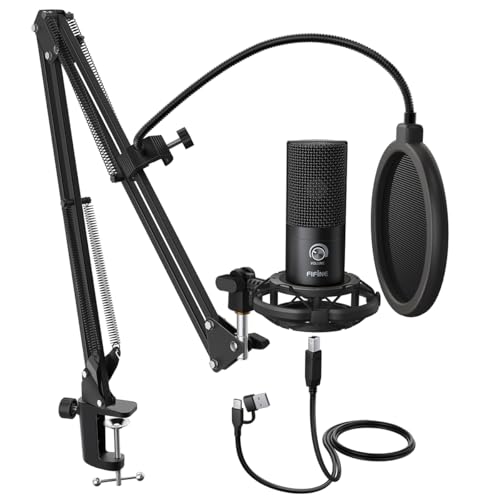
Best for Podcasting FIFINE T669 USB Condenser Microphone with Boom Arm | 9.5 | Check Price on Amazon |

|
FIFINE AmpliGame A6V USB Gaming Microphone | 9.4 | Check Price on Amazon |

|
Best for Home Podcasting Dejasound DJM5 USB Condenser Microphone | 9.4 | Check Price on Amazon |
In-Depth Reviews
ZealSound K66 USB condenser microphone with cardioid pickup, 40Hz to 18kHz response, mute button, and headphone monitoring for PC, Mac, and mobile.
Key Facts
- Pickup Pattern
- Cardioid condenser
- Frequency Response
- 40Hz to 18kHz
- Connectivity
- USB with USB-C and Lightning adapters
- Size
- 1.58 x 1.58 x 6.1 inches
Pros
- +Dedicated knobs for mic gain, monitoring, and echo
- +Single-press mute with visible red LED indicator
- +Plug-and-play USB with no drivers or software
- +360-degree rotatable top-addressed body on weighted metal base
Cons
- −Top-addressed design needs correct mouth positioning
- −Echo knob adds reverb that clutters clean voice recording
Detailed Review
The ZealSound K66 is a top-addressed USB condenser mic with a cardioid pattern and a 40Hz to 18kHz response, so it aims at spoken voice rather than room ambience. Its Noise Reduction Mode, toggled by holding the mute button, targets keyboard clatter and fan hum for noisier desks.
Physical control is the real story here. Separate knobs handle mic gain, headphone monitoring, and echo, and the 3.5mm jack gives zero-latency feedback through your own headphones. The 360-degree rotating body and weighted metal base let me angle the capsule without a boom arm.
Two things to weigh. The top-address design means you speak down into the capsule, which takes a little positioning, and the echo knob adds reverb that most podcast and meeting setups will want off. I would pair this with closed-back headphones for monitoring, and the included USB-C and Lightning adapters cover desktop and phone recording without extra purchases.
FIFINE K669B is a plug-and-play USB condenser microphone with a metal body, cardioid pickup, and an onboard volume knob for PC, Mac, and PlayStation.
Key Facts
- Connectivity
- USB-A, USB-B to USB-A/C cable
- Compatibility
- PC, Mac, PS4, PS5
- Included
- 5.9-foot USB cable and tripod stand
Pros
- +Plug-and-play USB-A setup with no drivers or phantom power
- +Cardioid pattern targets voice over room noise
- +Onboard volume knob allows quick level adjustment or mute
- +Metal body and included tripod stand for desk stability
Cons
- −Not compatible with Xbox or phones
- −USB-A connection limits use with USB-C only devices
Detailed Review
The FIFINE K669B is a USB condenser mic with a cardioid pickup pattern, which means it focuses on your voice and rejects some room noise. The metal body and included tripod stand give it a stable desk presence, and the onboard volume knob lets you adjust levels or drop to zero for privacy.
Setup is plug and play over USB-A with the included 5.9-foot cable, and it works with PC, Mac, and PS4 or PS5 without phantom power. For my money, this suits a student on Zoom calls or a new streamer who wants clear voice capture without an audio interface.
The catch is it won't work with Xbox or phones, and the USB-A connection may need an adapter for USB-C only laptops.
HyperX SoloCast 2 is a USB-C condenser microphone with a cardioid pattern, 24-bit/96kHz recording, tap-to-mute, and a built-in shock suspension.
Key Facts
- Key Spec
- 24-bit/96kHz, Cardioid Condenser
- Connectivity
- USB-C to USB-A
- Compatibility
- PC Compatible
- Included
- Foam Pop Filter, Tiltable Stand, Mic Arm Threads
Pros
- +Built-in foam pop filter and tiltable stand included
- +USB-C to USB-A plug-and-play connection with no setup
- +Tap-to-mute with clear red LED status indicator
- +NGENUITY software adds high-pass, low-pass, and voice filters
Cons
- −Cardioid-only pattern limits multi-directional recording
- −No XLR output for use with audio interfaces
- −Weighted base stand takes up desk space
Detailed Review
The HyperX SoloCast 2 centers on a built-in suspension system that reduces desk vibration without a separate shock mount. Its cardioid condenser capsule records at 24-bit and 96kHz, which suits voice capture for streaming or calls. A tap-to-mute control with a red LED makes live muting quick and visible.
The included foam pop filter, tiltable stand, and 3/8-inch and 5/8-inch threads mean it mounts to a mic arm without extra hardware. For my money, this fits a desk where a simple USB-C mic is preferred over an XLR setup. The cardioid-only pattern keeps it focused on one speaker, which is a real limit for recording a room.
The FIFINE T669 is a USB condenser microphone kit with a boom arm, shock mount, and double pop filter. It connects via USB-B to USB-A or USB-C for plug-and-play recording.
Key Facts
- Connectivity
- USB-B to USB-A or USB-C
- Included
- Boom arm, shock mount, double pop filter, USB cable
- Compatibility
- PC and laptop (incompatible with Xbox)
- Weight
- 2.2 lb
Pros
- +Plug-and-play USB connection needs no drivers or interface
- +Boom arm and shock mount included for immediate desk setup
- +Double pop filter helps control plosive bursts on vocals
- +C-clamp and desktop mount fit most table edges
Cons
- −Incompatible with Xbox consoles
- −No headphone jack for zero-latency monitoring
- −Fixed 13-inch horizontal arm limits placement flexibility
Detailed Review
The FIFINE T669 kit centers on a cardioid condenser capsule, which focuses pickup on the front and rejects some room noise behind it. I find that pattern useful for a home desk where a PC fan or air conditioner sits off to the side.
The included boom arm reaches 30 inches with 180-degree vertical rotation and 135-degree forward extension, plus a C-clamp and desktop mount. A double pop filter and shock mount come in the box, which matters if you record close to the mic without a treated room.
The USB-B to USB-A or USB-C cable makes setup simple on a PC or laptop, but the T669 does not work with Xbox and there is no headphone jack for direct monitoring. For podcasting, voiceovers, or Discord chat on a computer, that trade-off is easy to live with.
The FIFINE AmpliGame A6V is a USB condenser gaming microphone with a cardioid pattern, 192kHz sampling, quick mute, gain knob, and gradient RGB.
Key Facts
- Key Spec
- 192kHz sampling rate, cardioid condenser
- Connectivity
- Detachable USB cable, 6.6ft
- Compatibility
- PS4, PS5, desktop, laptop, Windows, Mac OS
- Included
- Shock mount, pop filter, tripod stand, USB cable, manual
Pros
- +Cardioid pattern and 70dB SNR for focused front-facing voice capture
- +192kHz sampling rate for detailed voice reproduction
- +Quick mute button with visible RGB off status
- +Plug and play over USB with no extra software needed
Cons
- −No headphone jack for zero-latency sidetone monitoring
- −Tripod stand sits on desk and picks up surface vibrations
Detailed Review
The FIFINE AmpliGame A6V centers on a cardioid condenser capsule with a 70dB signal-to-noise ratio and 192kHz sampling, which points at clean front-facing voice capture rather than room ambience. A quick mute button kills the mic instantly and turns the gradient RGB off so the stream knows you are silent. The onboard gain knob is the part I care about most, since adjusting level without software menus keeps game chat and Discord calls moving. The included shock mount and pop filter handle keyboard taps and plosives, and the detachable 6.6ft USB cable reaches a tower under the desk. The trade-off is monitoring, as there is no headphone jack for zero-latency sidetone. I would point desk streamers and Discord regulars here, keeping the tripod on a stable surface to limit vibration.
Dejasound DJM5 USB condenser microphone kit with a 16mm diaphragm, cardioid pattern, and a foldable five-panel isolation shield for podcasting and vocal recording.
Key Facts
- Key Spec
- 16mm diaphragm, cardioid, 192kHz/24-bit
- Connectivity
- USB output, 3.5mm monitor jack, Lightning and Type-C adapters
- Size
- Shield 27.55 x 10.23 in, mic 6.3 x 1.96 in
- Included
- Mic, pop filter, soundproof cover, clip, tripod, adapters, cable, headphones, foam cover
Pros
- +USB output removes need for an audio interface
- +Onboard echo and volume controls for live monitoring
- +Five-panel folding shield for tighter recording space
- +Complete kit with tripod, pop filter, and headphones
Cons
- −Condenser capsule picks up more room reflections than dynamic mics
- −No XLR output limits upgrade path to mixers
- −Tripod stand sits low for seated desktop use
Detailed Review
The Dejasound DJM5 pairs a 16mm cardioid condenser capsule with a USB output, so a single cable runs it into a PC, laptop, or smartphone without an interface. The kit also ships with a five-panel foldable isolation shield, a pop filter, a tripod, and a headphone set.
For a home studio desk, that shield is the piece I would lean on most, since a condenser capsule hears the room as much as the voice. The onboard echo, volume, and mute controls plus a 3.5mm monitor jack cover basic podcast and streaming needs without extra gear.
The trade-off is that a condenser still pulls in more room reflection than a dynamic mic, and the tripod sits low for seated use. I would point this at solo podcasters and vocalists recording in a treated corner, not at noisy untreated rooms.
FAQs
Do you need a shock mount for podcasting?
A shock mount helps if you type or bump the desk while recording, because it isolates the mic body from surface vibration. If you record standing at a boom arm away from the keyboard, the difference is smaller. The FIFINE T669 and FIFINE AmpliGame A6V both include one in the box.
Is a USB condenser mic good enough for a two-person podcast?
A single cardioid USB mic works best for one voice at a time, since it rejects sound from the sides and rear. For two people in the same room, you generally want one mic per person so each voice gets its own track. A mic with a monitoring jack, like the ZealSound K66, lets you hear your own level while the other person speaks.
Does a condenser microphone need phantom power?
The USB models here draw power over the USB connection and do not need a separate phantom power supply. That keeps the setup to one cable into your computer. If you later move to an XLR microphone, you will need an audio interface or mixer that supplies phantom power, which is a different purchase entirely.
Will a condenser mic pick up my mechanical keyboard?
A cardioid condenser still picks up some keyboard noise because it is sensitive by design. Positioning matters more than the mic itself: keep it close to your mouth and angled away from the keyboard, and use the noise reduction mode or a low gain setting. The Dejasound kit’s isolation shield adds another layer of separation between the mic and the desk.
Final Thoughts
The right podcasting mic comes down to how much control you want at your fingertips and how much room noise you need to work around. A cardioid pattern, reachable gain, and a stable mount matter more than a high sampling rate on paper. If you record in a shared space, the isolation and pop filtering matter more than anything else.
For most solo podcasters and streamers, the ZealSound Podcast Microphone for PC is the best overall choice. The physical gain, monitoring, and echo knobs let you adjust on the fly without touching software, and the top-addressed design keeps your voice aimed at the capsule. If you want to spend less, the FIFINE AmpliGame A6V USB Gaming Microphone is the value pick, bundling a shock mount, pop filter, and tripod so you are not buying accessories separately. Skip both if you need XLR output for a mixer-based studio, or if you record in a room with heavy reverb that no cardioid pattern can tame. A desk microphone setup lives or dies on placement, so budget time for positioning before you blame the gear. Check the current price on Amazon, and pick the one whose controls match how you actually record.

