


A pair of desktop speakers that sounds thin at low volume, or hums through a noisy USB port, makes critical listening at a desk frustrating. Many listings lead with a wattage number and say little about cabinet resonance, driver size, or whether the inputs match a computer, an audio interface, or a turntable.
The models worth considering pair a cabinet that controls vibration with drivers tuned for nearfield use, plus the connections your desk actually has. I compared the Best Desktop Speakers for Audiophiles by reading manufacturer spec sheets, checking stated driver and amplifier details, and comparing input options across brands.
My overall pick for best desktop speakers for audiophiles is the Computer Speakers for Desktop PC Monitor. Its clip-on mount frees desk space, and the listing states it works with Windows, macOS, ChromeOS, and Linux over USB. My top picks are just below.
Best Desktop Speakers for Audiophiles at a Glance
| Product | PGH Score | ||
|---|---|---|---|

|
Best Overall XKX USB Computer Speakers with Monitor Clip Mount | 9.9 | Check Price on Amazon |

|
Best for Desktop Stereo Klipsch R-51M Bookshelf Speakers with 5.25" | 9.9 | Check Price on Amazon |

|
Best for Desktop Studio PreSonus Eris 3.5 Powered Studio Monitors with 50W | 9.8 | Check Price on Amazon |

|
Best for Desktop Listening Audioengine A2+ Gen 3 Wireless Desktop Speakers | 9.8 | Check Price on Amazon |
|
Best for Desktop Production ADAM Audio D3V Active Desktop Studio Monitors | 9.7 | Check Price on Amazon |
|
Best for Desk Clutter Creative Pebble 2.0 USB Desktop Stereo Speakers | 9.6 | Check Price on Amazon |

|
Best for TV Audio ULTIMEA BS-3 3-Way Powered Bookshelf Speakers | 9.4 | Check Price on Amazon |
In-Depth Reviews
USB plug-in stereo speakers with dual drivers and passive radiators, plus a G-sensor that keeps left and right channels correct when clamped to a monitor.
Key Facts
- Key Spec
- Dual Drivers and Dual Passive Radiators
- Connectivity
- USB Plug-In with USB-C Adapter
- Compatibility
- Windows, macOS, ChromeOS, Linux
- Size
- 1.65 x 9.17 x 2.83 inches
Pros
- +Monitor clamp clears desk space for keyboard and mouse
- +Adaptive channel switching keeps stereo orientation correct
- +USB-C adapter covers newer laptops and tablets
- +Front touch buttons for quick mute and volume
Cons
- −No 3.5mm jack, so USB audio output is required
- −Desk placement depends on the clamp holding firm
- −Not compatible with monitors, TVs, or projectors
Detailed Review
The XKX USB speakers are built around a monitor clamp rather than a desk footprint, which matters if your desk is already crowded with a keyboard, mouse, and monitor stand. The 9 inch bar clamps to the top, side, or bottom edge, and a G-sensor flips the left and right channels so stereo stays correct even when the bar hangs upside down.
Audio comes from dual ultra-magnetic drivers and dual passive radiators, a setup aimed at louder output and deeper bass than a typical single-driver bar. Three touch buttons on the front handle mute and volume, and the included USB-C adapter lets the same speakers run from a USB-A port or a USB-C only laptop, tablet, or phone.
I would steer anyone with a 3.5mm-only source elsewhere, since this is a USB audio device with no analog input, and the clamp is the whole mounting story. For a tidy monitor setup on Windows, macOS, ChromeOS, or Linux, the channel-switching clamp is the part that actually earns its place.
Klipsch R-51M bookshelf speakers with 1" aluminum LTS tweeters and dual 5.25" spun-copper IMG woofers, sold as a pair.
Key Facts
- Key Spec
- 1" Aluminum LTS Tweeter, Dual 5.25" IMG Woofers
- Connectivity
- Passive Speaker Terminals (requires amplifier)
- Size
- 13.3" x 7" x 8.5" per speaker
- Weight
- 11 pounds (pair)
Pros
- +Dual 5.25" IMG woofers for strong midbass in a compact box
- +Horn-loaded 1" aluminum tweeter for controlled high-frequency dispersion
- +Rear port adds bass reinforcement when placed near a wall
- +Pair included, ready for a stereo or desktop setup
Cons
- −Rear-firing port needs wall clearance to avoid boomy bass
- −No included speaker wire or amplifier for a complete system
- −11-pound pair may need sturdy stands for optimal placement
Detailed Review
The Klipsch R-51M packs a 1-inch aluminum LTS tweeter behind a 90x90 Tractrix horn, a combination meant to keep high frequencies controlled across a listening room. Dual 5.25-inch spun-copper IMG woofers handle the midbass, so vocals and instruments stay full without a subwoofer in a desktop setup.
A rear-firing bass-reflex port adds low-end weight, but it also means these speakers need a few inches of space behind them to avoid muddy bass. At 13.3 by 7 by 8.5 inches and 11 pounds per pair, they fit most shelves or monitor stands, though a solid surface helps.
I see these working best for a stereo or desktop setup where the listener wants horn-loaded clarity without a separate sub. Just plan for speaker wire and an amplifier, since neither is included.
PreSonus Eris 3.5 powered studio monitors sold as a stereo pair with 50W built-in amplification, 3.5-inch woven-composite woofers, and 1-inch silk-dome tweeters.
Key Facts
- Key Spec
- 50W built-in amplification, 3.5-inch woven-composite woofer, 1-inch silk-dome tweeter
- Connectivity
- Balanced TRS, RCA, front-panel aux input, front headphone jack
- Frequency Response
- 80 Hz to 20 kHz
- Size
- 5.5 x 6 x 8.3 inches
Pros
- +50W amplification built into each monitor
- +Front aux input and headphone jack for quick access
- +High- and low-frequency tuning controls for room adjustment
- +Balanced TRS, RCA, and aux inputs cover most desktop sources
Cons
- −3.5-inch woofers limit deep bass output below 80 Hz
- −No Bluetooth or wireless connectivity built in
- −Sold as a pair with no subwoofer included
Detailed Review
The PreSonus Eris 3.5 pair runs 50 watts of built-in amplification through a 3.5-inch woven-composite woofer and a 1-inch silk-dome tweeter, with a rated range of 80 Hz to 20 kHz. That silk dome is the part I care about for long editing or gaming sessions, since it takes the edge off harsh highs that cheaper desktop speakers often push forward.
Connectivity covers balanced TRS, RCA, and a front aux input, so the same pair can sit behind a computer, an audio interface, a mixer, or a game console without a switcher. The front headphone jack matters more than it sounds, because it lets me mute the room without reaching around the back of the cabinet.
High- and low-frequency trim controls are the honest highlight, since they let a desk near a wall or a corner be tuned without acoustic treatment. The catch is the 3.5-inch woofer, which stops at 80 Hz, so anyone chasing sub-bass for cinematic games will want a subwoofer. I would point this pair at a student desk, a small studio, or a mixed gaming and music setup where balanced mids matter more than rumble.
Compact powered desktop speakers with real wood cabinets, a built-in 24-bit DAC, and Bluetooth 5.4 Adaptive plus USB-C, RCA, and 3.5mm inputs.
Key Facts
- Key Spec
- 24-bit DAC with Bluetooth 5.4 Adaptive and aptX-HD
- Connectivity
- USB-C, RCA, 3.5mm AUX, Bluetooth
- Size
- About 5.9 x 5.9 x 7.1 inches per cabinet
- Weight
- 6 pounds
Pros
- +Real wood cabinets cut resonance compared with plastic housings
- +Integrated 24-bit DAC fed directly over USB-C
- +Bluetooth 5.4 Adaptive with aptX-HD for wireless sources
- +USB-C, RCA, and 3.5mm inputs cover multiple setups
Cons
- −No subwoofer output limits low-end extension
- −Green finish may not suit every desk
Detailed Review
The Audioengine A2+ Gen 3 puts a 24-bit DAC inside the speaker, so a single USB-C cable from a computer feeds the digital signal directly and skips the motherboard audio path. The real wood cabinets are the other half of the pitch, since wood damps resonance better than the plastic shells common at this size, which matters when the speakers sit a couple of feet from your ears on a desk.
Bluetooth 5.4 Adaptive with aptX-HD covers phones, tablets, and laptops, while RCA and 3.5mm inputs handle a turntable with a built-in preamp, a TV, or a gaming console. For a bedroom desk or a small apartment office, that mix of wireless and wired inputs keeps cable swaps to a minimum.
At roughly 6 inches wide and 7 inches tall per cabinet and 6 pounds for the pair, they fit narrow desks without crowding a monitor. I would point anyone wanting deep bass at a separate subwoofer, since these are nearfield speakers and the low end only goes so far.
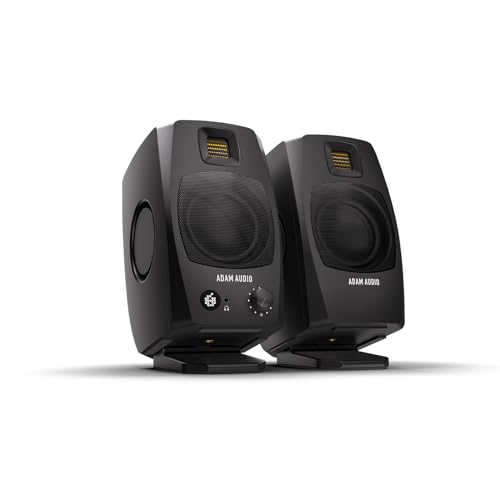
ADAM Audio D3V active desktop studio monitors with 3.5-inch aluminum woofers, 1.5-inch D-ART tweeters, USB-C, and 240W of amplification per pair.
Key Facts
- Key Spec
- 3.5-inch Aluminum Woofer, 1.5-inch D-ART Tweeter, 240W Total
- Connectivity
- USB-C, Balanced 1/4-inch TRS, Headphone Out
- Size
- 7.88 x 4.5 x 9.5 inches per monitor
- Included
- Detachable 15-Degree Angled Monitor Stands
Pros
- +USB-C input connects directly to computers and mobile devices
- +D-ART tweeter design for precise high-frequency detail
- +Front headphone socket and volume knob for easy access
- +Included angled stands aim sound toward ear level
Cons
- −11.9-pound pair suits fixed desk placement over portability
- −No wireless Bluetooth or Wi-Fi connectivity built in
- −Auto sleep mode defaults on and needs firmware to disable
Detailed Review
The ADAM Audio D3V is a fully active desktop monitor system built around a 1.5-inch D-ART ribbon tweeter and a 3.5-inch aluminum woofer, with dual passive radiators pushing response down to 45 Hz. Power comes from 80 W amplifiers per driver, and the left speaker's backplate carries balanced 1/4-inch inputs plus DSP switches for placement problems.
USB-C on the backplate lets a computer or mobile device feed the pair directly, which keeps a desk clean without a separate interface. I see this setup fitting a songwriter or producer working at a compact desk where a headphone socket and volume knob on the front panel matter more than rack gear.
At 11.9 pounds for the pair, these are desk-bound rather than portable, and there is no Bluetooth or Wi-Fi. The 20-minute auto sleep mode also defaults on until firmware is updated, which is worth planning for on long listening sessions.
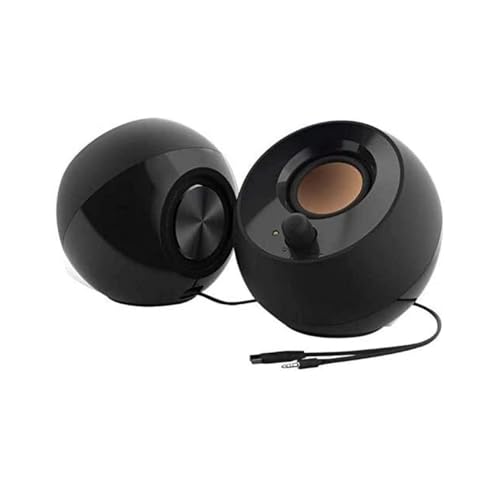
Creative Pebble 2.0 USB-powered desktop speakers with 45-degree elevated drivers, rear passive radiators, and a single USB cable for computers and laptops.
Key Facts
- Key Spec
- Frequency Response: 100 Hz to 17 kHz
- Connectivity
- Single USB cable for power and audio
- Size
- 4.96 x 9.57 x 4.96 inches
- Features
- 45-degree elevated drivers, rear passive radiators, front volume control
Pros
- +Single USB cable handles both power and audio
- +45-degree angled drivers improve desktop projection
- +Passive radiators extend low-end output
- +Front-mounted volume knob within easy reach
Cons
- −Bass rolls off below 100 Hz, so deep sub-bass is absent
- −USB-only connection rules out phones, tablets, and Bluetooth sources
Detailed Review
The Creative Pebble 2.0 runs from a single USB cable, so there is no separate power brick to hide behind a desk. Its 45-degree angled drivers aim sound up toward your ears rather than straight across the room, which suits a monitor setup where the speakers sit low.
Rear passive radiators help the small cabinets push more low-end than the size suggests, and the stated 100 Hz to 17 kHz range covers speech, music, and casual games. The front-facing volume control stays reachable without hunting for a keyboard shortcut.
For my money, this fits a student desk, a dorm room, or an office workstation where cable clutter matters more than deep bass. The 100 Hz floor means kick drums and explosions lose weight, and the USB-only connection leaves phones and tablets out.
ULTIMEA BS-3 is a 3-way powered bookshelf speaker pair with a 5.25-inch woofer, dedicated midrange, 70W RMS, and HDMI ARC plus SUB OUT.
Key Facts
- Power Output
- 70W RMS
- Driver Layout
- 5.25-inch woofer, dedicated midrange, tweeter
- Connectivity
- HDMI ARC, Optical, RCA, USB, Bluetooth 6.0
- Size
- 9.17 x 7.4 x 13.15 inches
Pros
- +Three-way driver layout separates lows, mids, and highs
- +70W RMS amplification with 0.1% stated distortion
- +HDMI ARC, optical, RCA, USB, and Bluetooth inputs onboard
- +SUB OUT port for adding an external subwoofer
Cons
- −18.96 pounds per pair limits shelf placement options
- −No stated remote control in the included accessories
- −13.15-inch height needs clearance on shallow shelves
Detailed Review
The ULTIMEA BS-3 splits its 5.25-inch woofer, dedicated midrange, and tweeter into a true three-way layout, which is why vocals and instruments stay separated instead of crowding the bass. The 70W RMS amplifier is rated for 0.1% distortion, so the pair should hold together at louder movie and music levels.
For a TV setup, HDMI ARC carries audio straight from the panel and the SUB OUT port leaves room to add a powered subwoofer later. The app EQ gives me a practical way to shift between movie, music, and gaming profiles without touching a dial.
At 18.96 pounds for the pair and 13.15 inches tall, these are not desk speakers, and the footprint suits a media console or sturdy shelf rather than a cramped desktop.
FAQs
Do you need a DAC for desktop speakers?
A separate DAC helps when your computer’s onboard audio picks up electrical noise or lacks the outputs your speakers need. Powered speakers with a built-in converter, like the Audioengine A2 GEN3, connect straight over USB-C and skip an extra box. For most desks, try the speakers first and add a DAC only if you hear hiss or hum.
What is the difference between studio monitors and desktop speakers?
Studio monitors aim for a flat response so mixes translate, while desktop speakers often add warmth for casual listening. The PreSonus Eris 3.5 and ADAM Audio D3V sit in the monitor camp, with tuning controls for room placement. If you produce music, lean monitor; if you mostly stream and game, either works.
How much desk space do bookshelf speakers take up?
A pair of 5.25-inch bookshelf speakers needs roughly a foot of width per side plus clearance behind a rear port, so measure before buying. The Klipsch R-51M lists a 13.3 by 7 by 8.5 inch cabinet, which is larger than most clip-on or 3.5-inch options. Small desks do better with compact or monitor-mounted models.
Can you add a subwoofer to powered desktop speakers?
Adding a subwoofer works only if the speakers expose a sub output or you route through a separate crossover. The ULTIMEA BS-3 includes a dedicated SUB OUT port, while most 2.0 pairs do not. Check the rear panel before buying, and match the sub’s crossover to where your speakers roll off.
Final Thoughts
For nearfield listening, the cabinet and driver tuning matter more than a big wattage figure, and the inputs have to match the gear already on your desk. If you want a pair that disappears into a monitor setup, the Computer Speakers for Desktop PC Monitor is my overall pick: the listing states USB support for Windows, macOS, ChromeOS, and Linux, and the clamp mount keeps the desk clear. If you want to spend less, the Creative Pebble 2.0, USB Desktop Stereo Speakers runs from a single USB cable and uses 45-degree elevated drivers for projection toward your ears.
Skip the clip-on and compact picks if you need deep low-end for mixing, and skip large bookshelf models if your desk is shallow or sits against a wall. A pair that fits your space and inputs removes the guesswork from desktop audio. Check the current price on Amazon before you commit.

