


A gaming laptop under a thousand dollars rarely fails because of one bad part. It fails because the money went to the wrong place: a fast processor paired with a weak graphics chip, or a bright screen bolted to a chassis that throttles the moment a game gets busy. The listings that hold up are the ones where the GPU, memory, and display are balanced for 1080p play rather than one headline number.
I compared the Best Gaming Laptops under $1000 by reading the stated specifications, checking what each machine actually includes at its listed configuration, and weighing how the parts fit together for 1080p gaming, schoolwork, and everyday multitasking. The picks below are the ones where the spec sheet tells a coherent story instead of a marketing one.
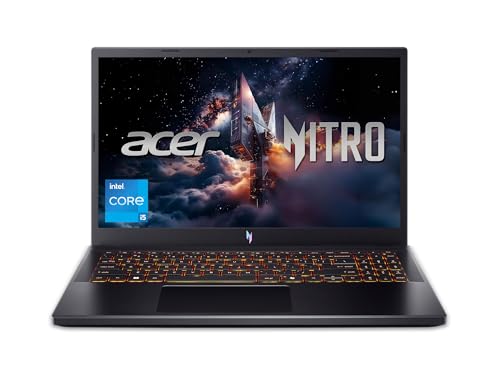
My overall pick for best gaming laptops under $1000 is the Acer Nitro V Gaming Laptop. Its RTX 4050 graphics and 165Hz panel line up well for 1080p play, and the listing notes two DDR5 memory slots so the 8GB starting configuration can grow later. My top picks are just below.
Best Gaming Laptops under $1000 at a Glance
| Product | PGH Score | ||
|---|---|---|---|
|
Best Overall Acer Nitro V 15.6" Gaming Laptop with RTX 4050 | 9.8 | Check Price on Amazon |

|
Best for 1080p Gaming HP Victus 15.6" Gaming Laptop with RTX 3050 | 9.7 | Check Price on Amazon |

|
Best for Work and Play NEOBIHIER Gaming Laptop 16.1" with i7 and GTX 1650 | 9.5 | Check Price on Amazon |

|
MSI Cyborg 15 Gaming Laptop with RTX 5050 8GB | 9.5 | Check Price on Amazon |

|
Alienware 15 Gaming Laptop with RTX 4050 and 165Hz | 9.5 | Check Price on Amazon |
In-Depth Reviews
Acer Nitro V 15.6-inch gaming laptop with Intel Core i5-13420H, GeForce RTX 4050 graphics, 165Hz FHD IPS display, 8GB DDR5, and 512GB Gen 4 SSD.
Key Facts
- Key Spec
- 15.6-inch FHD IPS, 165Hz
- Connectivity
- Thunderbolt 4, Wi-Fi 6, Killer Ethernet E2600
- Memory
- 8GB DDR5, 2 slots, max 32GB
- Storage
- 512GB PCIe Gen 4 SSD
Pros
- +165Hz refresh rate suits fast-paced shooters
- +Thunderbolt 4 port handles charging, data, and display
- +Two DDR5 slots support up to 32GB memory
- +Wi-Fi 6 and Killer Ethernet E2600 for wired or wireless
Cons
- −512GB SSD fills quickly with modern game installs
- −8GB DDR5 may limit heavy multitasking out of the box
- −4.66-pound weight makes frequent travel less comfortable
Detailed Review
The Acer Nitro V pairs a 165Hz 15.6-inch FHD IPS panel with an RTX 4050 GPU, a combination aimed at smooth motion in fast-paced games rather than high-resolution detail. The Core i5-13420H and 8GB of DDR5 handle everyday gaming and light editing, though the memory ceiling of 32GB across two slots gives room to grow later.
I find the Thunderbolt 4 port the most useful connectivity detail here, since it carries power, data, and video over one cable for a clean desk setup. Wi-Fi 6 and Killer Ethernet E2600 cover both wireless and wired connections, which matters for anyone switching between a dorm room and a home desk.
The 512GB Gen 4 SSD is the main compromise, as modern game libraries can outgrow it quickly, and the 4.66-pound weight makes this a desk-first machine rather than a daily commuter. For a student or newer PC gamer who wants a 165Hz screen and RTX 4050 graphics without a desktop, this fits well.
A 15.6-inch gaming laptop with an Intel Core i5-12450H and Nvidia GeForce RTX 3050 6GB, paired to a 144Hz FHD IPS panel.
Key Facts
- Processor
- Intel Core i5-12450H, up to 4.4GHz
- Graphics
- Nvidia GeForce RTX 3050 6GB GDDR6
- Memory
- 16GB DDR4-3200
- Storage
- 512GB PCIe SSD
Pros
- +144Hz refresh rate suits fast-paced shooters at 1080p
- +RTX 3050 6GB handles 1080p gaming and light creative tasks
- +16GB DDR4-3200 RAM for smooth multitasking
- +Backlit keyboard for low-light gaming and typing
Cons
- −7-pound weight makes daily carry a chore
- −512GB SSD fills quickly with modern game installs
- −No Thunderbolt or USB4 port listed for high-speed docks
Detailed Review
The HP Victus pairs a 15.6-inch FHD IPS panel running at 144Hz with an Nvidia GeForce RTX 3050 6GB, a combination aimed at 1080p gaming rather than high-refresh esports. The Intel Core i5-12450H and 16GB of DDR4-3200 RAM cover everyday multitasking and game overlays without much strain.
This is at its best for a student or remote worker who wants one machine for classes, spreadsheets, and evening games. The backlit keyboard helps in dim rooms, and Wi-Fi 6 keeps wireless connections current without a dongle.
Two things to weigh before buying. At 7 pounds, this is a desk-first laptop, not a daily backpack companion. And the 512GB PCIe SSD fills fast once you install a few modern titles, so plan on external storage or a swap.
A 16.1-inch gaming laptop with an i7-8750H, 32GB RAM, 1TB NVMe SSD, and GTX 1650 4GB graphics in a gray chassis.
Key Facts
- Processor
- Intel i7-8750H, 6 cores, 12 threads, up to 4.1GHz
- Graphics
- GTX 1650 with 4GB dedicated video memory
- Memory
- 32GB RAM
- Storage
- 1TB NVMe SSD
Pros
- +32GB RAM suits heavy multitasking and many browser tabs
- +1TB NVMe SSD offers fast storage for games and files
- +6-core i7-8750H with 12 threads for work and play
- +16.1-inch 1920 x 1200 display gives extra vertical space
Cons
- −GTX 1650 4GB limits modern AAA games at high settings
- −5.07-pound weight makes frequent travel less comfortable
- −0.98-inch thickness takes up more bag space
Detailed Review
The NEOBIHIER Gaming Laptop pairs a 6-core i7-8750H with 32GB RAM and a 1TB NVMe SSD, which is a lot of memory and storage for a machine in this class. The 16.1-inch 1920 x 1200 panel also gives a bit more vertical room than a standard 1080p screen, which helps with documents and timelines.
The GTX 1650 4GB is the part I would weigh most carefully. It handles compatible PC games and creative apps, but 4GB of VRAM is the ceiling, so newer titles at high settings will need lowered textures and effects. For esports and older games, that ceiling matters less.
At 5.07 pounds and 0.98 inches thick, this is a desktop replacement more than a daily carry. I see it fitting a student or remote worker who wants one machine for classes, office apps, and lighter gaming, with the 1-year limited warranty and U.S. repair support as a practical backup.
A 15.6-inch FHD 144Hz gaming laptop with an Intel Core i5-13420H, 16GB DDR5 RAM, and an RTX 5050 with 8GB GDDR7.
Key Facts
- Display
- 15.6-inch FHD 1920 x 1080, 144Hz
- Processor
- Intel Core i5-13420H
- Graphics
- NVIDIA GeForce RTX 5050 8GB GDDR7
- Memory
- 16GB DDR5 RAM
Pros
- +144Hz refresh rate for smoother motion in shooters
- +8GB GDDR7 VRAM supports modern game textures
- +16GB DDR5 memory for multitasking during play
- +512GB NVMe SSD for fast game and app loading
Cons
- −512GB fills quickly with large game installs
- −4.37 pounds is heavy for daily backpack carry
- −No Thunderbolt or USB4 port listed
Detailed Review
The MSI Cyborg 15 pairs a 15.6-inch FHD 144Hz panel with an RTX 5050 carrying 8GB of GDDR7, a combination aimed at 1080p gaming where smooth motion matters more than raw resolution. The 144Hz refresh rate is the headline for anyone playing fast-paced shooters, since the panel can show more frames per second than a standard 60Hz screen.
Inside, the Intel Core i5-13420H and 16GB of DDR5 RAM handle everyday multitasking, streaming, and schoolwork alongside games. The 512GB NVMe SSD is enough for Windows 11 and a handful of titles, though a large game library will outgrow it quickly. At 4.37 pounds, this is a laptop I would keep mostly on a desk rather than carry all day.
For a student or remote worker who wants one machine for class, work, and 1080p gaming, this configuration covers the basics without overspending on features that go unused.
Alienware 15 gaming laptop with a 15.3-inch 165Hz display, AMD Ryzen 5 220 processor, and NVIDIA RTX 4050 6GB graphics, configurable with up to 64GB DDR5 RAM.
Key Facts
- Display
- 15.3-inch 1920x1200 165Hz, 300 nits
- GPU
- NVIDIA GeForce RTX 4050 6GB GDDR6
- CPU
- AMD Ryzen 5 220
- Connectivity
- USB 3.2 Type-A and Type-C, HDMI 2.1, Ethernet, 3.5mm, Wi-Fi 6, Bluetooth 5.2
Pros
- +165Hz 1920x1200 display suits fast-paced competitive titles
- +RTX 4050 6GB GDDR6 GPU supports ray tracing and DLSS
- +Ethernet port plus Wi-Fi 6 and Bluetooth 5.2 for connectivity
- +Configurable up to 64GB DDR5 RAM and 2TB NVMe SSD
Cons
- −4.96 pounds is heavy for frequent commutes
- −8GB base RAM limits heavy multitasking without upgrade
- −Resealed unit voids original factory seal
Detailed Review
The Alienware 15 pairs a 15.3-inch 1920x1200 panel running at 165Hz with an RTX 4050 6GB GPU, a combination aimed at smooth 1080p-class gaming. The AMD Ryzen 5 220 and up to 64GB DDR5 RAM give enough headroom for streaming or photo editing alongside a game.
At 4.96 pounds and 0.9 inches thick, it is portable enough for a dorm or shared desk, but I would not want to carry it daily. The Ethernet port and Wi-Fi 6 are useful when Wi-Fi is congested, and the 165Hz refresh rate pays off in fast-paced shooters where motion clarity matters.
The base 8GB RAM config is the main catch, since modern games and Chrome tabs eat memory quickly. I would spec at least 16GB if buying this for anything beyond light gaming.
FAQs
Can you actually game on a laptop under $1000?
You can play current titles at 1080p on a laptop in this range, though you will usually run medium to high settings rather than maximum. The graphics chip matters more than the processor here, so favor a machine with a recent dedicated GPU and at least 16GB of memory. A 144Hz or 165Hz screen also makes fast shooters feel smoother than a standard panel.
Is 8GB of RAM enough for a gaming laptop?
8GB is workable for lighter games and everyday tasks, but modern titles and a browser running in the background will push it close to the limit. If the laptop has accessible memory slots, confirm the maximum supported capacity in the manufacturer’s spec sheet before buying a kit. Otherwise, buy the 16GB configuration up front.
What should you check before buying a budget gaming laptop?
Check the graphics chip first, then the memory and storage configuration, then the screen refresh rate. Confirm the port layout matches your peripherals, and read the warranty terms, since some sellers reseal units to upgrade memory or storage. If you plan to add a monitor, verify the video output specifications with the manufacturer before you buy.
Do budget gaming laptops run hot or loud?
Most slim gaming laptops get warm and audible under sustained load, and this price range is no exception. The listing does not state noise or temperature figures, so treat any specific claim with caution. Give the machine space on a hard surface rather than a bed or cushion, and follow the manufacturer’s guidance on charging and ventilation.
Final Thoughts
The deciding factor in this range is balance: a graphics chip that can handle 1080p, enough memory for the games and apps you actually run, and a screen that keeps motion clear. Paying more for a faster processor while settling for an older GPU is the most common mistake I see in budget listings.
For most people, the Acer Nitro V Gaming Laptop is the best overall choice. Its RTX 4050 graphics and 165Hz display suit 1080p gaming and streaming, and the listing notes two DDR5 slots so you can add memory later. If you want to spend less, the HP Victus 15.6″ Full HD 144Hz Gaming Laptop is the value pick, with 16GB of RAM and an RTX 3050 already installed. Skip both if you need a color-accurate panel for professional creative work or a machine light enough to carry all day, since gaming laptops at this price prioritize performance over portability. Check the current price on Amazon, and let the GPU tier settle the choice rather than the processor name.
