Nothing kills a writing session faster than a laptop that runs out of charge three pages in, or a screen so dim and glossy that you spend more time shifting position than typing. Writers do not need a gaming rig. They need a keyboard that does not fight them, a display that stays readable in a coffee shop, and enough battery to finish a chapter without hunting for an outlet.
I looked at the Best Laptops for Writers by reading manufacturer spec sheets, comparing stated battery figures and display types, and checking what each listing actually includes in the box. The picks below lean toward machines that handle long documents, browser research, and video calls without asking you to compromise on portability.
My overall pick for best laptops for writers is the HP 14″ Laptop Computer for 2026 Student Business. Its anti-glare 14-inch panel and included wireless mouse and earbuds make it a practical starting point for someone who writes in different rooms. My top picks are just below.
Best Laptops for Writers at a Glance
| Product | PGH Score | ||
|---|---|---|---|

|
Best Overall HP 14" Student Laptop with Intel N150 and 628GB | 9.8 | Check Price on Amazon |

|
Best for Students Acer Aspire Lite 15 Laptop with 16GB RAM and 256GB | 9.8 | Check Price on Amazon |

|
Unowo 15.6 Inch Laptop with Celeron N4020 | 9.7 | Check Price on Amazon |

|
Best for Travel HP 2027 Everyday Laptop with Intel N150 | 9.6 | Check Price on Amazon |

|
DRKAKO 15.6" FHD IPS Student Laptop with 12GB RAM | 9.6 | Check Price on Amazon |
|
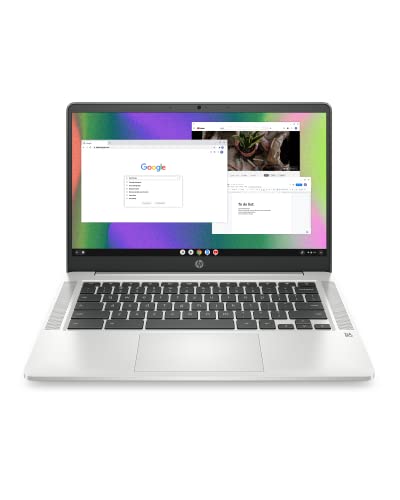
HP Chromebook 14 Laptop with Intel Celeron N4120 | 9.5 | Check Price on Amazon |

|
Best for Everyday Work Lenovo 15.6" FHD Essential Laptop with 128GB | 9.4 | Check Price on Amazon |

|
Apple MacBook Neo 13-inch Laptop with A18 Pro Chip | 9.4 | Check Price on Amazon |
In-Depth Reviews
A 14-inch HP laptop with a quad-core Intel N150, 4GB DDR5 RAM, and 628GB total storage via a bundled 500GB external drive.
Key Facts
- Processor
- Intel N150, 4 cores, up to 3.6 GHz
- Memory
- 4GB LPDDR5
- Storage
- 128GB UFS + 500GB external drive
- Display
- 14-inch HD anti-glare
Pros
- +Quad-core N150 handles web apps and light photo editing
- +Windows 11 Pro brings encryption and malware protection built in
- +Bundled 500GB external drive expands storage without opening the laptop
- +Anti-glare 14-inch panel reduces reflections in bright rooms
Cons
- −4GB RAM limits heavy multitasking and browser tabs
- −128GB UFS drive fills quickly with local files and apps
- −3.24-pound weight is noticeable for daily carry
Detailed Review
The HP 14 with the Intel N150 is a compact 14-inch machine built for students and remote workers who need Windows 11 Pro and Office out of the box. Its quad-core N150 with 6MB cache and 4GB of LPDDR5 memory suit web apps, documents, and light photo work, though I would not push it into heavy multitasking.
Storage is split between a 128GB UFS drive and a bundled 500GB portable external drive, which gives a workable total of 628GB without opening the chassis. The 14-inch anti-glare HD screen and 720p camera cover Zoom calls and presentations in bright rooms.
The catch is the 4GB RAM ceiling, which will feel tight once several browser tabs and Office apps are open at once. For a student or office user sticking to everyday tasks, that trade-off is manageable, but creators running heavier software should look elsewhere.
Acer Aspire Lite 15 with Intel Core N150, 16GB RAM, 256GB NVMe SSD, and a 15.6-inch FHD IPS anti-glare display for study, work, and daily multitasking.
Key Facts
- Processor
- Intel Core N150, 4 cores, 4 threads, up to 3.7GHz
- Memory
- 16GB RAM
- Storage
- 256GB NVMe SSD
- Display
- 15.6-inch FHD (1920 x 1080) IPS, anti-glare
Pros
- +16GB RAM handles many browser tabs and study apps
- +Full-size numeric keyboard speeds up data entry
- +Wi-Fi 6 and Bluetooth 5.2 for modern wireless connections
- +15.6-inch anti-glare IPS panel with wide viewing angles
Cons
- −256GB SSD fills quickly with large media libraries
- −No mouse included in the box
- −3.92-pound weight adds heft for daily backpack commutes
Detailed Review
The Acer Aspire Lite 15 pairs an Intel Core N150 with 16GB of RAM, which suits dozens of browser tabs, lecture recordings, and document edits at once. A 256GB NVMe SSD keeps the system responsive for textbooks and projects, though that capacity can fill quickly if you store large media libraries.
The 15.6-inch FHD IPS panel uses anti-glare ComfyView coating, so overhead lights and window glare stay manageable during long study sessions. I rate the full-size numeric keyboard a practical addition for spreadsheet work and data entry, and the 3.92-pound body is reasonable for a 15.6-inch laptop but noticeable on daily commutes.
Connectivity covers full-function USB-C, dual USB-A, HDMI 2.1, Wi-Fi 6, and Bluetooth 5.2, which handles most student and remote-work setups without a dongle. For my money, this fits learners and home-office users who need memory headroom more than raw CPU speed.
Unowo 15.6 inch laptop with Intel Celeron N4020, 4GB LPDDR4 RAM, 128GB storage, and a 1080p IPS display for light schoolwork and browsing.
Key Facts
- Key Spec
- Celeron N4020, 4GB LPDDR4 RAM, 128GB Storage
- Display
- 15.6 inch FHD 1920x1080 IPS
- Connectivity
- Type-C PD 45W, Dual-Band AC WiFi, Bluetooth
- Size
- 14 x 8.9 x 0.8 inches
Pros
- +Fanless design runs silent in quiet spaces
- +1080p IPS screen with wide viewing angles
- +Type-C PD 45W charging and data port
- +Weighs about 3.2 pounds for backpack carry
Cons
- −4GB RAM limits heavy multitasking and browser tabs
- −128GB storage fills quickly with local files and apps
- −Celeron N4020 struggles with demanding creative software
Detailed Review
The Unowo 15.6 inch laptop pairs an Intel Celeron N4020 with 4GB of LPDDR4 RAM and 128GB of storage, which sets clear expectations for what it handles well. A fanless cooling system keeps it silent, so it suits a library desk or a shared bedroom far better than a noisy budget machine.
The 15.6 inch 1080p IPS panel with narrow bezels gives documents and video calls plenty of room, and the 180 degree lay-flat hinge helps when sharing a screen across a table. At about 3.2 pounds it slips into a backpack without much thought, and the Type-C PD 45W port handles charging and data over one cable.
For my money this fits a student or remote worker running browser tabs, Office 365 documents, and video calls, not someone editing video or juggling dozens of tabs. The 4GB of RAM and 128GB drive are the real ceilings here, so plan around cloud storage and light multitasking.
A 3.24-pound 14-inch HP laptop with an Intel N150 quad-core processor, 4GB LPDDR5 RAM, and 128GB UFS storage for everyday tasks.
Key Facts
- Processor
- Intel N150 Quad-Core, up to 3.6 GHz
- Memory
- 4GB LPDDR5-4800
- Storage
- 128GB UFS
- Display
- 14-inch HD, 250 nits, 62.5% sRGB
Pros
- +Light 3.24-pound frame for daily commuting
- +Wi-Fi 6 and Bluetooth 5.4 for modern wireless
- +USB-C with DisplayPort 1.2 for external screens
- +Microsoft 365 Personal included for one year
Cons
- −4GB RAM limits heavy multitasking and many tabs
- −128GB UFS storage fills quickly with local files
- −720p webcam resolution trails 1080p alternatives
Detailed Review
The HP 2027 Everyday Laptop pairs an Intel N150 quad-core processor with 4GB of LPDDR5-4800 memory and 128GB of UFS storage, a combination aimed at web browsing, document work, and video calls rather than heavy multitasking. The 14-inch anti-glare display at 250 nits and 62.5% sRGB keeps reflections down in bright rooms, which I appreciate for a study desk near a window.
At 3.24 pounds and 0.71 inches thick, it slips into a backpack without much thought, and the Wi-Fi 6 plus Bluetooth 5.4 wireless keeps connections current. The port selection covers a USB-C with DisplayPort 1.2, two USB-A ports, HDMI 1.4b, and an SD card reader, so an external monitor and a flash card can both stay plugged in.
The honest catch is the 4GB of RAM and 128GB of storage, which will feel tight if you keep many browser tabs or large local files open. For students, remote workers, and travelers who live in cloud apps, it lands in a sensible place.
A 15.6-inch FHD IPS laptop with a J4105 quad-core processor, 12GB RAM, 256GB SSD, and a 53.2Wh battery rated for up to 6 hours.
Key Facts
- Key Spec
- 15.6-inch FHD IPS, 1920x1080
- Processor
- Intel J4105 Quad-Core
- Memory & Storage
- 12GB DDR4, 256GB SSD
- Weight & Thickness
- 3.66 pounds, 0.79 inches
Pros
- +12GB DDR4 memory suits browser tabs and documents
- +256GB SSD upgradeable to 2TB for storage
- +15.6-inch FHD IPS panel with wide viewing angles
- +180-degree hinge supports flat screen sharing
Cons
- −J4105 quad-core limits heavier multitasking
- −Battery rated for up to 6 hours, modest for full days
Detailed Review
The DRKAKO 15.6-inch laptop pairs a 1920x1080 IPS panel with a J4105 quad-core processor and 12GB of DDR4 memory. That combination points to web browsing, online classes, streaming, and document work rather than heavy multitasking. The 256GB SSD is the part I care about most for daily feel, since it keeps startup and file access quick, and it can be swapped for up to a 2TB drive or a 1TB microSD card.
Portability is a real factor here. At 3.66 pounds and 0.79 inches thick, it slips into a backpack for commutes, and the 180-degree hinge makes it easy to lay flat for group presentations. The 53.2Wh battery is rated for up to 6 hours, so I would plan on carrying the charger for a full campus day.
For a student or remote worker who mainly needs Office 365, video calls, and streaming, the spec sheet lines up. The J4105 is the honest ceiling though, so I would not expect smooth performance with many heavy apps open at once.
The HP Chromebook 14 is a 3.24-pound laptop with a 14-inch HD display, Intel Celeron N4120, 4GB RAM, and 64GB eMMC storage.
Key Facts
- Processor
- Intel Celeron N4120
- Memory
- 4 GB RAM
- Storage
- 64 GB eMMC
- Display
- 14-inch HD (1366 x 768) anti-glare
Pros
- +Light 3.24-pound frame for daily backpack carry
- +Micro-edge anti-glare 14-inch HD display
- +Quad-core Intel Celeron N4120 for basic multitasking
- +802.11ac Wi-Fi and Bluetooth combo for wireless peripherals
Cons
- −4GB RAM limits heavy browser tab loads
- −64GB eMMC storage fills quickly with local files
- −1366 x 768 resolution looks soft for text work
Detailed Review
The HP Chromebook 14a-na0226nr keeps its footprint small at 3.24 pounds and 0.7 inches thick, which suits a backpack commute or a shared kitchen table. Its 14-inch anti-glare panel runs at 1366 x 768, a resolution I would only pair with light document and browser work rather than side-by-side windows.
Inside, the quad-core Intel Celeron N4120 and 4GB of RAM cover Chrome OS basics like email, docs, and streaming, and the 64GB eMMC holds the operating system with room for a modest app set. The 802.11ac Wi-Fi and Bluetooth combo lets me pair a wireless mouse without a dongle, and HP rates battery life up to 14 hours with a 0-to-50% charge in about 45 minutes.
For a student or remote worker who lives in a browser and cloud storage, this fits a light daily routine. Anyone needing local video editing or many simultaneous tabs should look at a machine with more memory and a higher-resolution screen.
Lenovo 15.6-inch FHD laptop with an Intel processor, 8GB LPDDR5 memory, 128GB UFS 2.2 storage, and Windows 11 Home for everyday work and study.
Key Facts
- Key Spec
- 15.6-inch 1920x1080 anti-glare display, 250 nits
- Connectivity
- Wi-Fi 6, Bluetooth 5.2, USB-C with Power Delivery and DisplayPort, two USB-A, HDMI 1.4, SD card reader, audio jack
- Compatibility
- Windows 11 Home
- Size
- 14.14 x 9.21 x 0.7 inches, 3.42 pounds
Pros
- +Anti-glare 1920x1080 panel with 250-nit brightness
- +USB-C Power Delivery and DisplayPort for external displays
- +Physical privacy shutter on the 720p camera
- +65W adapter and Microsoft 365 Personal included
Cons
- −128GB UFS 2.2 storage fills fast with local files
- −8GB memory soldered limits heavy multitasking headroom
- −No dedicated graphics for gaming or GPU work
Detailed Review
The 15.6-inch 1920x1080 anti-glare panel at 250 nits is the anchor here, and the 88% active-area ratio keeps the bezels tight for documents and video. An Intel processor paired with 8GB LPDDR5 and 128GB UFS 2.2 storage covers browsing, email, and video meetings without drama.
I see this fitting a student or remote worker who carries a machine between home and campus, since the 3.42-pound shell and 0.70-inch profile slide into a backpack. Wi-Fi 6, Bluetooth 5.2, USB-C with Power Delivery and DisplayPort, two USB-A ports, HDMI 1.4, and an SD reader cover most desk setups.
Storage is the honest catch. 128GB UFS 2.2 runs out quickly once local files, apps, and offline media pile up, so cloud storage or an SD card becomes part of the routine. The 8GB of soldered memory also caps how many heavy tabs and apps run at once.
The Apple MacBook Neo is a 13-inch laptop with the A18 Pro chip, 8GB unified memory, and 256GB of storage, rated for up to 16 hours of battery life.
Key Facts
- Key Spec
- A18 Pro chip with 8GB unified memory
- Display
- 13-inch Liquid Retina, 1 billion colors
- Storage
- 256GB SSD
- Battery
- Rated up to 16 hours
Pros
- +A18 Pro chip with 8GB unified memory
- +Rated up to 16 hours of battery life
- +Aluminum enclosure at about 2.7 pounds
- +1080p FaceTime HD camera and dual-mic array
Cons
- −8GB unified memory limits heavy multitasking headroom
- −256GB storage fills quickly with large media files
- −Two side-firing speakers only, no upward drivers
Detailed Review
The MacBook Neo pairs the A18 Pro chip with 8GB of unified memory and a 13-inch Liquid Retina display, so it covers writing, presentations, and Apple Intelligence features without reaching for a discrete GPU. At about 2.7 pounds and half an inch thick, it slips into a backpack next to a charger and a notebook.
Apple rates battery life at up to 16 hours, which is the figure that matters for back-to-back classes or a full remote workday away from an outlet. The 1080p FaceTime camera and dual-mic array cover video calls, and the aluminum enclosure carries a color-matched keyboard in Blush, Silver, Citrus, or Indigo.
For my money, the 256GB SSD is the spec I would weigh hardest, since it fills fast with video projects or a large photo library. I see this fitting students and remote workers who live in browser tabs and Apple apps, not editors juggling 4K timelines.
FAQs
How much RAM does a writer actually need?
For plain document work and a handful of browser tabs, 8GB is comfortable and 4GB is workable if you keep tabs closed. If you run a reference manager, a dozen research tabs, and a video call at once, 16GB removes the stutter. Writers who edit photos or short video alongside text benefit most from the higher figure.
Is a Chromebook good enough for writing?
A Chromebook handles Google Docs, long-form web research, and email well, and the HP Chromebook 14 lists a 14-inch anti-glare display with a quad-core Intel Celeron N4120. The catch is offline access: if you need full desktop Word or Scrivener without a connection, a Windows machine is the safer call. Writers who work mostly online will not miss much.
Do I need a dedicated graphics card for writing?
No. Integrated graphics handle documents, streaming, and video calls without issue, and they keep the laptop thinner and cooler. A dedicated GPU only makes sense if you also edit video or play games between drafts. If you later add a desktop GPU for that work, check the card maker’s recommended power supply wattage and the connectors it needs, and use only the cables that came with your power supply.
Is a smaller screen better for portable writing?
A 13 or 14-inch laptop is easier to carry and fits smaller cafe tables, while a 15.6-inch panel gives you more room for two documents side by side. If you split your time between a home desk and a bag, the smaller size usually wins. Pair it with an external monitor at your desk for longer sessions.
Final Thoughts
For writing, the priorities are a keyboard you can type on for hours, a display that stays readable in mixed light, and battery life that matches your working day. Raw processor speed matters far less than those three things, which is why several of these picks use modest chips and put the money into portability and screen quality instead.
The HP 14″ Laptop Computer for 2026 Student Business is my best overall choice. Its anti-glare 14-inch display and bundled mouse and earbuds suit writers who move between rooms and want a complete setup out of the box. For a lower spend, the HP Chromebook 14 Laptop, Intel Celeron N4120 covers cloud-based writing and research with a thin, light body. Skip both if you need desktop-only software offline, and look at a Windows machine with more memory instead. If you want to compare more options across sizes and budgets, the full laptops category has the wider list. Check the current price on Amazon, and the right pick should settle the question of which laptop to carry to your next writing session.