


By hour six of a coding sprint, a flat keyboard has your wrists angled inward and your shoulders creeping toward your ears. The ache shows up before the bug does. A split keyboard lets you set each half at shoulder width, which is the whole point: your forearms stay parallel instead of crossing over a single slab of keys.
I looked at 6 split keyboards for programmers, comparing layout, tenting and tilt options, switch type, programmability, and how each connects. The picks below range from a budget membrane board to a fully programmable wireless mechanical model, so there is a fit whether you want plug-and-play or a layout you build yourself.
My overall pick for best split keyboards for programmers is the Arteck Split Ergonomic Keyboard with Palm Rest. It pairs a cushioned palm rest with a 2.4G USB receiver, so you get the split posture without a cable or a setup routine. My top picks are just below.
Best Split Keyboards for Programmers at a Glance
| Product | PGH Score | ||
|---|---|---|---|

|
Best Overall Arteck Split Ergonomic Wireless Keyboard | 9.9 | Check Price on Amazon |
|
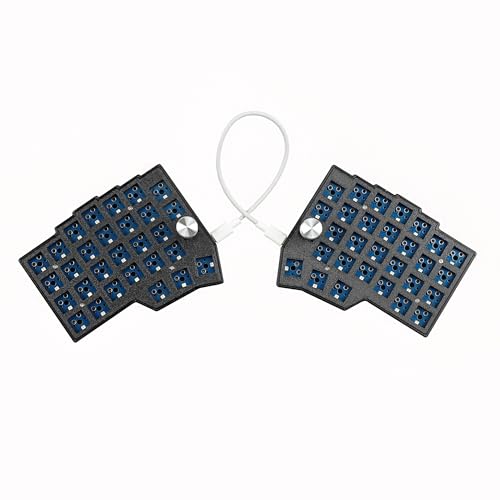
Best for Split Typing YMDK BORNE Corne 4x6 Split Keyboard with Dual | 9.9 | Check Price on Amazon |

|
YIVU Corne LP Low Profile Split Ergonomic Keyboard | 9.8 | Check Price on Amazon |

|
Best for Ergonomic Typing Keychron Q11 Ultra 8K Wireless Split Mechanical | 9.6 | Check Price on Amazon |

|
Frixalox Wired Ergonomic Split Keyboard with RGB | 9.5 | Check Price on Amazon |

|
Perixx PERIBOARD-524B Wired Ergonomic Split | 9.4 | Check Price on Amazon |
In-Depth Reviews
The Arteck Split Ergonomic Keyboard is a 2.4G USB wireless model with a split layout, cushioned wrist rest, and rechargeable battery rated for 6 months.
Key Facts
- Key Spec
- Split Ergonomic Layout with Palm Rest
- Connectivity
- 2.4G USB Wireless with Nano Receiver
- Battery
- Rechargeable Lithium, Rated 6 Months per Charge
- Size
- 16.5 x 9.6 x 1.02 inches
Pros
- +Split key layout for natural wrist and forearm alignment
- +Cushioned palm rest reduces wrist suspension while typing
- +Plug-and-play nano receiver with onboard storage slot
- +USB-C charging cable and 24-month warranty included
Cons
- −No Bluetooth option limits use to devices with USB-A ports
- −Split layout demands relearning for touch typists
- −Wired charging required when battery depletes
Detailed Review
The Arteck Split Ergonomic Keyboard uses a split key layout that angles each half inward, which is the feature that separates it from a standard flat board. A cushioned wrist rest runs the full width, so forearms stay supported through long writing or coding sessions instead of hovering above the desk.
Setup is straightforward with the nano USB receiver stored at the back of the keyboard, and the rechargeable battery is rated for 6 months on a single charge at two hours of daily use. I see this fitting a home office or dorm desk where a single USB-A port is available and cable clutter is unwelcome.
The trade-off is that split layouts force touch typists to relearn key positions, and there is no Bluetooth mode for tablets or phones. Anyone wanting a wireless board for a laptop with only USB-C ports will need an adapter.
YMDK BORNE Corne 4x6 split keyboard with 58 hot-swap keys, dual metal knobs, south RGB, and QMK/Vial programming over USB-C.
Key Facts
- Key Spec
- 58 Keys, Hot-Swap MX Sockets
- Connectivity
- USB-C Wired
- Compatibility
- Windows, macOS, Linux
- Size
- 7.87 x 3.94 x 3.94 inches
Pros
- +Hot-swap sockets allow switch swaps without soldering
- +Dual metal knobs mapped through QMK or Vial
- +South RGB per-key lighting fully customizable
- +Compact 58-key footprint saves desk space
Cons
- −Wired USB-C only, no wireless mode
- −No tenting or wrist rest included
- −PLA case may not suit buyers wanting metal
Detailed Review
The YMDK BORNE Corne 4x6 splits into two halves so I can set hand spacing to match shoulder width, which matters for long typing sessions. Dual metal knobs on each side handle volume, navigation, or layer switching through QMK and Vial.
Hot-swap MX sockets mean Kailh or Gateron switches drop in without soldering, and south-facing per-key RGB stays visible under the keys. The 58-key 4x6 layout keeps a small desk footprint while retaining full function.
The wired USB-C connection rules out wireless use, and the PLA case is a lightweight choice rather than a metal one. For a compact split board with knobs, this fits a desk-focused setup.
YIVU Corne LP is a 40% split ortholinear mechanical keyboard with hot-swappable low profile switches and Vial programming.
Key Facts
- Key Spec
- 46 keys, 3x6 column-staggered split layout
- Connectivity
- USB-C wired, 28cm TRS interconnect
- Switch Type
- Low profile linear, 40g actuation, hot-swappable
- Included
- 1.5m USB-C cable, 28cm TRS cable, keycap and switch puller
Pros
- +Split halves adjust spacing, tilt, and rotation
- +Vial firmware remaps every key without limits
- +Hot-swappable sockets simplify switch changes
- +Two cables included for combined or separate use
Cons
- −Wired USB-C only, no wireless option
- −40% layout omits dedicated number row and function keys
- −TRS interconnect cable is about 11 inches long
Detailed Review
The YIVU Corne LP splits into two halves that adjust spacing, tilt, and rotation, which suits programmers and typists who want their wrists closer together or angled apart. Each side carries a 3x6 column-staggered layout with three thumb keys, moving Enter and Space off the pinkies.
Low profile linear switches need only 40g of actuation force, and the hot-swappable sockets let me swap them without soldering. Vial handles all remapping, so I would build a dedicated layer for shortcuts instead of reaching for a mouse.
The catch is the 40% footprint. With 46 keys and no dedicated number row or function keys, everything lives on layers, and the wired USB-C connection rules out couch or travel use. For a fixed desk setup, that trade is easy to accept.
Keychron Q11 Ultra 8K is a wireless split 75% mechanical keyboard with 2.4 GHz, Bluetooth 5.3, USB-C, ZMK firmware, dual knobs, and hot-swappable RGB.
Key Facts
- Key Spec
- 8000 Hz polling rate in 2.4 GHz and wired modes
- Connectivity
- 2.4 GHz, Bluetooth 5.3, USB-C
- Compatibility
- macOS, Windows, Linux
- Size
- 13.58 x 5.27 x 1.3 inches
Pros
- +Wireless split design with 2.4 GHz sync between halves
- +8K polling rate adjustable via Keychron Launcher
- +Tri-mode connectivity across Mac, Windows, and Linux
- +Hot-swappable switches and per-key RGB customization
Cons
- −Aluminum body adds noticeable weight for portable use
- −8K polling not active by default, requires manual adjustment
- −Split layout demands desk space when halves are separated
Detailed Review
The Keychron Q11 Ultra 8K is a wireless split 75% mechanical keyboard that snaps together as one board or separates to match shoulder width. Its two halves communicate over 2.4 GHz without a tether, and the left half can work alone as a one-handed keyboard.
I see this suiting writers and programmers who want a natural typing angle without cables crossing the desk. The 8K polling rate applies in 2.4 GHz and wired modes, though it ships at 1000 Hz and needs the Keychron Launcher to change.
The CNC-machined aluminum body and multi-layer foam give it a solid feel, but that metal build adds weight if you move between rooms. ZMK firmware handles remaps and macros through the browser, which keeps setup simple.
Wired ergonomic split keyboard with integrated wrist rest, full numpad, and 17 RGB lighting effects, connecting through a 5.6 ft USB-A cable.
Key Facts
- Key Spec
- 17 RGB lighting effects, 5 brightness levels
- Connectivity
- 5.6 ft USB-A cable with USB-C adapter
- Compatibility
- Windows, macOS, Chrome OS, Linux
- Size
- 17.1 x 9.4 x 1.1 inches
Pros
- +Split frame with integrated wrist rest supports neutral wrist posture
- +Three kickstand angles let you tune typing height
- +17 lighting effects with five brightness levels for low-light work
- +Wired USB-A connection with no pairing, batteries, or drivers
Cons
- −Wired only, no wireless or Bluetooth option
- −Full-size footprint takes up more desk depth than tenkeyless boards
- −Not compatible with PS5 or Xbox consoles
Detailed Review
The Frixalox split keyboard pairs a hard plastic palm rest with a flat, split-key layout, and its 17.1 x 9.4 inch footprint makes it a full-desk board rather than a compact one. Two pairs of kickstands give three typing angles, which I would set once and leave alone for long spreadsheet or email sessions.
Lighting runs to 17 effects across 10 rainbow modes and 7 solid colors, with five brightness levels, so late-night typists can keep keys visible without flooding the room. The 5.6 ft USB-A cable is plug-and-play on Windows, macOS, Chrome OS, and Linux, and the USB-C adapter covers laptops and desktops with different ports.
The trade-off is the wiring. There is no wireless mode, so this suits a fixed desk setup, and console owners should look elsewhere since it will not work with PS5 or Xbox. I would point anyone wanting a split layout with a numpad and a wrist rest at this, provided the desk has the depth.
Perixx PERIBOARD-524B wired split ergonomic keyboard with up to 2 ft separation, low profile membrane keys, and adjustable tilt angle.
Key Facts
- Key Spec
- Up to 2 ft split separation
- Connectivity
- Wired USB
- Compatibility
- Windows 7, 8, 10, 11
- Size
- 14.2 x 8.5 x 1.1 inches
Pros
- +2 ft separation lets each half sit at shoulder width
- +Curved split-key slope supports neutral wrist alignment
- +Adjustable tilt angle with multiple positions for posture tuning
- +Low profile membrane keys with long travel reduce mistyping
Cons
- −Wired USB connection limits placement to cable reach
- −Membrane keys offer less tactile feedback than mechanical switches
- −Windows-only compatibility excludes macOS and Linux systems
Detailed Review
The PERIBOARD-524B splits into two halves with up to 2 ft of separation, letting each half sit at shoulder width instead of forcing wrists inward. The curved, split-key slope encourages a more natural arm and hand position than a flat board, which matters for long typing sessions.
I rate the adjustable tilt angle as the most practical feature here, since multiple positions let you dial in wrist posture rather than accepting one fixed angle. Low profile membrane keys with long travel aim for a tactile feel and fewer mistyping errors, though membrane switches lack the crisp feedback of mechanical designs.
The wired USB connection keeps latency predictable but limits placement to cable reach, and the board is built for Windows 7 through 11 only. For remote workers or students with shoulder or wrist discomfort from flat keyboards, this split design is worth considering.
FAQs
Can you program macros on a split keyboard?
Several models here run QMK, VIAL, or ZMK firmware, which lets you remap keys and record macros without writing code. That matters if you want a shortcut for a code snippet or a build command. Boards without firmware support rely on the operating system’s own shortcut tools instead.
Do you need a wrist rest with a split keyboard?
A wrist rest helps only if it keeps your wrists level rather than propped up at an angle. The Arteck and Frixalox models include one, while the compact mechanical boards expect you to float your hands or add your own. If you already have wrist pain that persists, see a doctor rather than treating a keyboard as a fix.
Is a split keyboard better for programming than a standard one?
A split layout lets you set each half at shoulder width, which keeps your forearms parallel and reduces the inward wrist angle of a one-piece board. Whether that feels better is personal. Programmers who use heavy modifier combos often gain the most from programmable layers that move brackets and symbols onto the thumb cluster.
What is the difference between ortholinear and column-staggered splits?
Ortholinear keys sit in straight columns, while column-staggered boards offset each column to match finger length. The YIVU Corne LP uses a column-staggered arrangement with thumb keys. Neither is objectively faster; the adjustment period is usually a week or two before typing speed recovers.
Final Thoughts
The deciding factors for a split keyboard are how much separation you actually want, whether you need programmability, and whether you prefer membrane or mechanical switches. A board that sits too wide or too narrow for your shoulders will not help, so measure your natural typing position before you commit.
For most programmers, the Arteck Split Ergonomic Keyboard with Palm Rest is the best overall choice. It suits anyone who wants the split posture with a cushioned rest and a wireless receiver, and it is the simplest of the group to set up. If you want to spend less, the Frixalox Wired Ergonomic Split Keyboard with RGB is the value pick, with a full-size layout, a number pad, and adjustable typing angles for spreadsheet and terminal work. Skip both if you need hot-swappable mechanical switches or firmware-level remapping, and look at the mechanical boards instead. If you are still sorting out the rest of your desk setup, a look at the full keyboards category can help you match a board to the rest of your gear. Check the current price on Amazon, and the right split layout removes the guesswork about where your hands should sit.

