Copying a folder of RAW photos or a project archive to an external drive should take minutes, not an hour. On a Mac, the bottleneck is often the port and the drive itself: a USB 3.0 enclosure caps real-world transfers well below what a Thunderbolt or USB 3.2 Gen 2 port can carry, and a drive that only lists a peak speed without saying which interface it needs leaves you guessing.
For best external ssds for mac, the useful comparisons are interface type, stated read and write speeds, capacity, and how the enclosure handles heat and travel. I worked from manufacturer spec sheets, the ports each drive requires, and buyer feedback on reliability and thermals rather than lab numbers I did not run.
My overall pick for best external ssds for mac is the WD 1TB Elements SE – Portable SSD, USB 3.0. It is a straightforward plug-and-play drive with a stated 400MB/s read speed and a compact shell, which suits everyday backups and file moves without fuss. My top picks are just below.
Best External SSDs for Mac at a Glance
| Product | PGH Score | ||
|---|---|---|---|

|
Best Overall WD 1TB Elements SE Portable SSD with USB 3.0 | 9.9 | Check Price on Amazon |

|
Best for iPhone ProRes SSK Portable SSD 250GB USB-C External Drive | 9.6 | Check Price on Amazon |
|
Best for iPhone 4K Capture fanxiang PS1008 500GB Portable SSD with 1000MB/s | 9.6 | Check Price on Amazon |

|
Best for Travel SanDisk 1TB Portable SSD with 1000MB/s Read Speeds | 9.6 | Check Price on Amazon |

|
Best for Pocket Carry Lexar ES3 1TB Portable SSD with 1050MB/s USB 3.2 | 9.6 | Check Price on Amazon |

|
Best for Video Editing Samsung T7 Portable SSD 1TB USB 3.2 Gen 2 Titan | 9.6 | Check Price on Amazon |

|
Best for Large Files Samsung T9 Portable SSD 2TB with 2,000 MB/s USB | 9.6 | Check Price on Amazon |

|
SanDisk 2TB Extreme Portable SSD with 1050MB/s | 9.5 | Check Price on Amazon |

|
Best for Everyday Backup Generic 1TB-128TB Portable External SSD with USB-C | 9.4 | Check Price on Amazon |
In-Depth Reviews
WD Elements SE portable SSD with 1TB capacity and USB 3.0 connectivity. Read speeds up to 400MB/s and drop resistance up to 2 meters.
Key Facts
- Capacity
- 1TB
- Interface
- USB 3.0
- Read Speed
- Up to 400MB/s
- Drop Resistance
- Up to 2 meters
Pros
- +Read speeds up to 400MB/s for large file transfers
- +1TB capacity in a pocket-sized square footprint
- +Drop resistance up to 2 meters for portable use
- +Plug-and-play setup with no software required
Cons
- −USB 3.0 interface caps throughput below newer USB standards
- −No hardware encryption or password protection mentioned
Detailed Review
The WD Elements SE packs 1TB of storage into a square that measures just 2.54 inches across and weighs 0.06 pounds. That footprint slips into a laptop bag without adding noticeable bulk, which matters if you carry a drive between a desk and a campus or office.
WD rates read speeds up to 400MB/s, enough to move large game installs or video files without waiting on a spinning disk. The USB 3.0 connection is plug-and-play on PC and Mac, so there is no driver step before the drive shows up.
Drop resistance up to 2 meters covers the occasional desk knock, though the USB 3.0 interface is the real ceiling here. I would pick this for students and remote workers who need a simple, pocketable drive rather than a high-speed external SSD.
SSK Portable SSD with 250GB capacity, USB 3.2 Gen2 interface, and read speeds up to 1050MB/s.
Key Facts
- Capacity
- 250GB
- Interface
- USB 3.2 Gen2
- Read Speed
- Up to 1050MB/s
- Write Speed
- Up to 1000MB/s
Pros
- +Reads up to 1050MB/s over USB 3.2 Gen2
- +Includes both USB-C and USB-A cables
- +Aluminum case helps dissipate heat
- +Weighs just 36.6g for easy carrying
Cons
- −250GB capacity fills quickly with 4K video
- −SLC cache shrinks as drive fills
- −No hardware encryption mentioned for sensitive data
Detailed Review
The SSK Portable SSD packs 250GB into a 2.6 by 1.5 by 0.5 inch aluminum shell that weighs just 36.6g. Its USB 3.2 Gen2 interface is rated for reads up to 1050MB/s and writes up to 1000MB/s, which suits moving large project files between a desktop and a laptop without waiting on a spinning drive.
This works best for someone who needs a pocketable scratch disk for iPhone 4K ProRes capture, since the drive draws under 2.4 watts and includes both USB-C and USB-A cables. The S.M.A.R.T. diagnostics and TRIM support are useful for keeping write speeds steady over time.
The 250GB capacity is the main trade-off. Windows shows about 232GB, and the SLC cache claims 25% of available space, so the high-speed buffer shrinks as the drive fills. For large video shoots, I would step up in capacity.
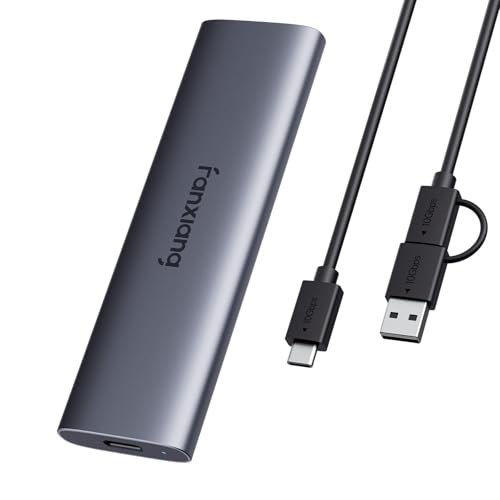
The fanxiang PS1008 is a 500GB portable SSD with USB 3.2 Gen2 Type-C, rated up to 1000MB/s read and 900MB/s write, and an aluminum alloy shell.
Key Facts
- Capacity
- 500GB
- Interface
- USB 3.2 Gen2 Type-C
- Rated Speed
- 1000MB/s read, 900MB/s write
- Compatibility
- iPhone 15 and newer, Mac, Windows, Android
Pros
- +Rated 1000MB/s read and 900MB/s write over Gen2
- +USB-C cable included for immediate plug-and-go setup
- +Aluminum body helps dissipate heat during long transfers
- +Five-year limited service commitment stated by brand
Cons
- −Full speed requires a USB 3.2 Gen2 port on your device
- −Some Mac Thunderbolt ports may not reach Gen2 speeds
- −iPhone file access needs the Files app, not plug-and-play
Detailed Review
The fanxiang PS1008 is a 500GB portable SSD built around a USB 3.2 Gen2 Type-C interface, rated for 1000MB/s read and 900MB/s write. That puts it in the right lane for moving 4K ProRes footage off an iPhone 15 or newer, though the drive only hits those numbers when the host port actually supports Gen2.
I rate the unibody aluminum shell as the more useful detail here. At roughly 4.25 by 1.34 by 0.51 inches and under 1.5 ounces, it slips into a pocket, and the metal casing helps pull heat away during long transfers. The brand notes some Macs may not reach full Gen2 speeds even over Thunderbolt 3 or 4, which is worth checking before buying for a Mac-based edit workflow.
For iPhone recording, the drive works without an app, but you have to open the Files app and browse to PS1008 to find your clips. That suits a creator who wants a small scratch drive for on-location capture, and less so anyone expecting a pop-up to appear the moment it connects.
The SanDisk 1TB Portable SSD is a pocket-sized external drive rated for read speeds up to 1000MB/s with USB-C connectivity and 2-meter drop protection.
Key Facts
- Capacity
- 1TB
- Read Speed
- Up to 1000MB/s
- Connectivity
- USB-C
- Drop Protection
- Up to 2 meters
Pros
- +Read speeds rated up to 1000MB/s for big transfers
- +USB-C connection works without drivers or setup
- +Pocket-size 0.07-pound body adds little bag weight
- +Drop protection rated up to 2 meters
Cons
- −USB-C cable not confirmed as included
- −1TB fills fast with large video projects
- −Sustained write speed not stated
Detailed Review
The SanDisk 1TB Portable SSD is built around a 1000MB/s read rating and a 0.07-pound body that measures 1.77 x 3.35 x 0.39 inches. For anyone moving large video files between a laptop and a desktop, that pocket footprint matters more than the raw speed figure alone.
USB-C plug-and-play keeps setup simple, and the 2-meter drop protection rating is the detail that makes this drive easy to toss in a bag for campus or a client shoot. I rate it a sensible pick for creators who shuttle projects between machines and do not want a spinning drive in the bag.
The 1TB capacity is the real constraint. Large video projects and AI-generated edits will fill it quickly, and the write speed is not stated, so heavy sustained transfers deserve caution. Pair it with a spare USB-C cable, since one is not confirmed in the box.
The Lexar ES3 is a 1TB portable SSD rated up to 1050MB/s over USB 3.2 Gen 2, weighing 42g and 10.5mm thick.
Key Facts
- Key Spec
- 1TB capacity, up to 1050MB/s read
- Connectivity
- USB 3.2 Gen 2, Type-C cable included
- Compatibility
- iPhone 17 series, Android, laptops, cameras, PS4, PS5, Xbox X|S
- Size
- 3.94 x 1.97 x 0.39 inches
Pros
- +42g weight and 10.5mm thickness for pocket carry
- +USB 3.2 Gen 2 rated up to 1050MB/s read
- +Type-C cable included for immediate use
- +DataShield 256-bit AES encryption software included
Cons
- −MagSafe not available in this version
- −iPhone 14 and older models not supported
- −Read speed can drop on systems without USB 3.2 Gen 2
Detailed Review
The Lexar ES3 packs 1TB into a shell that weighs 42g and measures 10.5mm thick, which is the kind of footprint I want for a drive that lives in a jacket pocket or a camera bag. The USB 3.2 Gen 2 interface is rated up to 1050MB/s read and 1000MB/s write, so large project files and game captures move quickly when the host port supports that standard.
Compatibility covers iPhone 17 series, Android devices, laptops, cameras, and consoles including PS4, PS5, and Xbox X|S, with a Type-C cable in the box for plug-and-play. I would keep the MagSafe caveat in mind, since this version does not include it, and iPhone 14 and older models are not supported.
For a creator shuttling footage between a camera and a laptop, or a console owner archiving games, the ES3 fits the job without bulk. Just confirm your system supports USB 3.2 Gen 2 to see the rated speeds.
The Samsung T7 is a 1TB portable SSD with PCIe NVMe technology, rated up to 1,050MB/s reads and 1,000MB/s writes over USB 3.2 Gen 2.
Key Facts
- Capacity
- 1TB
- Interface
- USB 3.2 Gen 2
- Rated Speed
- Up to 1,050MB/s read, 1,000MB/s write
- Dimensions
- 3.3 x 2.2 x 0.3 inches
Pros
- +Read and write speeds rated up to 1,050/1,000MB/s
- +Aluminum unibody with 6-foot fall protection rating
- +Compact 3.3 x 2.2 x 0.3-inch, 0.13-pound shell
- +1TB capacity for large project and game files
Cons
- −USB 3.2 Gen 2 speeds need a matching port to hit rated figures
- −Firmware and components are in-house, limiting third-party repair options
Detailed Review
The Samsung T7 packs PCIe NVMe internals into a 3.3 x 2.2 x 0.3-inch aluminum unibody that weighs 0.13 pounds, and Samsung rates it at 1,050MB/s reads and 1,000MB/s writes over USB 3.2 Gen 2. That puts it in the territory of shuttling 4K 60fps footage or a large game library between machines without a long wait.
I would point video editors and photographers at the 1TB capacity first, because it holds a working project plus camera originals in one pocketable drive. The shock resistance and 6-foot fall protection matter for anyone carrying it between a desk and a shoot.
The catch is the interface. Those rated speeds assume a USB 3.2 Gen 2 port on both ends, and an older USB-A or Gen 1 connection will pull them down. Buyers on legacy laptops should confirm the port before expecting the full figure.
The Samsung T9 Portable SSD is a 2TB USB 3.2 Gen 2x2 external drive rated for up to 2,000 MB/s reads and writes, with Magician software support.
Key Facts
- Key Spec
- 2TB capacity, rated up to 2,000 MB/s
- Connectivity
- USB 3.2 Gen 2x2
- Compatibility
- Desktop, camera, gaming console, iPhone 15 Pro
- Size
- 3.46 x 2.36 x 0.55 inches
Pros
- +2TB capacity suits large game and video libraries
- +Rated 2,000 MB/s reads and writes over USB 3.2 Gen 2x2
- +Dynamic Thermal Guard manages heat during long transfers
- +Magician software adds firmware updates and drive monitoring
Cons
- −Full 2,000 MB/s needs a USB 3.2 Gen 2x2 port, not standard USB 3.2
- −Light 0.27 lb shell can slide on smooth desks
Detailed Review
The Samsung T9 pairs a 2TB capacity with sustained read and write speeds rated up to 2,000 MB/s over USB 3.2 Gen 2x2. That ceiling only applies if the host port supports Gen 2x2, so a standard USB 3.2 Gen 1 or Gen 2 port will not reach it.
Dynamic Thermal Guard is the detail I care about for long edit sessions or multi-hundred-gigabyte game installs, since sustained writes are where portable drives tend to slow. The shell measures roughly 3.5 by 2.4 by 0.6 inches and weighs about 0.27 pounds, so it fits a jacket pocket or a camera bag without much bulk.
Magician software adds firmware updates and drive health monitoring, which suits creators and students moving project files between a desktop and a laptop. The included cable is the one to use, and the T9 is rated for iPhone 15 Pro Res 4K at 60fps capture. I would pick this for a video editor or a student who needs one fast drive for large files, not for someone who wants a rugged field drive.
SanDisk 2TB Extreme Portable SSD with up to 1050MB/s read, IP65 water and dust resistance, and 256-bit AES hardware encryption.
Key Facts
- Key Spec
- 2TB capacity, up to 1050MB/s read
- Connectivity
- USB-C 3.2 Gen 2
- Size
- 3.97 x 2.07 x 0.38 inches
- Rating
- IP65 water and dust resistance
Pros
- +1050MB/s read speed from USB-C 3.2 Gen 2
- +IP65 water and dust resistance for outdoor use
- +3-meter drop protection adds ruggedness
- +Carabiner loop secures drive to backpack
Cons
- −Write speed lower than read at 1000MB/s
- −USB-C cable not confirmed included
- −No hardware write-protect switch
Detailed Review
The SanDisk Extreme Portable SSD pairs a 2TB capacity with up to 1050MB/s read and 1000MB/s write speeds over USB-C 3.2 Gen 2. That speed suits moving large game folders or video files between a laptop and a desktop without waiting on a spinning drive.
The IP65 rating and 3-meter drop protection make this a sensible pick for tossing in a backpack or taking on location. The carabiner loop adds a way to clip it to a belt or bag, and 256-bit AES hardware encryption keeps private files locked behind a password.
I would choose this for a student or creator who needs fast, rugged external storage. The write speed trails the read figure, and the drive ships without a confirmed USB-C cable, so check what is in the box before relying on it as a sole transfer drive.
A generic portable external SSD with USB-C connectivity, offered in capacities from 1TB to 128TB and compatible with Windows, macOS, Android OTG, and Linux.
Key Facts
- Capacity Range
- 1TB to 128TB
- Connectivity
- USB-C (USB 3.0 or higher port required for optimal performance)
- Compatibility
- Windows 10/11, macOS 10.14+, Android with OTG support, Linux
- Included
- USB-C cable
Pros
- +USB-C connectivity with included cable for quick setup
- +Wide OS support across Windows, macOS, Android OTG, and Linux
- +Compact lightweight body for travel and daily carry
- +Capacity options up to 128TB for large media collections
Cons
- −Generic brand with little public track record for reliability
- −No stated read or write speeds to judge real transfer performance
- −USB 3.0 port needed for optimal speed, older ports may limit it
Detailed Review
This generic portable SSD is built around USB-C connectivity and a capacity range that runs from 1TB all the way to 128TB. The included cable and support for Windows 10/11, macOS 10.14+, Android OTG, and Linux make it a plug-in option for laptops, desktops, and compatible phones.
The compact, lightweight shell is the part I find most useful for carrying in a laptop bag or backpack, and the broad OS list covers most setups without extra adapters. For my money, it suits someone who needs simple external storage for photos, documents, or media files rather than a high-performance scratch drive.
The catch is the generic branding and the absence of stated read or write speeds, so I would treat it as everyday backup storage and keep a second copy of anything important. Check the manufacturer's stated limits before relying on it as a primary drive.
FAQs
What is the difference between USB 3.0 and USB 3.2 Gen 2 external SSDs?
USB 3.2 Gen 2 drives are rated for roughly 1000MB/s or more, while USB 3.0 models top out around 400MB/s. If you move large video files regularly, the faster interface saves real time; for documents and photos, a USB 3.0 drive is often enough. Check that your Mac’s port actually supports the faster standard.
Can you use an external SSD for video editing on a Mac?
Yes, provided the drive’s stated read and write speeds keep up with your footage and your Mac’s port supports the same interface. A 1000MB/s drive handles 4K editing more comfortably than a 400MB/s one. For heavy timelines, confirm the port spec and keep the drive on a stable surface so it is not knocked mid-render.
Is it worth buying a portable SSD with drop protection?
It is worth it if the drive travels in a bag or pocket. Several models here list drop protection up to 2 or 3 meters, and one lists IP65 water and dust resistance. Those figures come from the listings, not from testing. A padded pouch still helps, and no enclosure makes a drive immune to damage.
Do you need a Thunderbolt drive for a Mac?
No, most Mac users do fine with a USB-C drive. Thunderbolt matters mainly for very high sustained throughput, and several USB 3.2 Gen 2 drives here are rated near 1000MB/s. Note that some Macs may not reach full Gen 2 speeds even through a Thunderbolt port, so check your model’s spec before expecting peak numbers.
Final Thoughts
The deciding factors for best external ssds for mac are interface speed, capacity, and how the drive handles heat and travel. Match the drive to the port you actually have, and a backup that used to drag becomes a routine step.
For most people, the WD 1TB Elements SE – Portable SSD, USB 3.0 is the best overall choice. It suits everyday backups and file moves, with plug-and-play setup and a compact shell that fits a laptop bag. If you want to spend less, the 1TB-128TB Portable External SSD Hard Drive USB-C covers basic storage expansion across Windows, macOS, and Android. Skip both if you need sustained multi-gigabit throughput for 8K editing, where a higher-tier interface matters more. For related storage comparisons, see internal SSDs and storage and PC components.
Check the current price on Amazon, and pick the drive that matches your Mac’s port so you stop second-guessing whether your backup will finish before you need to leave.