A case that looks roomy in photos can still leave a 360mm radiator fighting the front panel, or push a graphics card into the pump reservoir. Water cooling adds parts that need their own space, and a chassis that ignores that turns a clean loop into a puzzle.
I compared the Best PC Cases for Water Cooling by looking at radiator mounts, GPU and PSU clearances, motherboard support, and how each layout handles cable routing and airflow. The picks below range from compact Micro-ATX shells to open-frame test benches, so the right one depends on whether you are building a quiet loop or a showcase rig.
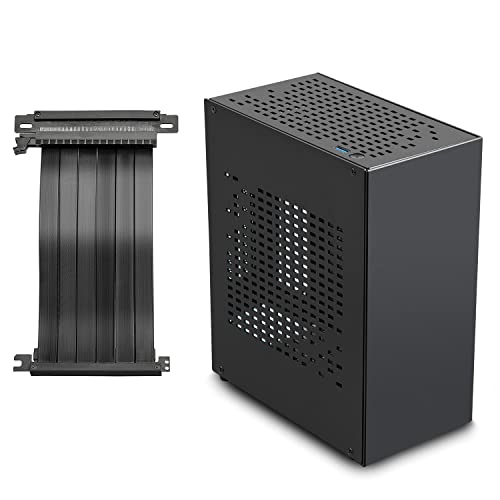
My overall pick for best pc cases for water cooling is the DALAIBUKESI DIY Aluminium Pc Open Case Computer. Its open aluminium frame gives a pump and reservoir room to breathe and makes it easy to reach fittings without pulling the whole loop apart. My top picks are just below.
Best PC Cases for Water Cooling at a Glance
| Product | PGH Score | ||
|---|---|---|---|

|
Best Overall DALAIBUKESI DIY Aluminum Open PC Test Bench | 9.9 | Check Price on Amazon |

|
Best for Full-Tower Builds Cooler Master HAF 700 EVO E-ATX Full-Tower PC Case | 9.9 | Check Price on Amazon |
|
Best for Showcase Builds Cooler Master MasterFrame 360 Stage LCD ATX Case | 9.8 | Check Price on Amazon |

|
Best for Long GPUs ASUS A32 Plus ATX Gaming PC Case with 4 ARGB Fans | 9.5 | Check Price on Amazon |

|
Best for Show Builds Thermaltake DistroCase 350P Mid Tower Case with 48 | 9.5 | Check Price on Amazon |

|
Best for Compact Builds Cooler Master Q300L V3 Micro-ATX Case with 366mm | 9.4 | Check Price on Amazon |
In-Depth Reviews
DALAIBUKESI DIY aluminum open PC test bench chassis supporting ITX through E-ATX boards, unlimited graphics card length, and ATX, SFX, or 1U power supplies.
Key Facts
- Form Factor
- E-ATX, ATX, MATX, ITX
- GPU Clearance
- Unlimited length
- PSU Support
- ATX, SFX, 1U
- Cooling
- Air and water CPU cooling
Pros
- +Open aluminum frame eases component access during builds
- +Unlimited GPU length gives freedom for long cards
- +Accepts ATX, SFX, and 1U power supplies
- +Supports air and water cooling setups
Cons
- −Open frame leaves dust and spills unprotected
- −No drive bays or cable routing channels mentioned
- −Sold without fans, cables, or mounting hardware
Detailed Review
The DALAIBUKESI DIY open chassis is an aluminum test bench that spans ITX up to E-ATX, so a single frame covers a swap from a small HTPC board to a full workstation build. The open layout means I can reach every slot and header without pulling panels, which suits anyone who swaps GPUs or coolers often.
Two specs stand out for builders. Graphics card length is unrestricted, so even a triple-slot card clears the frame, and the mount accepts ATX, SFX, and 1U power supplies, which covers most spare units on a shelf. Air and water CPU cooling both fit.
What it does not do is shield parts from dust, pets, or spills, and the frame ships without fans, cables, or mounting hardware. For a dedicated bench or a wall-mounted show build, that trade is acceptable. In a carpeted home office, I would plan for regular cleaning.
E-ATX full-tower case with a customizable IRIS LCD on the front, a breathable tempered glass panel, and two 200mm SickleFlow fans for high airflow.
Key Facts
- Form Factor
- E-ATX Full-Tower
- Dimensions
- 26.22 x 11.46 x 24.65 inches
- Weight
- 55.33 pounds
- Front Panel
- IRIS Customizable LCD with Breathable Tempered Glass
Pros
- +E-ATX full-tower space for large boards and radiators
- +IRIS LCD front panel for custom on-case display content
- +Two 200mm SickleFlow fans for high-airflow intake
- +Tool-less access for faster build and maintenance work
Cons
- −55.33-pound weight makes moving or repositioning awkward
- −Full-tower footprint demands serious desk or floor space
Detailed Review
The HAF 700 EVO leans on two 200mm SickleFlow fans and a breathable tempered glass front, so a high-airflow build gets a lot of intake without stacking extra 120mm units. I see that layout suiting a large E-ATX board with a thick radiator and a long graphics card, where the full-tower frame leaves room to work.
The IRIS LCD is the piece that separates this from a plain mesh tower, since it puts a customizable display on the front panel rather than leaving it blank. Tool-less access matters here too, because pulling panels for a GPU swap or a cable reroute is quicker than undoing a dozen thumbscrews.
At 55.33 pounds, this is a case to place once and leave in position, and the full-tower footprint needs a deep desk or floor spot. For a builder planning a big, air-hungry system, that trade is the point.
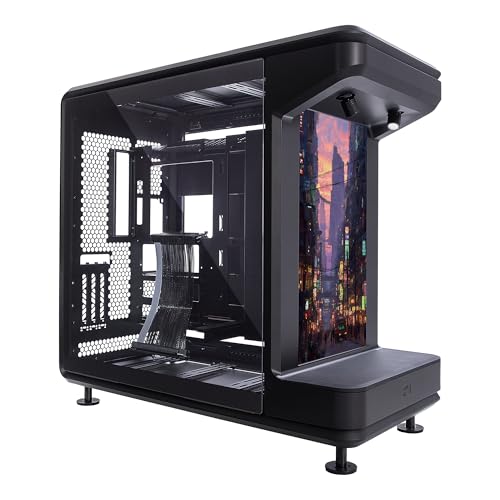
Cooler Master MasterFrame 360 Stage LCD is an open-frame ATX case with a front-facing LCD screen and support for up to twelve 120mm fans.
Key Facts
- Key Spec
- Front-facing LCD display with MicroSD playback
- Compatibility
- Mini-ITX, Micro-ATX, ATX, ATX BTF motherboards
- Size
- GPU clearance up to 430mm, PSU up to 210mm
- Included
- LCD screen, open-frame chassis, cable routing clearance
Pros
- +Front-facing LCD adds a functional display to the case
- +Open chassis supports up to 360mm radiators and twelve 120mm fans
- +Fits long graphics cards up to 430mm and ATX BTF boards
- +110mm cable routing clearance aids clean builds
Cons
- −Open-frame design leaves internal components exposed to dust
- −LCD screen adds cost over a standard ATX case
- −Large footprint takes up significant desk or floor space
Detailed Review
The MasterFrame 360 Stage LCD centers on a front-facing screen that works as a true secondary monitor or plays JPG and MP4 files from a MicroSD card. That makes it a different kind of case, one built for showing off a build rather than hiding it behind a solid panel.
Cooling headroom is the other headline. It supports up to twelve 120mm fans, fan sizes up to 200mm, and radiators up to 360mm, so a high-end air or custom liquid loop has room to breathe. The open frame also fits GPUs up to 430mm and PSUs up to 210mm, which covers most long cards and large power supplies.
For my money, the trade-off is dust and space. An open chassis exposes components to more dust than a filtered, enclosed case, and it needs a visible spot on a desk or floor. I'd consider this for a showcase build where the LCD and open layout are the point, not for a quiet, sealed office PC.
ASUS A32 Plus is a dual-chamber ATX case with four pre-installed ARGB fans, front USB-C, and room for 360mm radiators and 420mm graphics cards.
Key Facts
- Form Factor
- ATX, Micro-ATX, Mini-ITX
- Max GPU Length
- 420 mm
- Max CPU Cooler Height
- 165 mm
- Radiator Support
- Top 120/240/360 mm, Rear 120 mm, Bottom 120/240/360 mm
Pros
- +Four ARGB fans included, no extra fan purchase needed
- +420mm GPU clearance covers long triple-fan cards
- +360mm radiator support on top and bottom mounts
- +Front USB 10Gbps Type-C port for fast device hookups
Cons
- −No fans listed for rear exhaust position
- −Tempered glass panels need careful handling during builds
Detailed Review
The A32 Plus splits its interior into two chambers, which keeps CPU heat and graphics card heat from sharing one airflow path. Four ARGB fans come pre-installed, so a fresh build gets lighting and airflow without a separate fan order. The front panel adds a USB 10Gbps Type-C port, which suits anyone with a modern board header and a phone or drive that uses the smaller connector.
Clearance is the headline number here. A 420mm graphics card limit covers the longest triple-fan models, and the 165mm cooler height handles most tower air coolers. Radiator support runs up to 360mm on the top and bottom, with a single 120mm spot at the rear.
For a mid-tower build around $110, I'd point this at anyone running a long GPU who wants the glass-panel look without buying fans separately. The rear exhaust spot sits empty, so plan a fifth fan if you want a full push-pull layout.
Thermaltake DistroCase 350P is a mid tower case with an open frame design, 5mm tempered glass, and 48 addressable LEDs.
Key Facts
- Key Spec
- 48 RGB LEDs
- Connectivity
- USB 3.0 x 2, USB 2.0 x 2, HD Audio x 1
- Size
- 22.32 x 13.1 x 19.3 inches
- Warranty
- 3 years
Pros
- +Open frame shows off components clearly
- +48 RGB LEDs sync with TT RGB PLUS and NeonMaker
- +Tempered glass side panel adds durability
- +Four USB ports plus HD audio on front
Cons
- −39.2 pounds makes it heavy to move
- −No USB-C port on front panel
- −Open frame exposes internals to dust
Detailed Review
The DistroCase 350P stands out with an open frame design and a 5mm tempered glass window, which puts the build itself on display. That 5mm glass is thicker than the acrylic panels common at this size, and the 48 LEDs are compatible with TT RGB PLUS and NeonMaker for software control.
At 22.32 x 13.1 x 19.3 inches and 39.2 pounds, this is a substantial mid tower that I would treat as a stationary showpiece rather than a lan party case. The front panel gives you two USB 3.0, two USB 2.0, and HD audio, so most peripherals connect without a hub.
An open frame does mean more dust reaches the components, and there is no USB-C on the front I/O. For a builder who wants the hardware visible and is willing to clean more often, the DistroCase 350P fits that goal.
Micro-ATX case with tempered glass, support for 366mm graphics cards and 240mm AIO radiators, plus six fan mounts for airflow.
Key Facts
- Key Spec
- 366mm GPU Clearance
- Compatibility
- Micro-ATX Motherboards
- Size
- 15.2 x 15.3 x 12.6 inches
- Weight
- 10 pounds
Pros
- +366mm GPU clearance fits most current gaming graphics cards
- +Six fan mounts plus 240mm radiator support for airflow
- +Movable I/O panel adapts to desk or floor placement
- +Magnetic dust filters simplify cleaning in dusty rooms
Cons
- −Micro-ATX form factor limits motherboard choices versus ATX cases
- −Tempered glass side panel shows dust and fingerprints easily
Detailed Review
The Q300L V3 centers on a 366mm graphics card clearance, which covers most current RTX and Radeon cards without forcing a mid-tower. I would point builders toward it when a compact footprint matters more than room for a full ATX board. Six fan mounts and 240mm radiator support give real airflow headroom for a small case.
Cooler clearance tops out at 178mm, so most tower air coolers still fit alongside a 200mm ATX power supply. The movable I/O panel is a practical touch for desk or floor placement, and magnetic dust filters cut down on cleaning. My reservation is the Micro-ATX limit, which rules out full ATX motherboards and their extra PCIe slots.
FAQs
How much radiator space do you need for a custom loop?
One 360mm radiator is a common starting point for a CPU-only loop, and adding a graphics card usually means a second radiator. Check the case listing for exact mount sizes and thickness limits before buying, because a thick radiator plus fans can exceed the stated clearance even when the length fits.
Can you water cool in a Micro-ATX case?
A Micro-ATX case can handle a 240mm AIO or a small custom loop if the layout leaves room for the pump and tubing. The Cooler Master Q300L V3 lists 240mm AIO support, which suits a CPU-only loop, but a dual-radiator build with a graphics card block needs a larger chassis or an open frame.
Is an open-frame case better for water cooling?
An open frame gives unrestricted access to fittings and lets heat leave without passing through a panel, which suits test benches and showcase builds. It also collects dust faster and offers less protection for the loop, so a closed case with filtered intakes is often the better daily driver.
Does case size affect graphics card and power supply fit?
Case size sets the maximum graphics card length and power supply length, and those numbers vary by model. Confirm the card maker’s recommended power supply wattage and the connectors it needs, and use only the cables that came with your power supply. A full tower case gives more room when a long card and a large radiator share the same space.
Final Thoughts
The deciding factors for water cooling are radiator mounts, GPU and PSU clearance, and how easily you can reach the pump and fittings once the loop is filled. A case that lists those numbers clearly saves you from measuring twice and returning once.
For most custom loops, the DALAIBUKESI DIY Aluminium Pc Open Case Computer is the best overall choice. Its open aluminium frame supports water cooling for the CPU, accepts ATX, SFX, and 1U power supplies, and makes component swaps simple because nothing is boxed in. If you want to spend less, the Cooler Master Q300L V3 Micro-ATX PC Case is the value pick, with 240mm AIO support and a compact layout that suits a CPU-only loop. Skip both if you need a sealed, filtered enclosure for a dusty room, and look at a closed mid tower instead. A mid tower PC case with filtered intakes is the safer home for a loop that runs every day.
Check the current price on Amazon once you know your radiator size and card length, and the guesswork around which case actually fits your loop goes away.