


Most desktop speakers sit in two columns on either side of your monitor, and on a narrow desk that space is already spoken for. A soundbar that tucks under the display solves the footprint problem, but then you have to sort out whether it runs on USB power, whether it needs a wall outlet, and whether Bluetooth is a real listening mode or an afterthought.
I looked at the listings for 9 Bluetooth computer speakers and compared the things that actually change how they live on a desk: the connection options, the physical size, the control layout, and whether the power comes from a USB port or a wall adapter. The picks below are the ones with clearly stated specs and a shape that fits under a monitor without crowding your keyboard.
My overall pick for best bluetooth computer speakers is the Tylubio Computer Speakers for PC Desktop. Its 15.7-inch under-monitor body and single hybrid USB and Type-C cable keep the desk clean, and the rotary knob handles mode switching and lighting without a separate remote. My top picks are just below.
Best Bluetooth Computer Speakers at a Glance


In-Depth Reviews
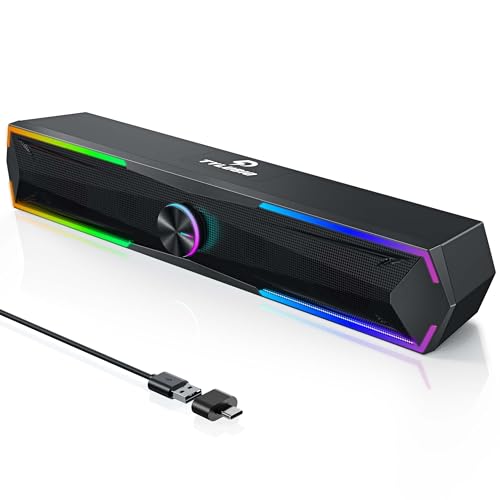
Tylubio under-monitor soundbar with dual 5W drivers, 10W total output, and a hybrid USB and Type-C cable for power and digital audio.
Key Facts
- Key Spec
- 10W total, dual 5W full-range drivers
- Connectivity
- Hybrid USB and Type-C, Bluetooth
- Size
- 15.7 x 2.7 x 2.5 inches
- Included
- 1.8-meter (about 6-foot) attached cable
Pros
- +15.7-inch bar frees desk space under a monitor
- +Single hybrid USB and Type-C cable for power and audio
- +Rotary knob replaces a separate inline remote
- +Four LED modes with an off setting for focus
Cons
- −No 3.5mm jack limits hookup to older audio gear
- −Bluetooth reset needs a quadruple-click on the knob
Detailed Review
The Tylubio soundbar measures 15.7 x 2.7 x 2.5 inches, so it tucks under a monitor or laptop instead of eating desk space beside it. Dual 5W full-range drivers give it 10W total output, which is the part that matters for anyone tired of thin built-in monitor speakers.
Its single hybrid USB and Type-C connector carries power and digital audio together, so there is no separate 3.5mm cable to route. A rotary knob covers mode switching, play and pause, LED cycling, Bluetooth reset, and power.
I would steer this toward small desks and laptop setups where cable clutter is the enemy. Buyers with older 3.5mm audio gear should note the missing AUX jack, and the 1.8-meter cable is the only length you get. Follow the manufacturer's stated limits for your setup.
Logitech Z207 2.0 stereo speakers with 10W peak power, Bluetooth 4.2, 3.5mm input, and on-speaker headphone jack.
Key Facts
- Power
- 10W peak
- Connectivity
- Bluetooth 4.2, 3.5mm input, headphone jack
- Dimensions
- 9.5 x 3.5 x 4.9 inches
- Weight
- 2.88 pounds
Pros
- +Dual connection options cover wired and wireless sources
- +Easy-Switch toggles between two paired devices quickly
- +Headphone jack and volume controls sit on the speaker
- +Passive radiators extend bass beyond typical small drivers
Cons
- −10W peak power limits room-filling volume
- −Bluetooth 4.2 lacks newer codec support
- −No subwoofer output for deeper bass
Detailed Review
The Logitech Z207 keeps things simple with a 10W peak power 2.0 setup and one passive radiator per speaker for bass extension. Each cabinet also holds one active driver, so the sound stays full range without a separate subwoofer.
I like the Easy-Switch pairing for jumping between a work laptop and a phone, and the on-speaker headphone jack is handy for late sessions. The 3.5mm input covers any wired source, and Bluetooth 4.2 handles wireless.
Volume tops out early for a large room, and the lack of a subwoofer output caps how deep the bass goes. For a desk setup in a bedroom or office, the size and connections make sense.
The Creative Pebble V3 is a 2.0 desktop speaker pair with 2.25-inch full-range drivers, 8W RMS, USB-C, Bluetooth 5.0, and a 3.5mm input.
Key Facts
- Power Output
- 8W RMS, up to 16W peak
- Connectivity
- USB-C, Bluetooth 5.0, 3.5mm AUX-in
- Drivers
- 2.25-inch full-range, 45-degree elevated
- Included
- USB-C to USB-A converter
Pros
- +Single USB-C cable handles both power and audio
- +Bluetooth 5.0 adds wireless flexibility beyond the desk
- +45-degree angled drivers direct sound to listening position
- +Clear Dialog processing keeps movie and YouTube speech clear
Cons
- −No AUX cable included for the 3.5mm input
- −Gain switch requires a 10W USB-C or USB-A port
- −Bluetooth pairing button on the speaker itself, no remote
Detailed Review
The Creative Pebble V3 is a 2.0 desktop speaker set built around 2.25-inch full-range drivers and a single USB-C cable that carries both power and audio. That one-cable approach keeps a desk free of the usual 3.5mm and power clutter, which matters if you work or game from a small table. The 45-degree elevated drivers angle sound toward your ears rather than your chest, so dialogue and effects land where you sit.
I would point students and remote workers toward the Clear Dialog processing, which targets spoken audio in YouTube lectures and shows without pushing the volume. Bluetooth 5.0 adds a second life for streaming from a phone when you leave the desk, and the 3.5mm input covers older analog gear. The catch is that the gain switch for extra loudness needs a 10W USB-C or USB-A port, and the AUX cable is not in the box, so plan for that if you rely on analog sources.
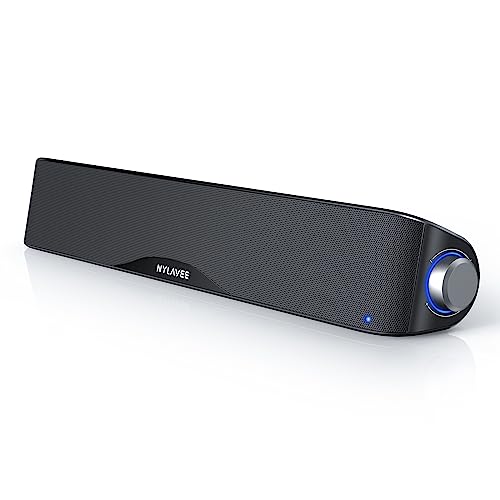
Nylavee desktop sound bar with four speaker drivers, dual bass diaphragms, Bluetooth 5.0 and 3.5mm AUX, USB powered, plus a built-in mic and headphone jack.
Key Facts
- Connectivity
- Bluetooth 5.0 and 3.5mm AUX
- Power
- USB powered, no built-in battery
- Drivers
- 4 speaker units and 2 bass diaphragms
- Size
- 16.5 x 2.4 x 2.8 inches
Pros
- +Four drivers and dual bass diaphragms for fuller stereo
- +Bluetooth 5.0 plus 3.5mm AUX for multiple source devices
- +Side knob keeps power and volume within easy reach
- +Built-in mic and headphone jack for calls and private listening
Cons
- −USB power only, so it needs a live port or adapter
- −No optical or HDMI input for TVs and consoles
- −Bass diaphragms can muddy dialogue at higher volumes
Detailed Review
The Nylavee sound bar packs four speaker units and two independent bass diaphragms into a bar measuring roughly 16.5 inches wide and 2.4 inches tall. The dual-layer neodymium magnets and mica fiber diaphragms are what the brand leans on for its stereo claim, and the cavity design is meant to push loudness from a small footprint.
Connection is Bluetooth 5.0 or a 3.5mm AUX cable, so a desktop, laptop, phone, or console can feed it. USB power means no battery to charge, and the side knob handles volume and power. I picture this bar under a monitor for bedroom or office listening where a full 2.1 set would crowd the desk.
There is no optical or HDMI input, so it is not a TV soundbar replacement, and the bass diaphragms can thicken dialogue at higher volumes. Buyers who want a simple wired-or-wireless desktop speaker should weigh that against the compact size.

Amazon Basics set of two USB-powered desktop speakers with 1.75-inch full-range drivers and Bluetooth 5.3, USB audio, and 3.5mm AUX input.
Key Facts
- Driver Size
- 1.75-inch full-range
- Connectivity
- Bluetooth 5.3, USB audio, 3.5mm AUX
- Power
- USB cord, no built-in battery
- Dimensions
- 4.33 x 2.68 x 3.43 inches
Pros
- +Three connection options cover most desktop and TV sources
- +Control pod keeps source and volume within easy reach
- +USB power means no separate wall adapter needed
- +Compact footprint suits small desks and shelves
Cons
- −No built-in battery limits use to a powered USB source
- −USB audio not supported on many TV USB ports
- −Blue LEDs stay on unless switched off at the pod
Detailed Review
The Amazon Basics Bluetooth Computer Speakers pair 1.75-inch full-range drivers with a passive radiator in a compact 4.33 by 2.68 by 3.43 inch shell. That size suits a desk or shelf where full-size bookshelf speakers will not fit, and the USB cord handles power so there is no wall adapter to find.
Three inputs set these apart at this size. Bluetooth 5.3, USB audio, and a 3.5mm AUX jack mean a laptop, desktop, or phone can all feed the same pair, and the control pod puts source, volume, LED, and AUX within arm's reach. I would point a student or remote worker at this setup for a dorm or small office where one pair has to serve several devices.
Two limits matter. There is no battery, so the speakers only run while the USB cord is plugged in, and USB audio does not work through most TV USB ports. The blue LEDs also stay lit unless you switch them off at the pod.
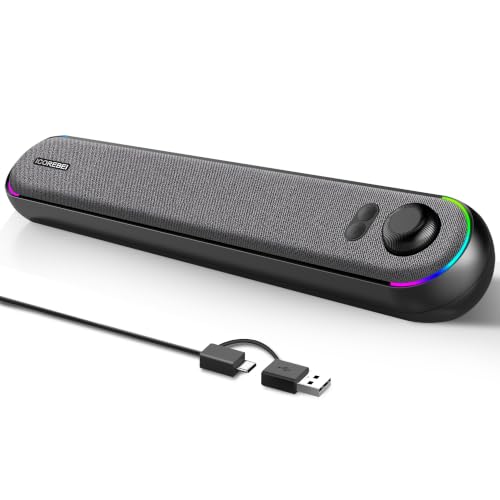
Slim USB-C soundbar with dual full-range drivers, a bass radiator, and Bluetooth 5.3. No built-in battery, so USB power is required.
Key Facts
- Connectivity
- USB-C to USB-A cable, Bluetooth 5.3
- Bluetooth Range
- Up to 10 meters (about 33 feet) in open conditions
- Size
- 16 x 2.6 x 2.5 inches
- Power
- USB powered, no built-in battery
Pros
- +One USB-C cable handles audio and power together
- +Slim angled bar fits under most monitors
- +Bluetooth 5.3 adds wireless playback from tablets and phones
- +No drivers or software needed on compatible devices
Cons
- −No built-in battery, so USB power is always required
- −Bluetooth range drops once walls or furniture intervene
- −Two-channel design limits true stereo separation
Detailed Review
The ICOREBEI soundbar measures 16 x 2.6 x 2.5 inches and angles its dual full-range drivers toward the listener, which suits desks where a pair of box speakers would crowd the monitor. A single USB-C connection carries both audio and power, so there is no separate wall adapter to route.
Bluetooth 5.3 covers roughly 33 feet in open conditions, useful for switching playback from a phone or tablet without unplugging the cable. The three RGB modes run multicolor, dynamic, and breathing effects, and one button cycles them or turns the lighting off.
I would treat this as a desk-first speaker rather than a portable one, since it has no battery and must stay tethered to USB power. Two-channel output also limits how wide the stereo image can spread.

SOULION R50 soundbar with Bluetooth and USB power, featuring 4 LED modes and a 30-degree tilt.
Key Facts
- Connectivity
- Bluetooth, USB power, 3.5mm aux
- Bluetooth Range
- Up to 33 feet (10 meters)
- Dimensions
- 16 x 2.7 x 3.5 inches
- Lighting Modes
- 4 (gradient, breathing, rhythm, fixed)
Pros
- +Four customizable LED lighting modes add visual flair
- +Bluetooth and wired aux options for flexible connectivity
- +Compact 16-inch width fits under most monitors
- +30-degree tilt aims sound toward ears
Cons
- −Volume knob sits on the speaker, not the cable
- −No built-in battery, so USB power is always required
Detailed Review
The SOULION R50 is a compact soundbar measuring 16 inches wide, designed to sit under a monitor thanks to its 30-degree upward tilt. That angle aims sound toward your ears rather than your desk, which helps in a typical desktop setup where speakers often fire straight ahead. The breathable cloth cover keeps dust out of the drivers, a practical touch for a desk that sees daily use.
With both Bluetooth and a 3.5mm aux input, the R50 works with PCs, laptops, tablets, and phones. The Bluetooth range is stated at up to 33 feet, so you can pair a phone without reaching for a cable. The four LED modes, including gradient and rhythm, add a customizable look, though the volume knob is on the speaker itself rather than a separate control puck. I rate this a sensible pick for a student desk or a secondary setup where space is tight and wired simplicity is fine.
Keep in mind that the R50 relies on USB for power and has no internal battery, so it stays tethered. The dual diaphragms and boosters are meant to deliver clear stereo sound for movies and music, but this is a nearfield speaker, not a room-filling system. For someone who wants a tidy soundbar with lighting effects and doesn't need deep bass, it covers the basics.
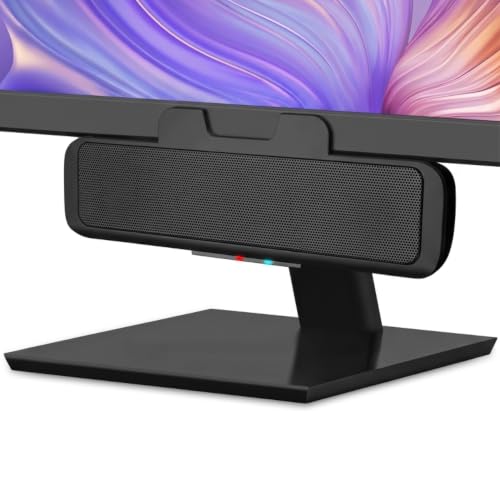
Compact 5W speaker bar with USB and Bluetooth 5.0, a built-in speakerphone, and mic mute for calls and music.
Key Facts
- Power Output
- 5W
- Connectivity
- USB and Bluetooth 5.0
- Compatibility
- PC, Mac, and Bluetooth smartphones
- Size
- 8.5 x 1.25 x 2.75 inches
Pros
- +Speakerphone with mic mute for hands-free calls
- +Auto-switches between USB and Bluetooth sources
- +Space-saving bar mounts under a monitor
- +Plug and play with no installation needed
Cons
- −5W total output limits room-filling volume
- −0.7 pound bar may sag on thin monitor stands
- −Bluetooth 5.0 only connects to phones, not PCs
Detailed Review
Cyber Acoustics builds the CA-2890BT around a 5W speaker bar that mounts under a monitor, which keeps desk space clear for a keyboard and mouse. The bar connects to a desktop or laptop over USB and to a smartphone over Bluetooth 5.0 at the same time, and a multi-function button switches between the two sources.
A mic mute button with an LED indicator sits on the bar for calls and virtual meetings, and the included USB-A to USB-C converter helps newer laptops with limited USB-A ports. I rate this a practical fit for a student desk or a small home office where a full 2.0 speaker set would crowd the surface.
The 5W output limits how loud the bar gets, so it suits near-field listening rather than a living room. At 0.7 pounds, it also needs a monitor stand that can take the extra weight without sagging.

OHAYO 60W stereo desktop speakers with Bluetooth 5.3, MDF wooden enclosures, carbon fiber drivers, and RCA, AUX, and USB inputs.
Key Facts
- Power Output
- 30W x 2
- Connectivity
- Bluetooth 5.3, RCA, AUX, USB
- Drivers
- 0.75-inch silk dome tweeter, 3-inch carbon fiber full-range
- Enclosure
- MDF wooden cabinet
Pros
- +30W per channel stereo output
- +MDF wooden enclosure reduces resonance
- +Bluetooth 5.3 plus RCA, AUX, and USB inputs
- +Front-panel volume knob for quick adjustments
Cons
- −No subwoofer output for deeper bass
- −AC powered only, no battery for portable use
- −Rear bass port needs clearance from a wall
Detailed Review
The OHAYO 60W speakers pair a 3-inch carbon fiber full-range driver with a 0.75-inch silk dome tweeter, so the highs and mid-bass get separate attention rather than one driver covering everything. The MDF wooden enclosure is the detail that matters most here, because it reduces the box resonance that makes plastic desktop speakers sound hollow.
For a desk setup, the front-panel volume knob is easy to reach during a game or a call, and Bluetooth 5.3 plus RCA, AUX, and USB inputs cover a PC, a turntable, or a phone without a dongle. I rate this a practical pick for a small office or gaming station where space is tight.
The rear bass port needs a few inches of clearance from the wall to work as intended, and there is no subwoofer output if you want deeper low end later. For my money, this suits someone who wants a compact stereo pair for music, games, and desktop audio, not a full 2.1 setup.
FAQs
Do Bluetooth computer speakers need a power outlet?
Most of these speakers have no built-in battery, so they still need USB power even when you stream over Bluetooth. The OHAYO pair is the exception here because its listing describes an AC-powered design. Plan on a free USB port or a nearby outlet either way.
Is a soundbar better than two separate speakers for a desk?
A soundbar frees the space on either side of your monitor, which matters on a shallow desk. Two separate speakers can spread the stereo image wider and give you more placement freedom. If desk depth is tight, a soundbar is the simpler fit.
Can you use Bluetooth speakers for video calls?
You can, but only the Cyber Acoustics CA-2890BT lists a built-in speakerphone and mic mute, so it is the one built for calls. Bluetooth audio also adds a small delay that can drift out of sync with lip movement. For meetings, a USB connection is the steadier choice.
What is the difference between USB audio and a 3.5mm connection?
USB audio sends a digital signal and often carries power on the same cable, which keeps wiring simple. A 3.5mm jack is analog and works with almost anything that has a headphone port. Some desks end up using both, and desktop speaker setups like these usually include one or the other.
Final Thoughts
The decision comes down to where the speakers sit and how they get their signal. A soundbar under the monitor saves the most desk space, while a two-piece set spreads the sound wider and gives you more freedom to angle each cabinet. Check the connection type against the ports you actually have free before you commit.
For most desks, the Tylubio Computer Speakers for PC Desktop[/acmlink] is the best overall choice. It fits under a monitor, runs on a single hybrid USB and Type-C cable, and puts mode switching, playback, and lighting on one knob. If you want to spend less, the [acms_link asin="B0CL99S27B"]Amazon Basics Bluetooth Computer Speakers with USB covers the basics with Bluetooth 5.3, USB audio, and a 3.5mm input on a separate control pod. Skip both if you need deep bass or a built-in microphone, since neither lists a subwoofer or a mic. For a wider look at matching audio gear, these PC peripherals pair well with a new set. Check the current price on Amazon, and the right connection type will settle most of the confusion before you buy.

