


A 2-in-1 that flops backward when you tap the screen, or dies halfway through a lecture, turns a flexible laptop into a daily annoyance. The hinge is the part that decides whether tablet mode is usable or just a spec-sheet bullet, and the battery claim on the box rarely matches a real class schedule.
I compared the Best 2-in-1 Laptops by reading the listed processor, RAM, storage, display, hinge design, and port layout, then cross-checking the stated battery capacity and weight against how these machines actually get used: note-taking, video calls, streaming, and light office work. The picks below cover a wide spread, from budget Chromebooks to a premium tablet-first convertible.
My overall pick for best 2-in-1 laptops is the 2-in-1 Laptop, 2026 15.6” Laptop Computer. It pairs a 15.6-inch 1080p touchscreen with 16GB of RAM and a 512GB SSD, and the listing states a 360-degree hinge that folds into tent, stand, and tablet modes. My top picks are just below.
Best 2-in-1 Laptops at a Glance


In-Depth Reviews

KUMNOSAL 2-in-1 laptop with 15.6-inch 1080p touchscreen, Core i5-7Y54, 16GB DDR3 RAM, and 512GB SSD.
Key Facts
- Key Spec
- Core i5-7Y54, 16GB DDR3 RAM, 512GB SSD
- Connectivity
- USB 3.0 x2, USB 2.0 x1, HDMI, full-function Type-C, 3.5mm headphone jack, 12V/3A DC port, M.2 slot
- Wireless
- WiFi 5, Bluetooth 4.2
- Size
- 15.6-inch 1920x1080 touchscreen, 14.13 x 0.76 x 9.45 inches
Pros
- +360-degree hinge adds tent and tablet modes
- +16GB RAM and 512GB SSD handle multitasking
- +Backlit keyboard helps in low-light rooms
- +Full-function Type-C and HDMI for external displays
Cons
- −Dual-core i5-7Y54 limits heavier creative workloads
- −38Wh battery rated for only 4 hours at max brightness
- −3.5-pound weight is heavy for frequent tablet use
Detailed Review
The 360-degree hinge on this KUMNOSAL 2-in-1 is the feature that separates it from a standard 15.6-inch notebook. I can see it working for students who want a tablet mode for notes and a laptop mode for typing, without carrying two devices. The 15.6-inch 1080p touchscreen supports direct input for sketching or annotating documents.
The Core i5-7Y54 is a dual-core, four-thread chip with a 3.2GHz max turbo, paired here with 16GB DDR3 RAM and a 512GB SSD. That combination handles office work, coursework, and multi-tab browsing, but the dual-core design is the main limit for heavier creative apps. The backlit keyboard and full-function Type-C port help in dim rooms and for connecting an external monitor.
The 38Wh battery is rated for up to 4 hours at max brightness, which is short for a full day away from an outlet. At 3.5 pounds, it also feels heavy in tablet mode. For a student or remote worker who mostly needs a flexible daily driver, the convertible design and port selection are the real draws.

The 2026 Surface Pro pairs a 13-inch OLED touchscreen with a Snapdragon X2 Elite chip, 16GB RAM, and 1TB SSD in a 1.97 lb tablet.
Key Facts
- Display
- 13-inch OLED PixelSense touchscreen, 120Hz
- Processor
- Qualcomm Snapdragon X2 Elite
- Memory & Storage
- 16GB RAM, 1TB SSD
- Connectivity
- Two USB-C / USB4 ports, Wi-Fi 7
Pros
- +OLED touchscreen with 120Hz refresh for fluid scrolling
- +Two USB-C ports support fast charging and 4K monitor output
- +Under 2 lb tablet weight eases daily carry
- +16GB RAM and 1TB SSD cover heavy multitasking
Cons
- −Keyboard and Surface Slim Pen sold separately
- −Battery rating reflects video playback, not heavier work
- −1.97-inch thickness comes from the kickstand design
Detailed Review
The 2026 Surface Pro centers on a 13-inch OLED PixelSense touchscreen running at 120Hz, which is the detail that separates it from the cheaper LCD models in this line. Colors and blacks on OLED matter most when you are editing photos or watching video in a dim room, and 120Hz makes scrolling long documents feel less choppy.
Inside, the Qualcomm Snapdragon X2 Elite chip and 16GB of RAM are aimed at running video calls, work or school apps, and 20+ browser tabs at once. Storage lands at 1TB, so you can keep a local project library without an external drive. At 1.97 lbs, it works as a tablet for note-taking, and the 165-degree kickstand props it for drawing or movies.
The catch is that the keyboard and Surface Slim Pen are sold separately, so the laptop experience costs more than the tablet price suggests. I would point students and remote workers who want one device for class, calls, and sketching toward this configuration, while anyone who mostly types should budget for the keyboard.

A 15.6-inch 2-in-1 convertible laptop with a 360-degree hinge, Core m3-8100Y, 16GB RAM and a 512GB SSD.
Key Facts
- Display
- 15.6-inch FHD IPS Touchscreen
- Processor
- Core m3-8100Y
- Memory
- 16GB Dual-Channel RAM
- Storage
- 512GB SSD
Pros
- +360-degree hinge covers laptop, tent, stand, and tablet modes
- +16GB dual-channel RAM suits browser tabs and light editing
- +512GB SSD holds documents, photos, and video without clutter
- +USB-C, HDMI, and USB ports cover external display and transfer
Cons
- −Core m3-8100Y limits heavier creative or gaming workloads
- −WiFi 5 wireless falls behind newer WiFi 6 laptops
Detailed Review
The 360-degree hinge is the real draw here, flipping a 15.6-inch IPS touchscreen between laptop, tent, stand, and tablet positions for study, streaming, or shared presentations. At 3.4 pounds with a 14 x 9 x 0.8-inch body, it stays easy to slide into a backpack for commutes or campus days.
The Core m3-8100Y paired with 16GB dual-channel RAM and a 512GB SSD is built for browsing, documents, video calls, and light productivity rather than demanding creative work. I would steer anyone running heavy editing or gaming toward a machine with a stronger chip, because the m3-8100Y will feel the strain.
WiFi 5 and Bluetooth 5.1 cover everyday connections, and the HDMI plus USB-C ports make external monitors straightforward. For students and remote workers who want one flexible screen, this fits well.
Cleriver 15.6-inch 2-in-1 laptop with 360 hinge, FHD IPS touchscreen, Core m3 8100Y, 16GB RAM, 512GB SSD, and Win11 Pro.
Key Facts
- Processor
- Core m3 8100Y, up to 3.40 GHz
- Memory & Storage
- 16GB RAM, 512GB SSD
- Display
- 15.6-inch FHD IPS touchscreen, 1920 x 1080
- Connectivity
- USB-A 3.0, USB-C, HDMI, headphone jack, WiFi 5, Bluetooth 5.0
Pros
- +360-degree hinge enables four distinct usage modes
- +15.6-inch FHD IPS touchscreen with wide viewing angles
- +16GB RAM supports heavy multitasking for study or work
- +USB-C, USB-A, HDMI, and headphone jack cover common devices
Cons
- −Core m3 8100Y limits heavier creative or gaming workloads
- −3.75-pound weight makes frequent travel less comfortable
- −No dedicated GPU for graphics-intensive applications
Detailed Review
The Cleriver 2-in-1 pairs a 15.6-inch 1920 x 1080 IPS touchscreen with a 360-degree hinge, so it works as a laptop for typing, a tablet for note-taking, or a tent for watching video. The Core m3 8100Y and UHD Graphics 615 suit web browsing, office work, and streaming, but not demanding creative or gaming tasks.
I see this fitting a student or home office user who wants one device for classes and documents. The 16GB RAM and 512GB SSD keep multiple tabs and apps responsive, and USB-C, USB-A 3.0, HDMI, and a headphone jack cover common peripherals.
At 3.75 pounds, it is not the lightest option for daily commuting, and the processor limits heavier workloads. For everyday productivity and video calls, it covers the basics without extra add-ons.
A 15.6-inch 360-degree flip 2-in-1 with an Intel Core m3-8100Y, 20GB RAM, and a 512GB SSD, running Windows 11.
Key Facts
- Key Spec
- 20GB RAM, 512GB SSD, Intel Core m3-8100Y up to 3.4GHz
- Connectivity
- 3x USB 3.0, HDMI, Type-C data port, Wi-Fi 5, Bluetooth 5.0
- Compatibility
- Windows 11 pre-installed
- Size
- 15.6-inch FHD touchscreen, 14.14 x 9.8 x 0.89 inches
Pros
- +20GB RAM handles heavy browser and app multitasking
- +512GB SSD gives ample space for projects and media
- +Three USB 3.0 ports plus HDMI and Type-C data
- +360-degree hinge enables four distinct use modes
Cons
- −Core m3-8100Y is an older dual-core chip for light tasks
- −3.59-pound weight is heavy for frequent tablet hand-holding
- −Type-C port is data-only, not for video or charging
Detailed Review
The 15.6-inch FHD touchscreen and 360-degree hinge let this Tylvx flip into laptop, tablet, tent, or stand mode, which suits students sketching notes or sharing video in a dorm. The 20GB RAM and 512GB SSD combination stands out at this size, giving browser tabs and project files room to breathe.
I would steer this toward note-taking, document editing, and streaming rather than demanding creative work, since the Intel Core m3-8100Y is a modest dual-core part. The 38Wh battery is rated for hours of use, enough for a day of classes if you keep tasks light.
At 3.59 pounds it stays put on a desk, though holding it in tablet mode for long stretches gets tiring. Three USB 3.0 ports, HDMI, and a Type-C data port cover peripherals, but that Type-C cannot drive a monitor or charge the machine.
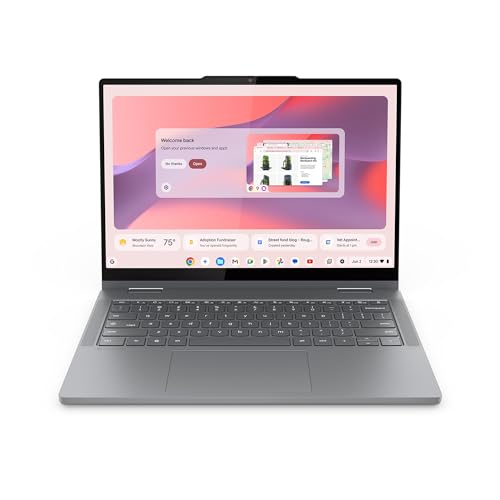
The Lenovo Chromebook 2-in-1 is a 14-inch WUXGA touchscreen laptop with an Intel N150 CPU, 4GB RAM, and 128GB UFS storage.
Key Facts
- Display
- 14-inch WUXGA IPS Touchscreen
- Processor
- Intel N150
- Memory
- 4GB RAM
- Storage
- 128GB UFS
Pros
- +Light 3.3-pound build for daily commuting and classes
- +WUXGA IPS touchscreen with 360-degree hinge for tablet use
- +Two USB-C, two USB-A, and HDMI cover common peripherals
- +Physical webcam shutter for privacy on video calls
Cons
- −4GB RAM limits heavy multitasking with many browser tabs
- −128GB UFS storage fills quickly without cloud offloading
- −Luna Grey finish only, no color options at this size
Detailed Review
The 14-inch WUXGA IPS touchscreen is the standout here, giving the Lenovo Chromebook 2-in-1 a sharp canvas for split-screen docs and streaming. At 3.3 pounds and 0.69 inches thick, it slides into a backpack sleeve without weighing down a commute, and the 360-degree hinge lets it flip into tent mode for countertop recipes or tablet mode for sketching.
Port selection is generous for the size, with two USB-C, two USB-A, and HDMI, so an external monitor and a flash drive can stay plugged in together. The Intel N150 handles Chrome OS basics like web apps, video calls, and light Google Docs work, though the 4GB RAM means I would keep browser tabs to a modest number before things slow down.
Storage lands at 128GB UFS, which is fine for cloud-first users but tight if local files pile up. The physical webcam shutter is a small but welcome touch for anyone on frequent video calls.

HP OmniBook X Flip 2-in-1 with 16-inch 1920 x 1200 IPS touchscreen, Intel Core Ultra 7 256V, 16GB LPDDR5X, and 1TB PCIe Gen4 NVMe SSD.
Key Facts
- Key Spec
- 16-inch 1920 x 1200 IPS Touchscreen, 400 nits
- Processor
- Intel Core Ultra 7 256V with 47 NPU TOPS
- Memory and Storage
- 16GB LPDDR5X, 1TB PCIe Gen4 NVMe SSD
- Connectivity
- Thunderbolt 4, USB-C, USB-A, HDMI 2.1, Wi-Fi 6E, Bluetooth 5.3
Pros
- +360-degree hinge converts between four usable modes
- +16-inch 1920 x 1200 touchscreen with 400 nits brightness
- +Thunderbolt 4, USB-C, USB-A, and HDMI 2.1 ports
- +Backlit keyboard and 5MP IR webcam with privacy shutter
Cons
- −4.15 pounds makes tablet mode tiring to hold
- −16GB soldered LPDDR5X memory cannot be upgraded later
- −No dedicated GPU for demanding 3D rendering workloads
Detailed Review
The 16-inch 1920 x 1200 IPS touchscreen is the centerpiece here, and the 360-degree hinge lets it fold into laptop, tablet, tent, and stand positions. That flexibility suits note-taking with a stylus or propping the screen for a video call without a separate stand.
Inside, the Intel Core Ultra 7 256V pairs with 16GB of LPDDR5X memory and a 1TB PCIe Gen4 NVMe SSD. The 47 NPU TOPS figure points to on-device AI features like Live Captions and Paint Cocreator, while Thunderbolt 4 and HDMI 2.1 cover external displays and fast transfers.
At 4.15 pounds, this is a desk-first convertible rather than a couch tablet, and the soldered memory means no later upgrade. I would point students and remote workers toward this one for its screen size and port set, not for gaming or heavy 3D work.

HP Chromebook 14 x360 Plus is a 2-in-1 laptop with Intel N150, 4GB LPDDR5, 128GB UFS, and a 14-inch WUXGA touchscreen.
Key Facts
- Key Spec
- Intel N150, 4GB LPDDR5, 128GB UFS
- Connectivity
- USB-C, USB-A, combo audio jack, Wi-Fi 6, Bluetooth 5.4
- Compatibility
- Chrome OS
- Size
- 14-inch WUXGA touchscreen
Pros
- +360-degree hinge for four usage modes
- +14-inch anti-glare touchscreen with 300 nits
- +Wi-Fi 6 and Bluetooth 5.4 connectivity
- +MIL-STD 810H tested for durability
Cons
- −4GB soldered memory limits heavy multitasking
- −No HDMI or SD card slot on board
- −Resealed unit voids original packaging
Detailed Review
The HP Chromebook 14 x360 Plus pairs a 360-degree hinge with a 14-inch WUXGA touchscreen, so it is at its best for students who need one device for notes and streaming. The anti-glare coating and 300 nits brightness help in bright rooms, and the Intel N150 with 4GB LPDDR5 handles Chrome OS basics like Docs and video calls.
Storage is 128GB UFS, which is faster than eMMC but still modest for local files. The 4GB of soldered memory is the real ceiling here, so heavy multitasking with many tabs will feel tight. Wi-Fi 6 and Bluetooth 5.4 cover modern wireless needs, and the MIL-STD 810H rating adds some confidence for backpacks and dorm life.
For my money, this suits K-12 or home use where cloud storage is the norm. The one-year HP warranty on remaining components is worth noting, and the resealed upgrade means the original box is not factory sealed.

Dell 14 2-in-1 with AMD Ryzen 7 8840HS, 16GB DDR5, 1TB SSD, and a 16:10 FHD+ touchscreen on a 360-degree hinge.
Key Facts
- Key Spec
- AMD Ryzen 7 8840HS, 16GB DDR5, 1TB SSD
- Connectivity
- Wi-Fi 6E
- Compatibility
- Windows 11 Home
- Size
- 12.36 x 8.9 x 0.68 inches
Pros
- +Ryzen 7 8840HS and 16GB DDR5 handle heavy multitasking
- +1TB SSD leaves room for large project files
- +360-degree hinge covers note-taking, tent, and stand use
- +16:10 panel adds vertical space for documents
Cons
- −3.77-pound body is heavy for tablet and handheld use
- −Integrated Radeon graphics limit demanding 3D work
- −Active pen sold separately for handwriting
Detailed Review
The Dell 14 2-in-1 pairs a Ryzen 7 8840HS with 16GB of DDR5 and a 1TB SSD, which is the kind of headroom I would want for juggling browser tabs, spreadsheets, and a video call at once. The 16:10 FHD+ touchscreen adds vertical space over a 16:9 panel, so documents and timelines feel less cramped.
Its 360-degree hinge covers tablet, tent, stand, and laptop modes, and the AI auto framing and eye contact features are aimed at remote meetings. At 3.77 pounds, this is a desk-and-bag machine rather than a one-hand tablet.
Radeon integrated graphics keep it on the productivity side of the line, so I would steer anyone needing heavy 3D work toward a discrete GPU. Note that the active pen is optional.
FAQs
Can a 2-in-1 laptop replace a tablet?
A convertible 2-in-1 can stand in for a tablet for notes, reading, and streaming, but it is heavier and thicker than a dedicated slate. The 15.6-inch models here weigh noticeably more than the 13-inch Surface Pro, so tablet mode is best for short sessions rather than long reading stretches. If you mostly want a tablet, a detachable design suits you better.
Is 4GB of RAM enough for a Chromebook 2-in-1?
4GB of RAM handles browser tabs, Google Docs, and video streaming on ChromeOS, which is lighter than Windows. Open a dozen heavy tabs alongside a video call and you will feel the ceiling, though. For Windows 2-in-1s, 16GB is the safer floor, and several picks here list that much.
Do you need a dedicated GPU in a 2-in-1 laptop?
No, most 2-in-1 buyers do not. These convertibles list integrated graphics, which is fine for office work, streaming, and light games at modest settings. If you want high frame rates in demanding titles, a gaming laptop with a discrete GPU is the better fit. Check the graphics card maker’s recommended power supply wattage and connectors if you later add a desktop GPU.
What is the difference between a 2-in-1 and a regular laptop?
A 2-in-1 adds a 360-degree hinge or a detachable keyboard so the screen can fold into tablet, tent, and stand modes. A regular laptop stays in clamshell form. The trade-off is usually a bit more weight and a hinge that can loosen over years of flipping. If you never use touch, a standard laptop is simpler.
Final Thoughts
For most people, the hinge quality, the RAM and storage tier, and the battery claim matter more than the processor name on the sticker. A 2-in-1 that folds cleanly and lasts a full day of classes or meetings is worth more than one with a faster chip and a flimsy screen.
My overall pick remains the 2-in-1 Laptop, 2026 15.6” Laptop Computer, which suits students and remote workers who want a large touchscreen, 16GB of RAM, and a 512GB SSD in a 360-degree convertible. If you want to spend less, the Lenovo Chromebook 2-in-1 – Lightweight Laptop is the value pick: ChromeOS keeps the software light, and the listed 14-inch WUXGA touchscreen and 128GB of storage cover browsing, docs, and streaming. Skip both if you need a discrete GPU for gaming or heavy video editing, and look at a gaming laptop instead. For more buying context, see our 2-in-1 laptop category and the broader laptop buying guides. Check the current price on Amazon, and the right hinge and battery match will remove the guesswork from your next upgrade.

