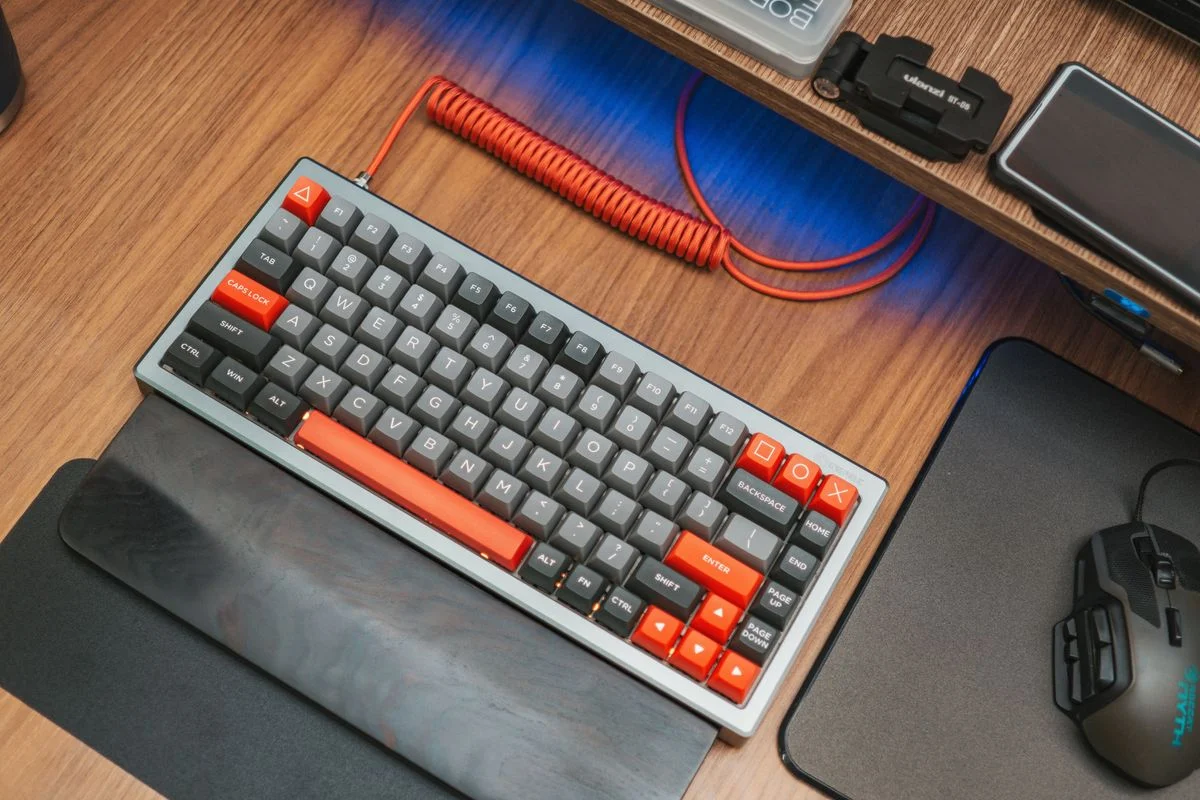
After a few hours of typing, a tall mechanical keyboard can leave your wrists angled up and your forearms tense. Low-profile boards sit closer to the desk, which some typists find more comfortable for long stretches, but the trade-off is that switch feel and keycap height vary a lot between models. Some listings lead with a slim look and say little about whether the switches are tactile, linear, or clicky, or how many devices you can pair.
I looked at the Best Low-Profile Mechanical Keyboards by comparing stated switch type, layout size, connectivity options, and build materials from manufacturer listings, then cross-referencing buyer feedback on typing feel and wireless reliability. The goal is to help you match a board to how you actually type, whether that is a full day of spreadsheets, a mix of Mac and Windows machines, or late-night gaming sessions.
My overall pick for best low-profile mechanical keyboards is the Keychron K3 Version 2 QMK 75% Wireless Low-Profile. Its 75% layout keeps the arrow keys and function row while saving desk space, and the QMK firmware lets you remap keys without installing extra software on a work machine. My top picks are just below.
Best Low-Profile Mechanical Keyboards at a Glance
| Product | PGH Score | ||
|---|---|---|---|

|
Best Overall Keychron K3 Version 2 Wireless Low-Profile | 9.8 | Check Price on Amazon |

|
Best for Multi-Device Desks ProtoArc K310 Pro Wireless Mechanical Keyboard | 9.7 | Check Price on Amazon |

|
Best for Multi-Device Work Keychron K5 Version 2 Wireless Low Profile | 9.7 | Check Price on Amazon |

|
Best for Low-Profile Gaming Logitech G515 LIGHTSPEED TKL Wireless Mechanical | 9.6 | Check Price on Amazon |

|
Best for Quiet Typing X9 Performance Slim Mechanical Keyboard with Low | 9.5 | Check Price on Amazon |
|
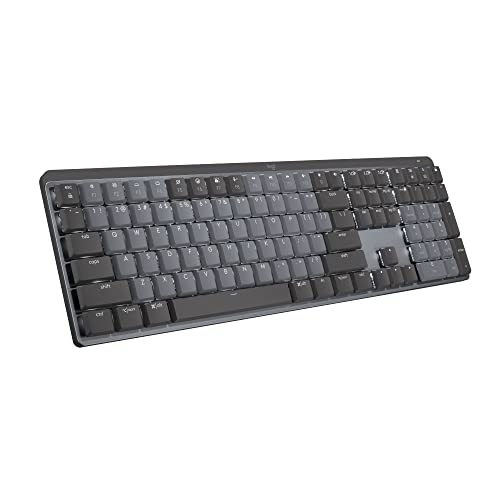
Logitech MX Mechanical Wireless Keyboard | 9.5 | Check Price on Amazon |

|
Best for Wired Battlestations Logitech G915 X Wired Low-Profile Mechanical | 9.5 | Check Price on Amazon |
In-Depth Reviews
The Keychron K3 Version 2 is a 75% low-profile wireless mechanical keyboard with Bluetooth 5.1 for three devices and Brown switches.
Key Facts
- Layout
- 75% compact
- Connectivity
- Bluetooth 5.1, USB-C wired
- Switch Type
- Low-profile Brown (tactile)
- Compatibility
- Mac and Windows
Pros
- +Compact 75% layout preserves arrow and function keys
- +Bluetooth 5.1 connects to three devices with easy switching
- +Low-profile Brown switches suit tight desk setups
- +QMK firmware enables deep key remapping and macros
Cons
- −Plastic bottom frame feels less premium than aluminum top
- −Low-profile switch options are limited compared to standard mechanicals
- −White LED backlight only, no RGB customization
Detailed Review
The Keychron K3 Version 2 packs a 75% layout into a body that is just 0.87 inches thick, so it frees up desk space without dropping the arrow keys or function row. Its low-profile Brown switches give a tactile bump that suits long typing sessions, while the reinforced aluminum top plate adds rigidity without much weight.
Bluetooth 5.1 lets me pair it with three devices and jump between a desktop, laptop, and tablet without re-pairing, which is handy for a mixed work and play setup. QMK firmware and the Keychron Launcher web app mean every key can be remapped, and the included Mac and Windows keycaps cover both platforms.
The plastic bottom frame is a step down from the aluminum top, and the white LED backlight is the only lighting option. For a compact wireless board that still feels mechanical, I see this fitting a student desk or a shared home office where space is tight.
Full-size 108-key wireless mechanical keyboard with low-profile linear red switches, aluminum top case, and three-device Bluetooth or 2.4G connectivity.
Key Facts
- Key Spec
- 108-key full-size, low-profile linear red switches
- Connectivity
- Bluetooth (3 devices) and 2.4G USB receiver
- Compatibility
- Windows 8/10, Mac OS X 10.12, Android 4.4 or higher
- Size
- 17.64 x 6.1 x 1.77 inches
Pros
- +Low-profile linear red switches keep typing quiet
- +Three-device Bluetooth and 2.4G switching with one button
- +Aluminum top case on a full-size 108-key layout
- +Two-level tilt legs for adjustable typing angle
Cons
- −Macro recording works only over 2.4G USB connection
- −Multi-port hubs and Safari block macro device detection
- −No wrist rest included for extended typing comfort
Detailed Review
The ProtoArc K310 Pro pairs low-profile linear red switches with a full-size 108-key layout and an aluminum top case, which is the combination that makes it feel more solid than a typical plastic wireless board. For a shared office or a bedroom desk, those linear reds keep the mechanical feel while holding noise down, so late-night typing is less likely to carry through the room.
Connectivity is where this board earns its place. It holds three devices over Bluetooth or 2.4G and switches with a single button, which suits a desk running a work laptop, a personal PC, and a tablet. I would pair it with Windows, Mac, iOS, or Android for that reason.
Two things to weigh first. Macro recording only functions over the 2.4G USB connection, and it will not be detected through a multi-port hub. The 150-day standby figure also assumes the backlight is off, so heavy lighting use will shorten that window.
Low-profile full-size wireless mechanical keyboard with QMK firmware, Bluetooth 5.2, USB-C wired, banana tactile switches, and 105-hour battery life.
Key Facts
- Key Spec
- Low-profile mechanical, banana tactile switches
- Connectivity
- Bluetooth 5.2, USB-C wired
- Compatibility
- Mac, Windows, Linux
- Size
- 16.69 x 4.69 x 0.99 inches
Pros
- +QMK firmware allows full key remapping and layers
- +Bluetooth 5.2 and USB-C wired dual connectivity
- +Low-profile banana switches with acoustic foam damping
- +Multi-OS support for Mac, Windows, and Linux
Cons
- −Full-size layout takes up significant desk space
- −Low-profile switches limit keycap swap options
Detailed Review
The Keychron K5 Version 2 packs a full 100% layout into a low-profile body that is just 0.99 inches tall and weighs 1.61 pounds. The banana tactile switches sit on IXPE and EPDM foam layers, which I think gives this board a quieter, more refined sound than a typical low-profile mechanical keyboard.
Bluetooth 5.2 lets you pair three devices and switch between a laptop, phone, and tablet without re-pairing. Wired USB-C mode bumps polling to 1000 Hz, which matters if you are using this for fast-paced games where every millisecond counts.
The 2000 mAh battery is rated for up to 105 hours at low brightness, so you can go weeks between charges. The full-size footprint and low-profile switch design are the main trade-offs for anyone with a compact desk or who likes to swap keycaps.
The Logitech G515 LIGHTSPEED TKL is a low-profile wireless mechanical keyboard with tactile GL Brown switches, double-shot PBT keycaps, and tri-mode connectivity.
Key Facts
- Key Spec
- GL Brown Tactile Mechanical Switches
- Connectivity
- LIGHTSPEED Wireless, Bluetooth, Wired Data Transfer
- Battery Life
- Up to 36 Hours Continuous
- Keycaps
- Double-shot PBT
Pros
- +Tri-mode wireless, Bluetooth, and wired data flexibility
- +Low-profile GL Brown switches with discernible tactile bump
- +Double-shot PBT keycaps resist shine and oil
- +36-hour rated continuous wireless battery life
Cons
- −Requires USB receiver or Bluetooth, no 2.4GHz dongle-free option
- −TKL layout omits numpad for spreadsheet work
Detailed Review
The Logitech G515 LIGHTSPEED TKL pairs low-profile GL Brown tactile switches with double-shot PBT keycaps in a thin tenkeyless frame. The 36-hour continuous wireless rating means I'd treat it as a couch or desk keyboard that occasionally needs a charge, not a wired-only board.
Tri-mode connectivity is the practical hook. LIGHTSPEED for low-latency play, Bluetooth for a laptop or tablet, and wired data transfer when the battery runs low. KEYCONTROL lets you program up to 15 functions per key, which suits MMO or macro-heavy players more than a pure FPS main.
I'd point competitive players toward the tactile bump and slim profile for fast key travel, but the tenkeyless layout is a real trade-off if your work involves heavy numpad entry. For a mixed gaming and typing desk, it's a focused pick.
Full size 107-key low profile mechanical keyboard with red switches, triple mode Bluetooth, 2.4GHz, and USB connectivity, aluminum top case, and 2000mAh rechargeable battery.
Key Facts
- Key Spec
- Low Profile Red Switches
- Connectivity
- Bluetooth (2 devices), 2.4GHz, USB-A/C
- Battery
- 2000mAh Rechargeable
- Layout
- 107-Key Full Size with Number Pad
Pros
- +Low profile red switches for quiet linear keystrokes
- +Triple mode connectivity across Bluetooth, 2.4GHz, and USB
- +Full 107-key layout includes number pad and volume knob
- +Aluminum top case reduces flex and wobble
Cons
- −No hot-swap sockets for replacing switches
- −White backlight only, no RGB color options
Detailed Review
The X9 Performance Slim Mechanical Keyboard uses low profile red switches, which give a quiet, linear feel closer to a laptop than a traditional mechanical board. That makes it a natural fit for shared offices or late-night work where clicky switches would be disruptive. The 107-key layout includes a number pad, 15 shortcuts, a Copilot key, and a volume knob, so spreadsheet work and media control stay within reach.
Connectivity is the other standout. It pairs over Bluetooth to two devices, connects via 2.4GHz, or runs wired over USB-A or USB-C, switching without re-pairing. For my money, that flexibility suits a desk with a work laptop and a personal desktop that share one keyboard. The aluminum top case adds rigidity, and the 2000mAh battery is rated for days of wireless typing.
Two honest trade-offs stand out. The switches are not hot-swappable, so you cannot swap in a different feel later, and the backlight is white only with three brightness levels rather than RGB. I would point this toward typists who want a quiet full-size board first and customization second.
Low-profile full-size wireless keyboard with tactile quiet mechanical switches, smart backlighting, and 3-device Bluetooth or Logi Bolt pairing.
Key Facts
- Key Spec
- Tactile Quiet Mechanical Switches
- Connectivity
- Bluetooth Low Energy or Logi Bolt Receiver
- Compatibility
- Up to 3 Devices, Multi-OS
- Size
- 17.9 x 5.9 x 2.1 inches
Pros
- +Tactile quiet switches reduce noise for shared workspaces
- +Three-device pairing across Bluetooth and Logi Bolt receiver
- +Smart backlight activates on hand approach and adjusts automatically
- +USB-C charging gives up to 15 days with backlight on
Cons
- −Full-size frame adds 17.9 inches of width to a desk
- −2.55-pound weight makes it less portable for travel
- −Low-profile switches offer less key travel than standard mechanical boards
Detailed Review
The MX Mechanical stands out for its tactile quiet switches, which give a felt bump without the loud click that annoys nearby coworkers. The low-profile full-size layout keeps wrists closer to the desk than a tall mechanical board, which matters for long typing days.
I like the smart backlight that lights up as your hands approach and dims when you leave, plus three-device pairing over Bluetooth or the included Logi Bolt receiver. That setup suits a desk with a laptop, desktop, and tablet sharing one keyboard.
The trade-off is the footprint. At 17.9 inches wide and 2.55 pounds, it claims real desk space and stays put rather than traveling. For a fixed workstation, that is a fair exchange for the full key set.
The Logitech G915 X is a full-size wired mechanical keyboard with low-profile GL switches, a 1.3 mm actuation point, and a sand-blasted aluminum top plate.
Key Facts
- Key Spec
- Low-profile GL mechanical switches, 1.3 mm actuation, 3.2 mm travel
- Connectivity
- Wired
- Compatibility
- PC and Mac
- Size
- 20.2 x 7.2 x 1.7 inches, 23 mm high
Pros
- +Low-profile GL switches with 1.3 mm actuation for quick inputs
- +Durable double-shot PBT keycaps and aluminum top plate
- +Full-size layout with nine G keys and volume roller
Cons
- −Wired-only connection limits cable-free desk setups
- −3.35 pound weight makes it less portable than compact boards
- −Full-size footprint needs a wide desk area
Detailed Review
The G915 X pairs low-profile GL mechanical switches with a 1.3 mm actuation point and 3.2 mm total travel, which shortens the distance your fingers cover per keypress. That matters more than a big DPI-style number for anyone who wants faster repeated inputs in strategy or MOBA play.
Build leans on a sand-blasted aluminum top plate and double-shot PBT keycaps, and the whole board sits just 23 mm high. The full-size layout adds a numpad, nine G keys, media controls, and a volume roller, so spreadsheet work and in-game macros share the same deck.
I would point this at a fixed desk setup rather than a LAN bag. At 3.35 pounds and 20.2 inches wide, it takes real space, and the wired connection means no cable-free option. For a permanent battlestation, that trade suits the feature set.
FAQs
Do low-profile mechanical keyboards feel different from standard ones?
Low-profile switches have a shorter travel distance, so keys bottom out sooner and the typing feel is closer to a laptop than a full-height mechanical board. That shorter throw can reduce finger travel on long documents, but some typists miss the deeper feedback of standard switches. If you switch between a laptop and a desktop all day, the adjustment is usually small.
Can you use a low-profile mechanical keyboard for gaming?
A low-profile board with linear or tactile switches works for gaming, and the shorter actuation distance can feel quicker for repeated key presses. The Logitech G515 and G915 X are built with gaming in mind, including per-key customization and RGB. For competitive play, response time matters more than switch height, so pick a board with wired or low-latency wireless.
Is it better to get a full-size or a compact low-profile keyboard?
A full-size board with a number pad suits spreadsheet work and data entry, while a 75% or TKL layout frees up desk space for a mouse. If you rarely use the numpad, the smaller footprint lets you keep your mouse closer to your body, which can reduce shoulder reach. Measure your desk before committing to a wide board.
How many devices can a low-profile mechanical keyboard connect to?
Most wireless models here pair with up to three devices over Bluetooth, and some add a 2.4GHz receiver or wired USB-C for a fourth. Switching between a work laptop, a personal desktop, and a tablet without re-pairing is the main draw. Check the listing for the exact Bluetooth version and whether a receiver is included, since that affects latency and compatibility.
Final Thoughts
The right low-profile mechanical keyboard comes down to matching switch feel and layout to your daily typing, not chasing the thinnest spec sheet. If you split time between Mac and Windows or want to remap keys without extra software, the Keychron K3 Version 2 QMK 75% Wireless Low-Profile is my overall pick. Its 75% layout keeps arrow keys and a function row while leaving room for a mouse, and the QMK firmware handles custom layouts on the board itself. For a full-size board on a tighter budget, the X9 Slim Mechanical Keyboard covers the number pad, a volume knob, and triple-mode connectivity at a lower cost.
Skip the low-profile route if you prefer deep key travel or plan to swap keycaps often, since low-profile sets are less common. If you are building out a desk setup, a quiet mechanical keyboard pairs well with a compact mouse and a monitor arm to keep the surface clear. Check the current price on Amazon, and let the switch type and layout decide rather than the marketing photos.