A monitor arm that clamps onto a thin desk is easy to find. One that grips a thick desktop, reaches across a deep surface, and still holds a heavy screen without sagging is a shorter list. The clamp gap is the first thing to check, and it is the spec most listings bury.
I compared the Best Monitor Arms for Thick Desks on the numbers that actually decide whether the arm works on your desk: stated clamp and grommet thickness range, reach, height, and monitor weight limit. I also looked at how each one handles cable routing and whether the VESA plate comes off for easier mounting.
My overall pick for best monitor arms for thick desks is the Acer Single Monitor Mount. Its clamp is listed for desktops up to 3.15 inches thick, and the gas spring arm adjusts with one hand once you set the tension screw. My top picks are just below.
Best Monitor Arms for Thick Desks at a Glance
| Product | PGH Score | ||
|---|---|---|---|

|
Best Overall Acer Single Monitor Arm for 17-34 Inch Screens | 9.9 | Check Price on Amazon |

|
Best for Deep Desks ErgoFocus Extra Long Arm Single Monitor Mount | 9.9 | Check Price on Amazon |

|
Best for Small Desks HUANUO FlowLift Single Monitor Arm for 13-32 Inch | 9.8 | Check Price on Amazon |

|
Best for Single Ultrawide VIVO Single Monitor Desk Mount for Screens up | 9.7 | Check Price on Amazon |

|
Best for Single Monitors WALI Single Monitor Arm for 13-34 Inch Screens | 9.5 | Check Price on Amazon |

|
Best for Ultrawide Screens ErGear Single Monitor Arm for 13-34 Inch Screens | 9.4 | Check Price on Amazon |

|
Best for Standing Desks HUANUO Single Monitor Arm with 39-Inch Extra-Tall | 9.4 | Check Price on Amazon |
In-Depth Reviews
Acer single monitor arm for 17-34 inch screens, holding 4.4-19.8 lbs with gas spring and VESA 75x75 or 100x100 compatibility.
Key Facts
- Screen Size
- 17 to 34 inches
- Weight Capacity
- 4.4 to 19.8 lbs (2 to 9 kg)
- VESA Compatibility
- 75x75mm and 100x100mm
- Adjustment
- Tilt -60 to +90 degrees, Swivel 90 degrees, Rotation 360 degrees
Pros
- +Wide 17 to 34 inch and 4.4 to 19.8 lb range
- +Tension screw adjusts gas spring for different monitor weights
- +C-clamp and grommet base fit desks 0.39 to 3.15 inches thick
- +One-piece build with included hardware speeds setup
Cons
- −Desk clamp needs 0.39 to 3.15 inch thick top
- −Not recommended for desks with double shelves or curved edges
- −Gas spring arm weighs 5.29 pounds before monitor
Detailed Review
The Acer single monitor arm covers 17 to 34 inch screens at 4.4 to 19.8 lbs, which is a wide enough spread for most 24 to 32 inch gaming panels. The gas spring tension screw lets me dial the lift for a lighter or heavier display, and the arm raises up to 18.1 inches off the desk for sit-stand shifts.
Mounting uses either a C-clamp or grommet base, and the clamp fits desk tops from 0.39 to 3.15 inches thick. That range leaves out thin glass tops and desks with double shelves or curved edges, so measuring the edge before buying matters. The full motion set includes tilt from -60 to +90 degrees, 90 degree swivel, and 360 degree rotation.
The one-piece design and included hardware make installation quick, though the arm itself weighs 5.29 pounds before any monitor goes on. I would keep the desk thickness and surface type in mind and follow the manufacturer's stated weight and clamp limits.
ErgoFocus extra long arm single monitor mount fits 13 to 32 inch screens, holds up to 19.8 lbs, and extends to 27.76 inches for deeper desks.
Key Facts
- Key Spec
- 27.76-inch max arm extension
- Compatibility
- 13 to 32 inch flat or curved screens, VESA 75x75 or 100x100mm
- Weight Capacity
- 4.4 to 19.8 lbs
- Mounting
- Clamp or grommet, 0.39 to 2.76 inch desk thickness
Pros
- +Extended 27.76-inch arm reaches across deep desks
- +Wide weight range covers 4.4 to 19.8 lbs
- +Tall pole lifts screens up to 28.5 inches above desk
- +Integrated cable management routes wires cleanly
Cons
- −Single arm only supports one monitor
- −Clamp and grommet fit desks 0.39 to 2.76 inches thick
Detailed Review
The ErgoFocus extra long arm stretches to 27.76 inches, which matters if your desk is deep or you want the screen pushed back without a wall mount. It fits flat or curved panels from 13 to 32 inches and handles 4.4 to 19.8 pounds on VESA 75 or 100mm patterns, so most mid-size gaming and work monitors fall inside that range.
Height is the other standout. The pole lifts a monitor up to 28.5 inches above the desktop, and the maker claims 30% more height than typical mounts. For a tall user or a standing desk, that extra rise can mean the difference between looking down and looking straight ahead. Swivel runs plus or minus 90 degrees, tilt is plus 85 to minus 45 degrees, and rotation is 360 degrees for portrait mode.
I would pair this with a 27 to 32 inch screen on a deep desk where a standard arm cannot reach far enough. Keep in mind it is a single-arm mount, so it holds one monitor only, and the clamp or grommet install needs a desktop between 0.39 and 2.76 inches thick. Check your monitor weight and desk thickness against those stated limits before ordering.
The HUANUO FlowLift is a single monitor arm for 13-32 inch displays weighing 4.4 to 19.8 lbs, with C-clamp or grommet mounting.
Key Facts
- Screen Size
- 13-32 inches
- Weight Capacity
- 4.4-19.8 lbs
- VESA Compatibility
- 75x75mm and 100x100mm
- Mounting Options
- C-clamp or grommet base
Pros
- +Wide VESA compatibility covers 75x75mm and 100x100mm patterns
- +Dual mounting options include C-clamp and grommet base
- +Full tilt, swivel, and rotation adjustments for flexible positioning
- +One-piece design simplifies installation with included hardware
Cons
- −Clamp requires desk edge free of beams or panels
- −Grommet mount limited to tabletops 0.59 to 3.54 inches thick
- −No cable management channel mentioned for routing wires
Detailed Review
The HUANUO FlowLift single monitor arm supports 13-32 inch displays weighing 4.4 to 19.8 lbs, which covers most mainstream gaming and office panels. Its VESA plate accepts both 75x75mm and 100x100mm patterns, so it works with a wide range of monitors without needing an adapter.
The arm adjusts from -50 to +85 degrees tilt, 90 degrees swivel, and 360 degrees rotation, letting you set the screen at eye level or swing it aside for desk space. It lifts your monitor up to 15.6 inches above the desktop, which I find useful for stacking a laptop below or clearing room for a keyboard.
Mounting uses either a C-clamp or grommet base, but the clamp needs a desk edge free of beams, and the grommet option fits tabletops 0.59 to 3.54 inches thick. For a wood desk that meets those limits, this is a practical way to free up space and dial in viewing angle without a permanent installation. Follow the manufacturer's weight and desk thickness limits to keep the arm stable.
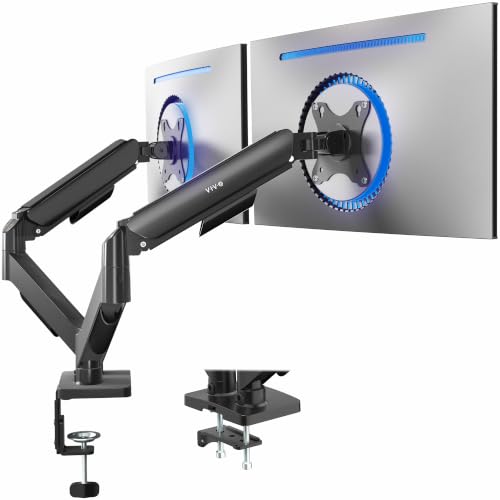
VIVO single monitor desk mount with C-clamp or grommet base, supporting screens up to 22 lbs and 38-inch ultrawides via VESA 75x75 or 100x100.
Key Facts
- Key Spec
- Max Load 22 lbs, fits screens 13-32 inches and ultrawides up to 38 inches
- Connectivity
- VESA 75x75mm or 100x100mm mounting
- Compatibility
- Desks up to 3.25 inches thick via C-clamp or grommet
- Size
- 16 inches tall pole, height adjustment up to 16 inches
Pros
- +Tool-free C-clamp installation with hand tightening
- +Integrated cable clips keep power and AV cables organized
- +Articulation includes 90-degree tilt and 360-degree swivel
- +Grommet mount option included for secure desk attachment
Cons
- −Clamp mount requires desk edge access for installation
- −Pole-based height adjustment limits vertical range to 16 inches
Detailed Review
The VIVO STAND-V001 handles a single screen up to 22 lbs, including ultrawides up to 38 inches, using a VESA 75x75 or 100x100 backside pattern. That weight ceiling and the 16-inch pole height are the two numbers that decide whether this arm suits a desk. I see it fitting a 34-inch ultrawide on a standard desk, but a heavier 38-inch panel near the limit leaves little headroom.
The C-clamp secures to desks up to 3.25 inches thick with hand tightening, and a grommet mount is included for desks without a free edge. Cable clips on the arm and pole keep power and display cables tidy. The detachable VESA plate helps when lining up the monitor, though the pole design means height changes require loosening and sliding the arm.
For a student or remote worker wanting a single screen off the desktop, this covers the basics without extra hardware. Just follow the stated weight and desk thickness limits.
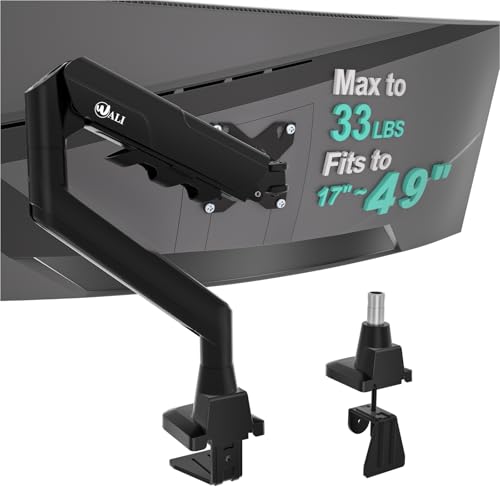
The WALI GSMP001N is a single monitor desk mount for 13 to 34 inch screens, holding up to 26.4 lbs with VESA 75x75mm and 100x100mm patterns.
Key Facts
- Screen Size
- 13 to 34 inches
- Max Load
- 26.4 lbs flat, 19.8 lbs curved
- VESA Pattern
- 75x75mm and 100x100mm
- Mounting
- C-clamp or grommet base
Pros
- +Wide 13 to 34 inch screen size coverage
- +Two desk mounting options included
- +Full motion tilt, swivel, and 360 rotation
- +Integrated cable guides for tidier routing
Cons
- −Curved screens capped at 19.8 lbs
- −Wooden desks only, no crossbeam blocking underside
Detailed Review
The WALI GSMP001N is a single monitor arm built for 13 to 34 inch screens, with a 26.4 lb ceiling for flat panels and 19.8 lbs for curved ones. That weight split matters because a curved 34 inch panel carries more leverage on the VESA head than a flat screen of the same size.
Full motion covers 19.3 inches of extension, 17.3 inches of lift, plus tilt, swivel, and 360 rotation. I rate the dual C-clamp and grommet mounting as the practical highlight, since both fit desks from 0.39 to 2.76 inches thick.
The catch is that WALI only recommends wooden desks with no crossbeam underneath, so a glass or metal desk is out. Follow the stated weight limits and desk thickness before mounting.
ErGear single monitor arm fits 13 to 34 inch screens from 4.84 to 19.8 pounds with a tool-free VESA plate and C-clamp or grommet mounting.
Key Facts
- Key Spec
- Screen Size: 13 to 34 inches
- Weight Capacity
- 4.84 to 19.8 pounds
- VESA Compatibility
- 75x75mm and 100x100mm
- Adjustment
- 17.5 inch height, 18.1 inch reach, +80/-50 degree tilt, 90 degree swivel, 360 degree rotation
Pros
- +Wide 13 to 34 inch screen and 4.84 to 19.8 pound range
- +Tool-free VESA mounting saves setup time
- +17.5 inch height and 18.1 inch reach for flexible placement
- +C-clamp and grommet base options fit different desk setups
Cons
- −17.5 inch height and 18.1 inch reach need generous desk clearance
- −No USB or cable routing ports on the arm itself
- −Requires 75x75mm or 100x100mm VESA pattern on the monitor
Detailed Review
The ErGear single monitor arm supports 13 to 34 inch flat or curved screens from 4.84 to 19.8 pounds, which covers most mainstream displays including ultrawides. Its tool-free VESA plate speeds up mounting, and the 40 percent wider VESA head is built to hold the monitor more firmly in place.
Adjustment runs up to 17.5 inches of height and 18.1 inches of reach, with +80/-50 degree tilt, 90 degree swivel, and 360 degree rotation. I see this working well for a student or remote worker who wants the screen at eye level and the desk surface cleared.
Desk mounting uses a C-clamp for 0.39 to 2.56 inch thick desks or a grommet base for 0.39 to 2.95 inch thick desks. The arm weighs about 4.4 pounds and the cable clips open without tools, though the reach and height need enough desk clearance to avoid hitting a wall.
HUANUO single monitor arm with a 39-inch extra-tall pole, fitting 13 to 32 inch screens and ultrawide up to 38 inches.
Key Facts
- Key Spec
- 39 inch extra-tall pole, 22 lb load capacity
- Compatibility
- 13 to 32 inch screens, ultrawide up to 38 inches, VESA 75x75mm and 100x100mm
- Mounting
- C-clamp up to 3.93 inch desks, grommet up to 2.75 inch desks
- Adjustment
- 180 degree tilt, 180 degree swivel, 360 degree rotation
Pros
- +39-inch pole suits standing desk and tall user setups
- +C-clamp and grommet bases cover two mounting styles
- +Detachable VESA plates fit 75x75mm and 100x100mm holes
- +Integrated cable management tidies power and signal lines
Cons
- −C-clamp fits desk thickness only up to 3.93 inches
- −Grommet base needs a pre-drilled hole up to 2.75 inches
- −Single arm limits setup to one monitor
Detailed Review
The 39-inch center pole is the headline here, and it is the reason I would point to this arm for a standing desk setup where a standard pole leaves the screen too low. HUANUO rates it for 13 to 32 inch screens and ultrawide panels up to 38 inches, with a 22 pound load limit, so a heavier 34 inch ultrawide is inside the stated range.
Two mounting options ship in the box. The C-clamp handles desk thickness up to 3.93 inches, and the grommet base fits up to 2.75 inches, which covers most desks without drilling. Detachable VESA plates accept 75x75mm and 100x100mm hole patterns, and the articulating joint offers 180 degree tilt, 180 degree swivel, and 360 degree rotation.
The trade-off is desk thickness. A thick butcher-block top over 3.93 inches will not fit the C-clamp, and the grommet route needs an existing hole. For a single-monitor desk where height is the problem, this is the practical fix.
FAQs
How thick a desk can a monitor arm clamp onto?
Clamp ranges vary by model, and the ones here are listed from roughly 0.39 inches up to about 3.93 inches depending on the arm. Measure your desktop edge with a ruler before buying, because a clamp that is too short will not close and one that is too tall leaves the base loose. Wood tops are the safer bet, and a crossbeam under the desk can block the clamp entirely.
Do you need a grommet mount instead of a clamp?
A grommet mount is worth using when your desk has a cable hole or you want the base out of the way, and most arms here include both options. The grommet route usually supports a slightly different thickness range than the clamp, so check the listing for each. If your desk has a solid back panel or a curved edge, the clamp may not grip, and the grommet hole becomes the practical choice.
Is it worth paying more for a longer monitor arm?
Extra reach matters most on deep desks, where a short arm leaves the screen sitting too far back. The ErgoFocus model lists an arm that extends up to 27.76 inches, which suits a large desktop better than a compact arm. On a standard 24 inch deep desk, a shorter and cheaper arm usually reaches a comfortable position without the extra cost.
What weight limit should you look for in a monitor arm?
Match the arm’s stated weight range to your monitor, and leave a little headroom rather than sitting at the top of the limit. Most single arms here are listed around 4.4 to 19.8 lbs, while a couple go higher for larger panels. Stay within the manufacturer’s stated weight capacity and fit range, and confirm the VESA pattern and monitor weight before you buy. A screen near the limit can drift if the tension is not set right.
Final Thoughts
The deciding factor for a thick or deep desk is the clamp range first, then reach and weight limit. Get those three right and the rest is preference on cable routing and how the arm adjusts. If you want a starting point on how these arms pair with different panel sizes, the monitor arms and mounts category covers the wider field.
For most desks, the Acer Single Monitor Mount is the best overall choice. It fits screens from 17 to 34 inches, clamps onto desktops up to 3.15 inches thick, and the gas spring lets you raise or lower the screen with one hand. If you want to spend less, the WALI Adjustable Single Monitor Arm for 13-34 inch is the value pick, with a higher stated load limit for flat screens and a clamp range that covers most standard desktops. Skip both if your desk has a curved edge or a solid back panel where a clamp cannot grip, and look at a grommet-only design instead. Check the current price on Amazon, and the right clamp range is one less thing to second-guess.