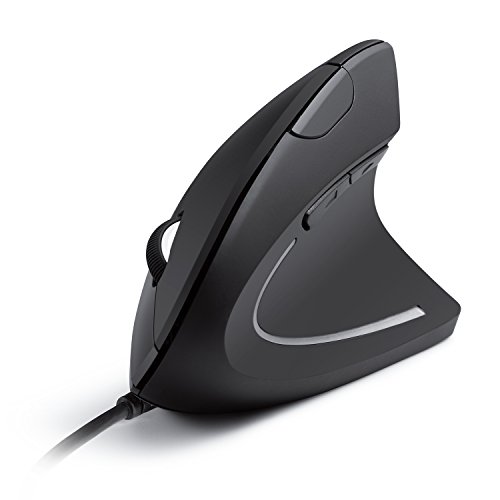
A vertical mouse angles your hand into a handshake-like position, while a regular mouse keeps your palm flat and your wrist rotated toward the desk. The right pick depends on how you grip, how long you sit at the desk, and whether precise cursor control or relaxed wrist posture matters more to you.
I based this guide on manufacturer manuals and spec sheets, published standards such as USB and Bluetooth, and widely documented PC peripheral practice. You will not find invented test numbers here, just the practical differences that change how each mouse feels during a long workday or a gaming session.
Vertical Mouse vs Regular Mouse at a Glance
The table below compares the two shapes across the criteria that matter most when you sit down to work or play. Treat it as a starting point, then read the sections that follow for the details behind each row.
| Criterion | Vertical Mouse | Regular Mouse |
|---|---|---|
| Hand and wrist posture | Handshake angle, palm faces inward | Flat palm, wrist rotated toward the desk |
| Learning curve | Noticeable at first, especially for fine clicks | Familiar from the first minute |
| Cursor precision | Good for general work, harder for fast twitch aiming | Easier for pixel-level and fast aiming |
| Grip style fit | Suits palm and relaxed claw grips | Suits palm, claw, and fingertip grips |
| Desk footprint | Often wider and taller, needs clear space | Compact and easy to reposition |
| Button and scroll layout | Thumb buttons vary, scroll wheel placement differs | Wide variety of layouts and sizes |
| Gaming suitability | Fine for casual and strategy play | Preferred for competitive and fast-action play |
| Price and availability | Fewer models, less room to compare | Huge selection at every level |

Posture and Wrist Angle Differences
The core difference is wrist rotation. A regular mouse keeps your forearm and hand flat, so your wrist rotates toward the desk for hours. A vertical mouse tilts the body so your hand sits more like a handshake, which changes the angle your wrist holds through the day.
That tilt is not a cure for anything. No mouse prevents or fixes pain, and if you already have wrist or forearm discomfort, talk to a doctor or physical therapist rather than shopping your way out of it. What the vertical shape can do is give you a different posture option if the flat position feels strained during long sessions.
What Changes in Daily Use
- Your shoulder and forearm may sit differently because the taller body raises your hand slightly.
- You may need to adjust chair height or armrest position to keep your elbow near a right angle.
- Switching between the two shapes mid-day is common and can help you avoid one fixed position.
- A wrist rest can help either shape, but check that it does not push your wrist into an upward bend.
If you want to compare specific vertical shapes before committing, my roundup of vertical mice covers the body styles and button layouts worth knowing. Pay attention to height and thumb rest design, since those drive how the tilt feels in your hand.
Control Precision and Gaming Performance
A regular mouse gives you a lower, flatter profile that many players find easier to flick and stop precisely. A vertical mouse raises your hand and changes the muscle groups doing the work, which can make fast twitch aiming feel less direct until you adapt.
That does not rule out gaming on a vertical mouse. Strategy games, simulation titles, and casual play work fine for plenty of people. Competitive shooters are where the flat shape usually wins, mostly because the lower profile and familiar grip make small corrections easier to repeat.
Settings That Matter More Than Shape
- DPI: set it low enough that you use arm movement rather than only wrist flicks.
- Polling rate: match it to what your mouse and port support, and check the manual for the exact steps.
- Acceleration: turn off pointer acceleration in your operating system for consistent aim.
- Surface: a consistent mousepad matters more than the shape for repeatable control.
If you want an alternative to both shapes for tight desk space, a trackball keeps your hand still and moves the cursor with your thumb or fingers. My roundup of trackball mice explains the thumb versus finger ball split, which changes the learning curve a lot.
Desk Space Comfort and Setup
Vertical mice are often taller and wider than regular mice, so measure your clear desk area before you buy. A tall body can crowd a keyboard tray or push your hand farther from the keyboard, which changes your shoulder position more than you expect.
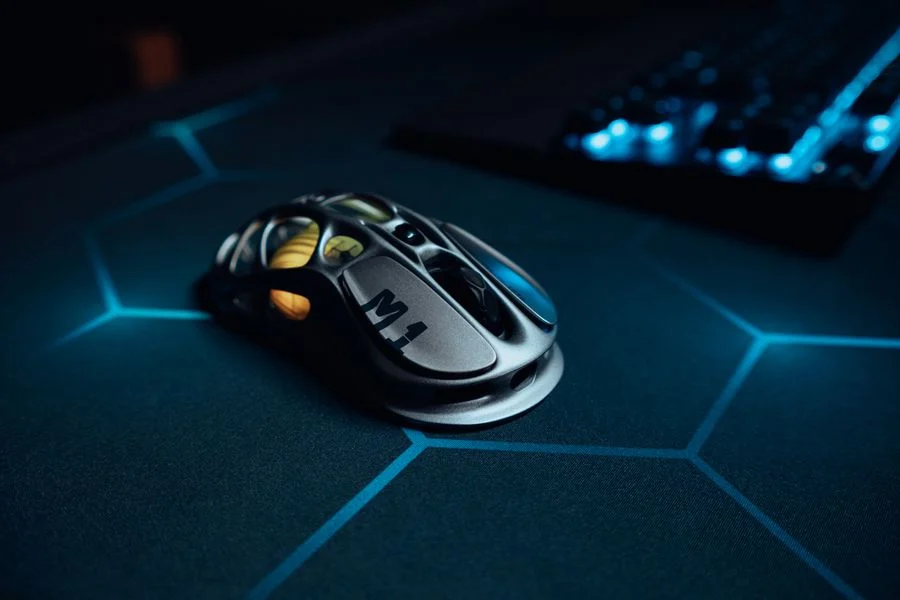
Regular mice come in many sizes, from tiny travel shapes to large palm models. That range makes it easier to match your hand length and grip style. With vertical mice you have fewer sizes to choose from, so check the manufacturer spec sheet for dimensions and weight rather than guessing from photos.
Common Setup Mistakes
- Placing the mouse too far forward so you reach with a straight arm instead of a relaxed elbow.
- Skipping the wrist rest adjustment after switching shapes, which can leave your wrist bent upward.
- Ignoring cable routing on a wired model, which can drag and pull the mouse off target.
- Forgetting to update the receiver or Bluetooth pairing steps in the manual after a swap.
Whichever shape you pick, keep the mouse close to the keyboard and your elbow near your side. That single change often matters more than the tilt of the mouse body.
Which One Should You Choose
There is no universal winner here. The right answer depends on your grip, your work, and how your wrist feels after a long session. Use the lists below to match the shape to your situation.
Choose a Vertical Mouse If
- You spend long hours on spreadsheets, writing, or browsing and want a different wrist angle.
- You use a palm or relaxed claw grip and find flat mice strain your forearm.
- You play strategy, simulation, or casual games rather than competitive shooters.
- You have desk space for a taller body and can adjust your chair or armrest.
Choose a Regular Mouse If
- You need precise, fast cursor control for competitive gaming or detailed design work.
- You use a fingertip or claw grip that depends on a low, flat profile.
- You want the widest choice of sizes, button layouts, and connection types.
- You share the desk with other people who expect a familiar shape.
If you are unsure, keep your current regular mouse and add a vertical model for part of the day. Alternating between shapes is a practical way to avoid one fixed wrist position without giving up precision when you need it.
Frequently Asked Questions
Is a vertical mouse better than a regular mouse?
Neither shape is better in every case. A vertical mouse changes your wrist angle and suits long desk work, while a regular mouse gives more precise control and a wider choice of sizes. Match the shape to your grip and tasks.
Can you game with a vertical mouse?
You can game with a vertical mouse, and it works well for strategy, simulation, and casual titles. Competitive shooters usually favor a regular mouse because the lower profile makes fast, small corrections easier to repeat.
How long does it take to adjust to a vertical mouse?
Most people need a few days of regular use before the tilt feels natural. Start with shorter sessions and keep your old mouse nearby so you can switch when fine control matters. Check the manual for button mapping steps.
Does a vertical mouse help with wrist pain?
A vertical mouse changes your wrist posture but does not prevent or cure pain. If you have wrist or forearm discomfort, see a doctor or physical therapist. Use the mouse as one posture option, not as a treatment.
Final Thoughts
The most important takeaway is that vertical mouse vs regular mouse comes down to wrist angle versus control precision. Pick the vertical shape for long desk sessions and a relaxed palm grip, and the regular shape for fast aiming, fingertip control, and the widest model choice.
Whichever you choose, keep the mouse close to your keyboard, set your DPI and pointer acceleration deliberately, and check the manufacturer manual for model-specific dimensions and pairing steps.