A mouse that is too long for your hand forces your fingers into a reach they were not built for, and after an hour of ranked play your wrist tells you about it. Most listings lead with a big DPI number and say almost nothing about shell length, weight, or which grip the shape actually suits.
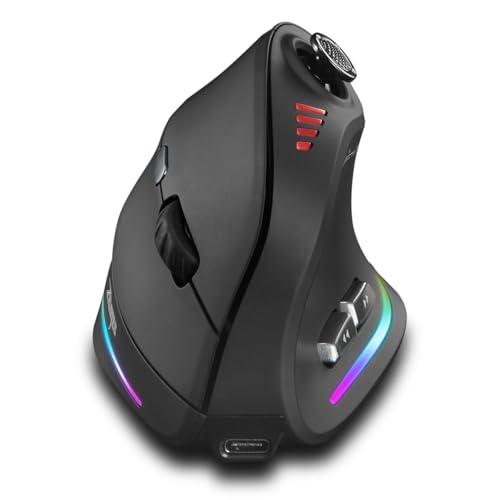
I looked at the Best Gaming Mice for Small Hands and focused on the details that matter for smaller hands: overall length and width, weight, whether the shape favors claw or fingertip grip, and how each mouse connects. My overall pick for best gaming mice for small hands is the TKMARS Wireless Ergonomic Vertical Gaming Mouse. Its vertical shell and built-in joystick give your thumb a job other than dragging along the pad, which some players find easier on the wrist over a long session.
My top picks are just below.
Best Gaming Mice for Small Hands at a Glance
| Product | PGH Score | ||
|---|---|---|---|
|
Best Overall TKMARS Wireless Ergonomic Vertical Gaming Mouse | 9.8 | Check Price on Amazon |

|
Best for Small Hands ASUS ROG Harpe Ace Mini Wireless Mouse with 49g | 9.7 | Check Price on Amazon |

|
Best for Multi-Device Work INPHIC Silent Rechargeable Wireless Mouse | 9.6 | Check Price on Amazon |

|
Best for Wireless FPS Redragon M810 PRO Wireless Gaming Mouse with 10000 | 9.6 | Check Price on Amazon |

|
Best for Budget Gaming BENGOO Wired Gaming Mouse with 3600 DPI RGB | 9.5 | Check Price on Amazon |

|
Best for MMO Gaming Redragon M602 Wired RGB Gaming Mouse with 9 | 9.5 | Check Price on Amazon |

|
Best for Fast Flicks Redragon M916 Wireless Gaming Mouse with 49g | 9.5 | Check Price on Amazon |
In-Depth Reviews
TKMARS vertical gaming mouse with a 5-way joystick, 12 programmable buttons, 24000 DPI, and dual Bluetooth 5.0 and 2.4G wireless plus USB-C wired mode.
Key Facts
- Key Spec
- Adjustable DPI up to 24000
- Connectivity
- Bluetooth 5.0, 2.4G Wireless, USB-C Wired
- Buttons
- 12 Programmable Buttons
- Battery
- 800mAh Rechargeable
Pros
- +Vertical shape supports a more neutral wrist angle
- +Dual wireless modes switch between two paired devices
- +12 programmable buttons cover macros and game binds
- +USB-C cable allows wired use while charging
Cons
- −0.66-pound body is heavy for fast flick shots
- −Joystick and twelve buttons add a learning curve
- −Vertical grip changes aim feel for players used to flat mice
Detailed Review
The TKMARS vertical mouse puts a 5-way joystick under the thumb, which is the part I find most interesting here. It adds up, down, left, right and press inputs on top of the usual buttons, so flight, RTS and menu-heavy games get more controls without reaching for the keyboard.
A 24000 DPI sensor and 12 programmable buttons cover the sensitivity and macro side, and dual Bluetooth 5.0 and 2.4G let two devices stay paired. The vertical shell aims to keep the wrist in a handshake position, which is the reason to pick this shape over a flat mouse.
At 0.66 pounds, that shell is heavy for fast flick shots, and the joystick plus twelve buttons take time to learn. I would steer competitive shooter players toward a lighter flat mouse and point this one at desk and strategy setups.
A compact 49g wireless gaming mouse with the ROG AimPoint Pro optical sensor rated at 42,000 DPI and tri-mode connectivity.
Key Facts
- Sensor
- ROG AimPoint Pro Optical, rated 42,000 DPI
- Weight
- 49g
- Connectivity
- Wired USB-C, 2.4 GHz RF, Bluetooth
- Grip Style
- Right-handed, semi-symmetrical, fingertip and claw
Pros
- +49g weight suits fast, low-fatigue flick aiming
- +Tri-mode connectivity covers wired, 2.4 GHz, and Bluetooth
- +Compact right-handed shape built for fingertip and claw grips
- +Omni Receiver links multiple supported devices through one dongle
Cons
- −Small shell can feel cramped for palm-grip players
- −Battery runtime depends on the chosen connection mode
Detailed Review
The ROG Harpe Ace Mini is a right-handed, semi-symmetrical mouse built around a 49g shell and a compact shape tuned for fingertip and claw grips. That low weight is the headline for anyone who plays high-sensitivity FPS and wants the mouse to disappear under quick flicks rather than fight the wrist.
Inside sits the ROG AimPoint Pro optical sensor, rated at 42,000 DPI with track-on-glass support, which is far more headroom than most players will ever need. The tri-mode link is the part I find most useful for a mixed desk, since it covers wired USB-C, low-latency 2.4 GHz RF, and Bluetooth pairing for up to three devices.
For my money this suits a small-handed competitive player or a laptop gamer who wants one mouse across several machines. Palm-grip players with larger hands should look elsewhere, because the mini shell is deliberately short and narrow.
The INPHIC Silent Rechargeable Wireless Mouse is a tri-mode mouse with 2.4G, Bluetooth 5.0, and USB-C wired options, plus 12800 DPI.
Key Facts
- Key Spec
- 12800 DPI optical sensor
- Connectivity
- Bluetooth 5.0, 2.4GHz wireless, USB-C wired
- Compatibility
- Windows, macOS, Linux, Android, iOS
- Weight
- 0.23 pounds
Pros
- +Tri-mode connectivity switches between two Bluetooth devices and one 2.4G device
- +Silent click switches reduce noise in shared workspaces
- +Six DPI presets from 800 to 12800 suit gaming and productivity
- +Built-in 500mAh battery recharges via USB-C
Cons
- −USB-C data cable required for wired mode but not included
- −Windows-only driver needed for DPI, polling rate, and button remapping
- −Right-handed shape limits use for left-handed users
Detailed Review
The INPHIC Silent Rechargeable Wireless Mouse packs a 12800 DPI optical sensor with six presets, from 800 for document work up to 12800 for fast-paced gaming. The tri-mode connection covers Bluetooth 5.0 dual channel, 2.4GHz wireless, and USB-C wired, so I can see it moving between a desktop, laptop, and tablet without re-pairing. The right-handed ergonomic shell with a thumb rest suits medium to large hands, and the matte anti-slip surface helps during long sessions.
The silent left and right clicks are a genuine plus for shared offices or late-night gaming, and the 500mAh battery with a three-level indicator avoids surprise shutdowns. The Windows-only driver unlocks DPI tweaks, 125 to 1000Hz polling, and button remapping, but Mac and Linux users are stuck with the presets. Also, wired mode needs a separate USB-C data cable that is not in the box, so plan ahead if you want that option.
For my money, this mouse fits a right-handed user who splits time between work and play and wants one device for several machines. Just keep the cable limitation and driver requirement in mind.
Wireless gaming mouse with a PAW3325 sensor, five DPI levels up to 10000, eight programmable buttons, and a rechargeable battery rated to 45 hours in eco-mode.
Key Facts
- Sensor
- PAW3325 Optical Pixart
- DPI Levels
- 500 / 1000 / 2000 / 3000 / 10000
- Connectivity
- 2.4GHz nano receiver
- Polling Rate
- 1000Hz in dual mode
Pros
- +2.4GHz wireless with nano receiver cuts cable drag
- +Eight programmable buttons with dedicated rapid-fire and side macros
- +Five DPI presets up to 10000 for quick sensitivity changes
- +Rechargeable battery rated to 45 hours in eco-mode
Cons
- −No Bluetooth option, so it needs the included receiver
- −Eco-mode 45-hour rating drops with backlight on
- −At 0.55 pounds it sits heavier than many wired rivals
Detailed Review
The Redragon M810 PRO pairs a PAW3325 optical sensor with a 2.4GHz nano receiver, so the cable drag that can spoil fast flicks simply is not there. Five on-board DPI steps run from 500 up to 10000, and the top setting suits high-sensitivity players who want a small arm movement to cover ground.
All eight buttons are remappable, and the dedicated rapid-fire key plus two side macros give MMO or MOBA players extra inputs without reaching for the keyboard. The rechargeable battery is rated to 45 hours in eco-mode, so a week of evening sessions is realistic if the backlight stays low.
For my money, this suits a wireless-first desk where a single receiver is acceptable, since there is no Bluetooth fallback and the 0.55-pound body is heavier than a stripped-down wired mouse.
BENGOO wired gaming mouse with 4-step DPI up to 3600, six programmable buttons, and RGB backlighting. Plug and play for PC and laptop.
Key Facts
- Key Spec
- 4 Adjustable DPI (1200 / 1600 / 2400 / 3600)
- Connectivity
- Wired USB
- Compatibility
- Windows XP, Vista, 7, 8, 10; Mac; laptop and PC
- Buttons
- 6 (left, right, forward, back, DPI, scroll wheel)
Pros
- +Four DPI steps from 1200 to 3600 without software
- +Six buttons with forward and back for extra binds
- +Plug and play on Windows XP through 10 and Mac
- +RGB backlighting for a colored desk setup
Cons
- −Wired cable limits movement compared to a wireless mouse
- −No driver means button remapping and macros are unavailable
- −No stated weight or sensor model for competitive tuning
Detailed Review
The BENGOO wired mouse centers on a four-step DPI switch that moves between 1200, 1600, 2400, and 3600, so sensitivity changes happen on the mouse itself rather than through software. Its six buttons cover left, right, forward, back, DPI, and scroll wheel, which is enough for basic binds in shooters and MOBAs. The wired USB connection sidesteps battery charging and pairing, and the shape is built to sit under the palm.
For a first gaming mouse or a backup for a laptop, I see the plug-and-play setup on Windows XP through 10 and Mac as the main draw. The RGB backlighting is cosmetic, but it does let the mouse match a themed desk without extra software.
The trade-off is that a wired cable adds drag compared to a wireless mouse, and with no driver there is no button remapping or macro support. Competitive players who want a specific sensor or weight will not find those figures here.
Redragon M602 wired RGB mouse with 7200 DPI, 9 programmable buttons, macro editing, and ergonomic grip for gaming or office work.
Key Facts
- Key Spec
- 7200 DPI adjustable sensor
- Connectivity
- Wired
- Compatibility
- PC, Windows, Laptop, Mac
- Size
- 4.92 x 2.87 x 1.57 inches
Pros
- +Nine programmable buttons allow macros and remaps
- +Adjustable 7200 DPI suits different game sensitivities
- +Seven RGB modes switchable on the fly
- +Ergonomic shape with dedicated finger rests
Cons
- −Wired only, no wireless option for cable-free use
- −No weight adjustment or tuning system
- −Software download required for full customization
Detailed Review
The Redragon M602 packs nine programmable buttons and a 7200 DPI adjustable sensor into a wired shell. That button count is the standout feature, giving you macros and remaps for MMOs or productivity shortcuts, though it also means a busier layout than a minimalist FPS mouse.
The ergonomic shape includes dedicated finger positions and suits palm or claw grips. Seven RGB modes can be cycled with a button or set in software, and the wired connection keeps tracking consistent without charging breaks. It makes the most sense for a desk setup where extra buttons and lighting matter more than low weight.
At 0.6 pounds it is heavier than ultralight esports mice, so fast flick players may notice the mass. The software download is needed for macros and full remapping, which adds a setup step. For a budget-conscious gamer wanting many buttons and RGB, it covers the basics well.
The Redragon M916 is a 49-gram wireless gaming mouse with 5 DPI levels up to 26,000, dual Bluetooth and 2.4GHz connectivity, and 5 programmable buttons.
Key Facts
- Weight
- 49 grams
- DPI Range
- 50 to 26,000, five preset levels
- Connectivity
- Bluetooth and 2.4GHz nano receiver
- Buttons
- 5 programmable
Pros
- +49-gram body keeps quick flicks low-effort
- +Bluetooth and 2.4GHz receiver for flexible wireless
- +Five DPI steps spanning 1000 to 26000
- +Five buttons remappable through Redragon software
Cons
- −No wired mode for zero-latency backup
- −Pink colorway limits matching most setups
- −Software needed for full DPI and macro customization
Detailed Review
The Redragon M916 pairs a 49-gram shell with a 26,000 DPI sensor, which is the combination that matters most for fast-paced shooters. Five DPI steps ship at 1000, 2000, 4000, 8000, and 26000, and Redragon's software lets you set anything between 50 and 26000.
Dual Bluetooth and 2.4GHz nano receiver connectivity means no cable drag, though there is no wired fallback if the battery runs out mid-session. The five programmable buttons cover side hotkeys and macros, with the two default side buttons handling most in-game binds.
I see the M916 fitting FPS players who want an ultra-light wireless mouse without stepping into flagship pricing. The pink finish is a specific look, and full DPI and macro customization depends on installing Redragon's driver.
FAQs
How do I know if a gaming mouse is small enough for my hand?
Measure from the base of your palm to the tip of your middle finger, then compare that to the mouse’s stated length. A shell that is roughly 60 to 70 percent of your hand length usually lets you reach the front buttons without shifting your grip. If you use a palm grip, a slightly longer shell can still work; claw and fingertip grips benefit most from a shorter body.
Is a lightweight mouse better for small hands?
A lighter shell reduces the effort needed to stop and redirect the mouse, which matters in fast flick-heavy shooters. The ASUS ROG Harpe Ace Mini is listed at 49 grams, and the Redragon M916 is also listed at 49 grams. That said, weight is personal: if you rest your palm heavily or play slower strategy games, a slightly heavier mouse can feel more stable. Pair a light mouse with a low-friction mouse pad and you will notice the difference in tracking more than in raw speed.
Do I need a wireless mouse for competitive gaming?
A mouse connected through its own 2.4GHz receiver responds fast enough that most players will not notice a gap versus wired. Bluetooth mode is generally slower, so keep it for office work and plug in the receiver for games. If you already have a wired mouse you like, there is no urgent reason to switch; the cable is a convenience issue, not a performance ceiling.
What is the difference between claw grip and fingertip grip?
Claw grip arches your fingers over the mouse with your palm lightly touching the back, while fingertip grip keeps your palm off the shell entirely. Claw grip suits a short-to-medium shell with a defined hump; fingertip grip works best with a flat, compact body. Neither is better, and many players switch between them depending on the game. Try both on the same mouse before deciding a shape is wrong for you.
Final Thoughts
For smaller hands, the shape and length of the shell matter more than the DPI ceiling on the box. A mouse that lets you reach every button without adjusting your grip will do more for your aim than a sensor spec you will never max out. If you want a mouse that pairs well with a compact setup, the TKMARS Wireless Ergonomic Vertical Gaming Mouse is my overall pick: its vertical shape and 12 programmable buttons suit players who want their thumb doing more than dragging, and the dual Bluetooth and 2.4G connection makes it easy to move between a desktop and a laptop.
If you would rather spend less, the BENGOO Gaming Mouse Wired with RGB Backlit is the value pick. It is a straightforward wired mouse with adjustable DPI and six buttons, and it suits a first build or a backup for a laptop bag. Skip either if you need a mouse with a specific sensor or a shape you have already tested and prefer; in that case, match the shell dimensions to your hand and buy from a listing with a clear return policy. Check the current price on Amazon, and the right shell size will stop being a guessing game.